Exclusive Features of the Mac OLM Converter Tool

Complete Mailbox Data Conversion

Complete Mailbox Data Conversion

The MacSonik OLM File Converter is a reliable solution that exports Mac Outlook OLM files effortlessly. It allows users to export all the mailbox items, including emails, contacts, calendars, notes, journals, and tasks. The tool also supports conversion to 15+ file formats and popular email platforms. Moreover, it preserves folder hierarchy while seamlessly migrating OLM data.

Export Outlook OLM to PST, MBOX, and More

Export Outlook OLM to PST, MBOX, and More

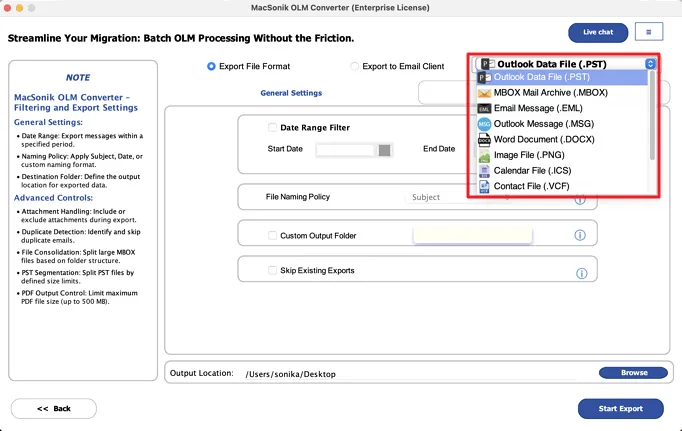
To make OLM data compatible with other email clients, it needs conversion to a supported format. With the OLM Converter, one can convert OLM File to EML and to 9+ formats, including PST, MBOX, PDF, MSG, HTML, CSV, and EMLX. Make the OLM mailbox data portable and accessible across different platforms without losing data integrity.

Migrate Mac Outlook to Various Email Clients

Migrate Mac Outlook to Various Email Clients

Businesses migrate from Outlook due to cost or compatibility issues with other tools. The OLM Exporter Tool is the perfect tool to migrate OLM mailbox data to other email clients. The tool exports all Outlook OLM emails, contacts, calendars, folders, and mailbox items to Gmail, Outlook web, Thunderbird, AOL, Yahoo Mail, and Office 365.

Bulk OLM File Conversion With Attachments

Bulk OLM File Conversion With Attachments

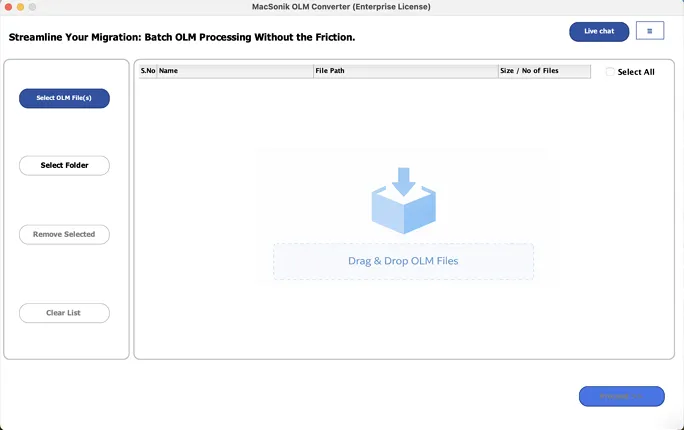
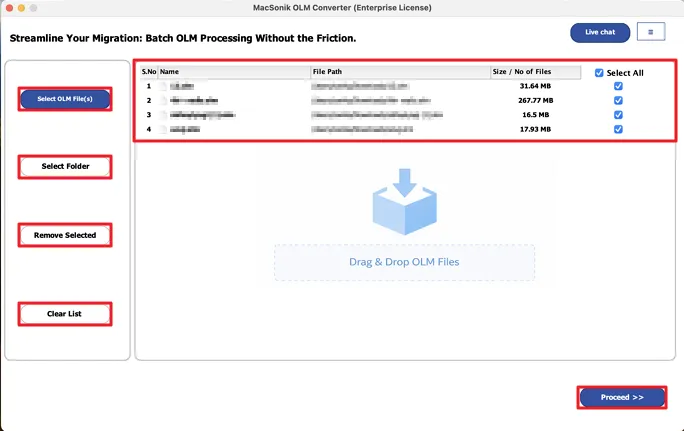
The MacSonik converter tool quickly converts Mac Outlook OLM files. Convert all emails, attachments, contacts, and other mailbox items to your preferred file format with ease. With support for both single and multiple OLM file conversions, the tool ensures faster and more efficient bulk migration without any data loss.

Backup Mail Data Without Attachments

Backup Mail Data Without Attachments

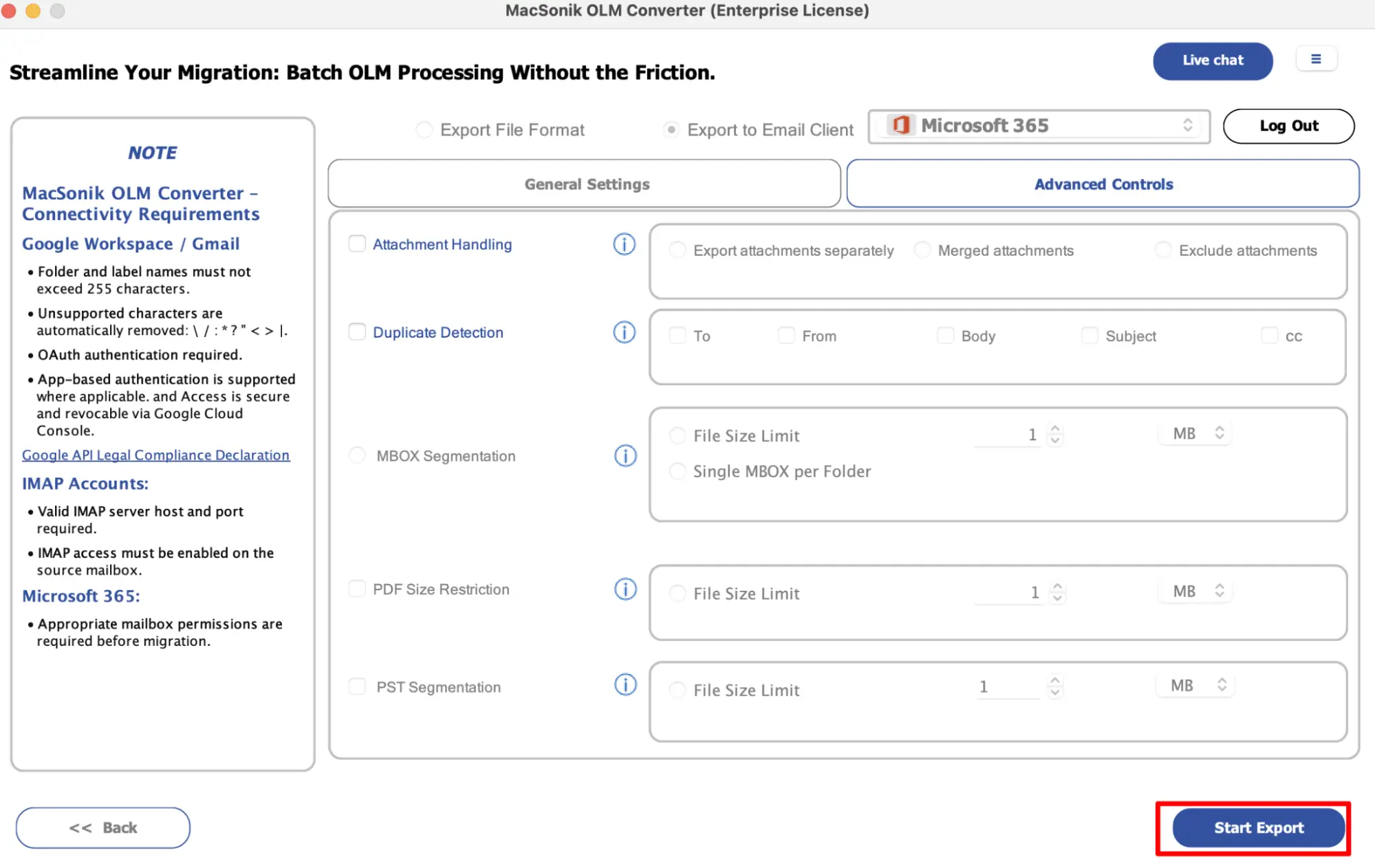
Large email attachments often take up a lot of storage space, increasing the size of your backup. With the OLM Converter Tool, one can easily exclude email attachments during backup, reducing file size and improving backup speed. This feature is suitable for users who only need to backup emails, not the attachments.

Skip Duplicate Emails During Backup or Migration

Skip Duplicate Emails During Backup or Migration

Duplicate email items can slow down Outlook and can unnecessarily overload your mailbox. This converter software provides a Remove Duplicate Emails feature to filter out similar email messages from OLM files and create an optimized, organized, and efficient OLM conversion. This overall improves email client performance.

Handle OLM File Attachments With Ease

Handle OLM File Attachments With Ease

With MacSonik OLM Converter Wizard, managing email attachments becomes simple and safe. It offers three options to handle attachments: download attachments individually, convert them into PDF format, or exclude attachments entirely during email migration and backup to optimize storage.

Wide Compatibility with 100% Data Integrity

Wide Compatibility with 100% Data Integrity

The MacSonik OLM Converter for Mac supports OLM files for all versions of Outlook for Mac, ensuring seamless compatibility. It converts the entire mailbox structure, including emails, attachments, contacts, and folders, into the desired format. The tool is also fully supported effortlessly on any Windows OS version.

Best OLM File Converter Tool - System Requirements

Run the Free OLM Converter Tool to test all the functions of the utility before buying it. It is restricted to converting only 50 OLM files.

processor-img

Trial Limitations

Run the Free OLM Converter Tool to test all the functions of the utility before buying it. It is restricted to converting only 50 OLM mail par folder.


processor-img

System Requirement

Operating System: macOS 10.13 High Sierra, macOS 11 Big Sur, macOS 12 Monterey, macOS 13 Ventura, macOS Sonoma, and later versions macOS (10.15 "Catalina")

Processor: Apple Silicon M1, M2, M3, M4, and newer Apple Silicon processors (including M5)

RAM: Minimum 4 GB (8 GB Recommended)


processor-img

About Software

Version: 26.02

Size: 246 MB

Release Date: 27th February, 2025

License Tyes: Home, Administrator, Technician, and Enterprise


processor-img

Software Prerequisites

  • If you are operating Windows OS 11, 10, 8, or 7 (32-bit or 64-bit), then you must launch the tool as an Administrator.
  • Turn off the Windows Firewall for proper installation.
  • Disable the Antivirus programs.

processor-img

Additional Information

To run this tool smoothly on Mac, follow the below-mentioned steps:

  1. Launch Mac OS.
  2. Go to the Finder Bar >> Go menu.
  3. Select the Applications option.
  4. Choose System Preferences.
  5. Click on the Security & Privacy.
  6. Here, select the Firewall tab, and choose to Turn Off the firewall.

If Yes! Please disable your antivirus temporarily or allow access from its setting so that the software can carry out its function.

It is advised to avoid the source file from any shared drives or networks (NAS, SAN, LAN, and WAN) as it should be on the same working machine.

Comparison of the Free OLM Converter Online and the Full Version

Product Features Free Version Full Version
Convert OLM File to CSV, PST, PDF, EML, MSG, and More File Formats 50 Items per folder All
Handle Single & Multiple OLM Files
Seamlessly Import OLM Files directly to Gmail, AOL, Office 365, iCloud, and more. 50 Items per folder All
Batch Export OLM Files With OLM Exporter Tool
Remove Duplicate OLM Emails
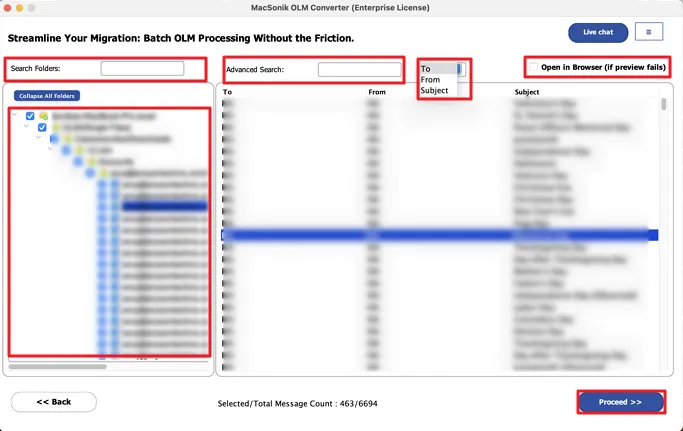
Migrate Only Selected Emails with Date-Based Filtering
Backup OLM Data Without Downloading Attachments
Preserve Folder Structure While Migrating OLM Files
24*7 Tech Support
Download and Purchase Download Buy Now

Frequently Asked Questions

Ans: Follow the step-by-step guide to export OLM files using MacSonik OLM Converter Tool:

  1. Download and launch the OLM File Converter tool on your system.
  2. Then, choose either Single Mode or Multiple Mode, select your desired OLM file, and click Next.
  3. After that, select the desired File Format or Email Client as the saving format.
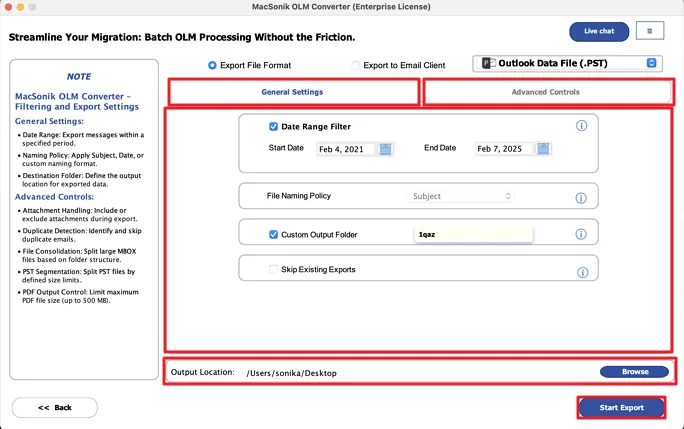
  4. Now, opt for the additional settings if needed.
  5. Next, press the Convert button to begin the conversion process.
  6. At the end, users also have the option to Download Report of the conversion summary.

Ans: There is no restriction on OLM file size. Users can safely convert OLM files of any size. The OLM Converter Tool supports both small and large OLM files without any file size limitations.

Ans: Yes. The MacSonik OLM File Converter exports all Mac Outlook emails along with their attachments. It efficiently converts emails, contacts, calendars, tasks, notes, and other mailbox data to your preferred file format with ease.

Ans: Yes, the MacSonik Mac OLM Converter enables free conversion of OLM files. But, yes, there is a limit that it will only convert the first 50 emails in each OLM file. To bypass this limitation, users need to upgrade to the paid licensed version.

Ans: MacSonik’s OLM Converter supports splitting the resultant PST file after OLM file conversion. Dividing large PSTs prevents PST oversizing problems and ensures smooth performance in Outlook.

Ans: When an application requests access that is broader than a single user’s data, Admin consent is required, For instance, access that includes organization-wide or multiple-user resources. In these instances, only a Microsoft 365 administrator can grant the login because this ensures compliance while securing data access throughout the tenant.

Ans: Yes. It is compulsory to enable user sign-in for Modern Authentication. To generate the authentication token, it is necessary to enable the sign-in access for Modern Authentication. If it is disabled, the application will not to be able to access the user data. Therefore, before using Modern Authentication, make sure the user sign-in is enabled for accessing the data.

avatar

Still have questions?

Can’t find the answer you’re looking for? Please chat with our friendly team.

Get in Touch

What Do Clients Say About Us?

Check here the Verified Purchase Reviews of the OLM Converter Software.

100%
Secure Software
24× 7
Technical Support
5M+
Downloads
30 Days
Money Back Guarantee