Quick Solutions to Import OLM to Google Workspace Account?

Amelia James
March 28th, 2026
Summary: The OLM files are often used to archive the email data in Outlook for Mac. Once the user switches devices or transitions to Google Workspace, the OLM format becomes incompatible. Now, to ensure that important conversions aren’t lost, the user import OLM to Google Workspace. This blog illustrates a step-by-step process to import the OLM emails to Google Workspace. Manual approaches and automated approaches using the OLM Converter are discussed below. Now, let’s begin the blog and explore the solutions in more detail.
User-Query:
“How do I import my Outlook for Mac OLM file into Google Workspace? I want to move all my mailbox items, including emails, contacts, and attachments, into my Gmail account without any data loss or formatting issues.”
Why Choose to Import OLM to G Suite?
The OLM to Google Workspace import process ensures better management and preservation of important emails. Look at the reasons why users choose Google Workspace to import their OLM data:
- Businesses shifting from Outlook for Mac to Google Workspace need to import their Outlook for Mac OLM data into Google Workspace.
- With G Suite, the archived OLM files can be accessed from any device or browser without any restrictions.
- Once the OLM files are imported into Google Workspace, the archived emails become easily searchable.
- Users import OLM file into Google Workspace for a secure cloud backup, providing long-term safety.
- For those who don’t have Outlook installed, they can access the OLM file data by importing it into Google Workspace.
A Manual Practice to Import OLM to Google Workspace
This method is suitable for small to medium-sized OLM files. Also, it takes place in three phases:
- First, configure the Google Workspace account in Outlook for Mac
- Second, import the OLM File in Outlook for Mac
- Third, transfer the OLM Files into the Google Workspace mailbox
Now, let’s start with the step-by-step process to begin:
Step 01: Add Google Workspace in Outlook for Mac
- In Gmail, go to Settings > Forwarding and POP/IMAP.
- Under IMAP Access, select Enable IMAP and Save Changes.
- Now, open Outlook for Mac and navigate to Outlook > Settings.
- Then, select Accounts > + > New Account and enter the Google Workspace account credentials.
- Authenticate the account details and let Gmail sync the emails.
Step 02: Import the OLM File in Outlook for Mac
- In MS Outlook, head to File > Import > Outlook for Mac Archive File (.olm).
- Next, find and select the desired OLM file.
- Then, Outlook will display the OLM data under On My Computer on Mac.
Step 03: Import OLM Emails to Google Workspace
- In Outlook, locate the OLM folders imported on the side panel.
- Now, select the emails or folder that you wish to move.
- Then, drag and drop the selected items into the Gmail mailbox.
- Outlook for Mac syncs the emails in Google Workspace via IMAP protocol.
What are the Challenges with the Manual Method?
- Uploading the large OLM mailboxes may take several hours. This makes the process time-consuming.
- While dragging and dropping the emails, the folder structure will not be preserved.
- The large or complex attachments may fail to move OLM files to Google Workspace.
- Also, the calendar events and contacts data will not be imported. IMAP only imports the emails.
- Syncing issues may create duplicate emails in Gmail, which can become difficult to remove manually.
Quick and Simple Solution to Import OLM to Google Workspace
For a quick and hassle-free solution, use the professional MacSonik OLM Converter to access OLM files in Google Workspace. It allows users to import OLM to Google Calendar and other email clients. Also, it supports conversion to various file formats as well. Moreover, with its batch convert option, users can import the OLM files in bulk in one go. The entire process ensures not compromise the data and maintains the original folder structure.
Simple steps to migrate OLM to Google Workspace:
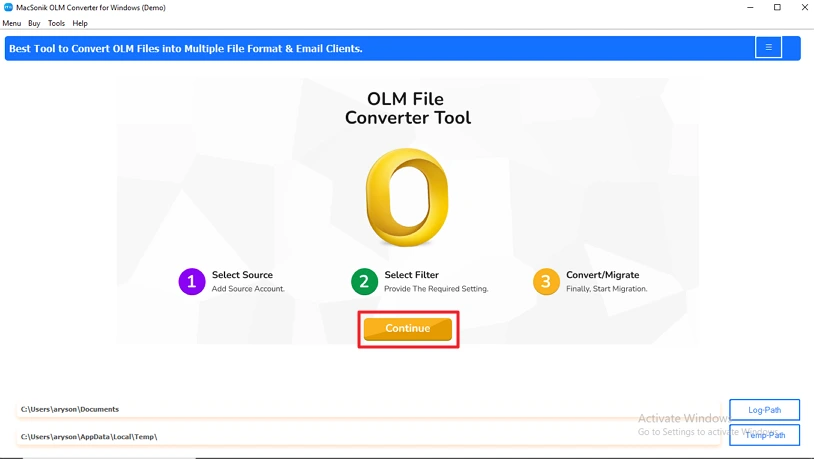
- Begin by downloading and installing the tool on your system.
- Open the tool and click on the Continue button.
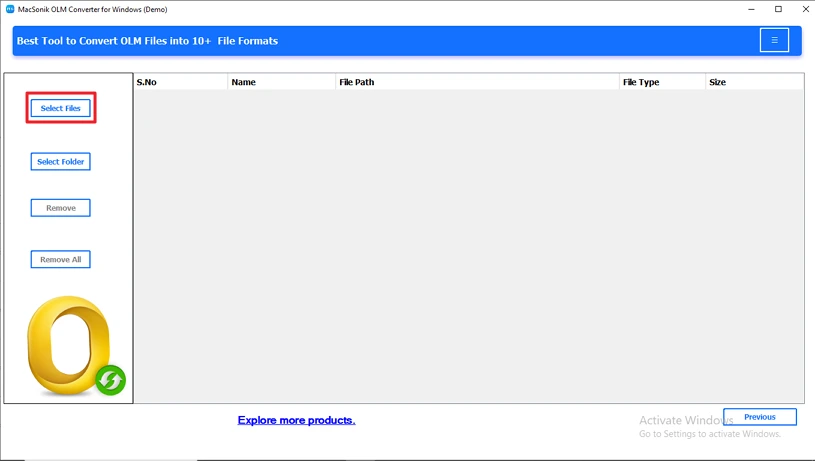
- After that, go to Select Files, browse the OLM file, and upload it.
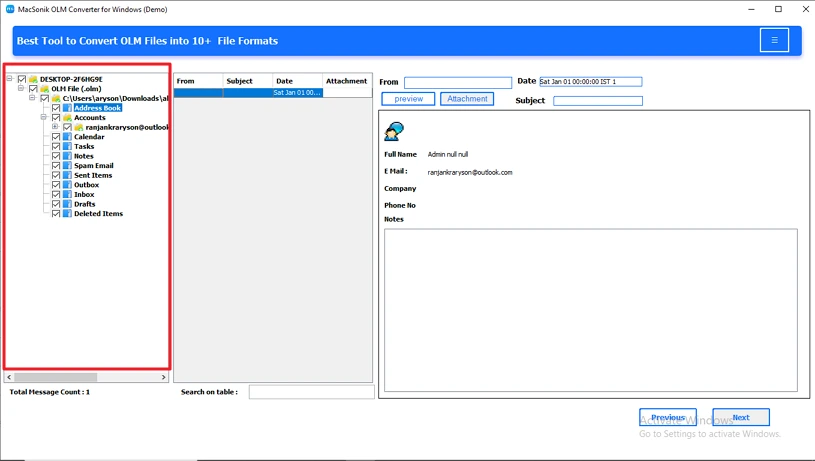
- Then, expand the mailbox hierarchy and select the folders to import.
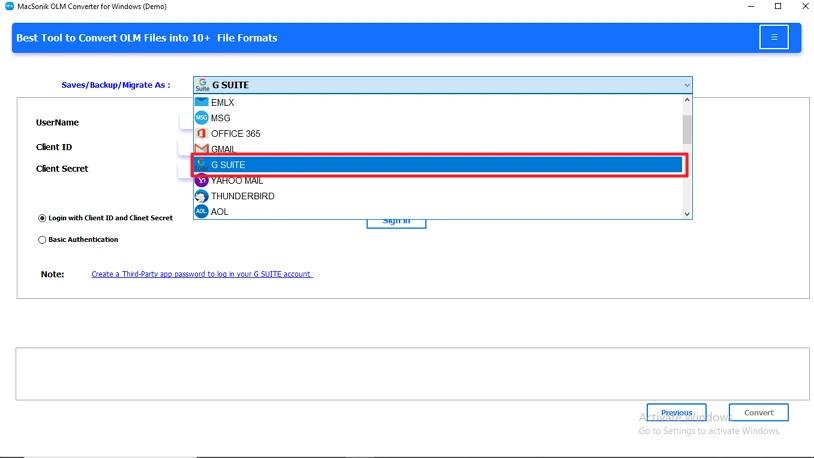
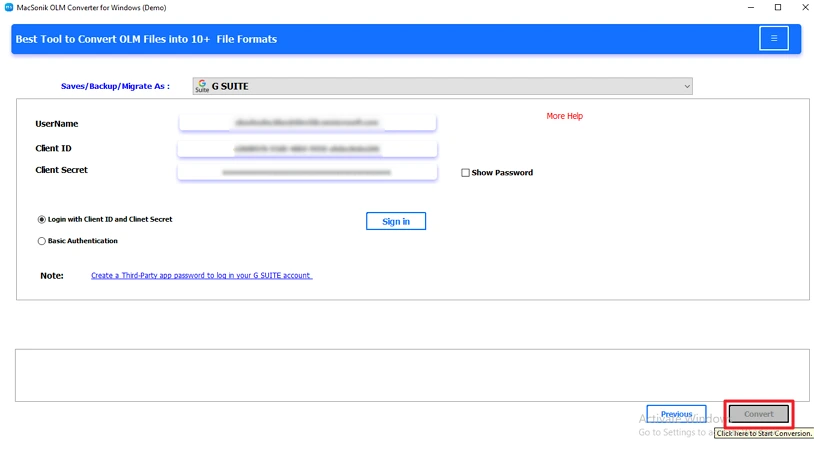
- Click Next and choose Google Workspace as the output Email Client.
- Configure the additional filters and hit Start Process.
Conclusion
The OLM to Google Workspace import process is essential to recover the OLM file data and for improved security. The manual import process is technical, complex, and quite lengthy to import OLM to Google Workspace. Alternatively, the professional method using the MacSonik OLM Converter. This converter tool offers various advanced features like duplicate removal, email filtering, and more. Moreover, it guarantees 100% data integrity and accuracy. Also, users can download the trial version of the tool to explore its functions and test them to upgrade to the premium version.
Frequently Asked Questions
Q1- Can I migrate Mac Outlook OLM to Google Workspace?
Ans- Yes. But there is no direct migration process to migrate Mac Outlook OLM to Google Workspace. You need to first add the Google Workspace account to Outlook for Mac. Then, import the OLM files into Outlook for Mac. And, finally, move the OLM emails to the Google Workspace account mailbox.
Q2- Is the OLM to Google Workspace migration safe and secure?
Ans- This depends entirely on the type of method you choose. The manual process may not guarantee data accuracy. With the professional tool, users are assured of complete data integrity and accuracy, and error-free results.
Q3- Can I import large OLM files to Google Workspace?
Ans- Yes. But there is no direct method to migrate OLM files to Google Workspace. With the help of indirect methods using IMAP syncing, you can import the large OLM files to Google Workspace. Keep in mind that the large OLM files (20 GB+) may experience performance issues while importing.
Q4- What tool is best for OLM to Google Workspace migration?
Ans- The best tool for OLM to Google Workspace migration is the MacSonik OLM Converter. It effortlessly migrates the OLM files into Google Workspace and to other email clients. Along with the email clients, it supports conversion to multiple file formats.
About The Author:
Amelia is the mistress of the webmail clients like Office 365, Gmail, Yahoo, Hotmail, and Opera Mail. Her research on downloading emails from webmail is outstanding. She has given the solution to download emails from webmail clients to a Mac device with all the mailbox items. She’s been into webmail solutions since 2010. In her free time, she reads books and writes technical blogs.
Related Post
