Key Business Benefits of the Pegasus Mail Exporter Tool

Enterprise Email Migration Made Simple
Quickly migrate old Pegasus Mail data to modern platforms without affecting the business operation or user access.
Bulk Conversion for Large-Scale Projects
Handle multiple mailboxes in one go, making it ideal for enterprise-wide migrations and IT consolidation tasks.
Compliance & eDiscovery Ready
Easily extract and convert specific emails using filters to meet legal, audit, and regulatory requirements.
Secure Data Preservation & Archiving
Maintain complete data integrity and attachments while creating reliable archives for long-term storage.

Is This Pegasus Mail Conversion a Good Fit for You?

IT Administrators & System Engineers
Designed for professionals managing large-scale email environments who need a reliable solution to migrate old Pegasus Mail data into cloud platforms with minimal downtime.

Enterprises Upgrading Legacy Email Systems
Ideal for organizations planning to migrate from outdated Pegasus Mail infrastructure to advanced systems such as Microsoft 365 or Outlook for improving scalability and collaboration.

Managed Service Providers (MSPs)
Perfect for service providers handling multiple client migrations, offering bulk conversion capabilities and streamlined workflows for efficient project delivery.

Legal & Compliance Teams
Useful for departments that require secure email extraction, audit-ready data, and filtering options for eDiscovery and regulatory compliance.

Small & Mid-Sized Businesses (SMBs)
A practical solution for growing businesses looking to modernize their email systems without investing heavily in complex IT resources.

Data Migration Consultants & Agencies
Supports consultants managing enterprise migration projects, ensuring fast, accurate, and risk-free data for clients across industries.

Everything You Get with the Pegasus Mail Converter Software

supported

Comprehensive Pegasus Format Support

This Pegasus converter tool seamlessly handles all major Pegasus Mail file types, including PMM, CNM, PNM, PML, PMF, PMC, and PMI, commonly associated with old environments. It eliminates the need for file renaming or any pre-conversion preparation, ensuring a hassle-free process.

file-format

Flexible Output File Format Compatibility

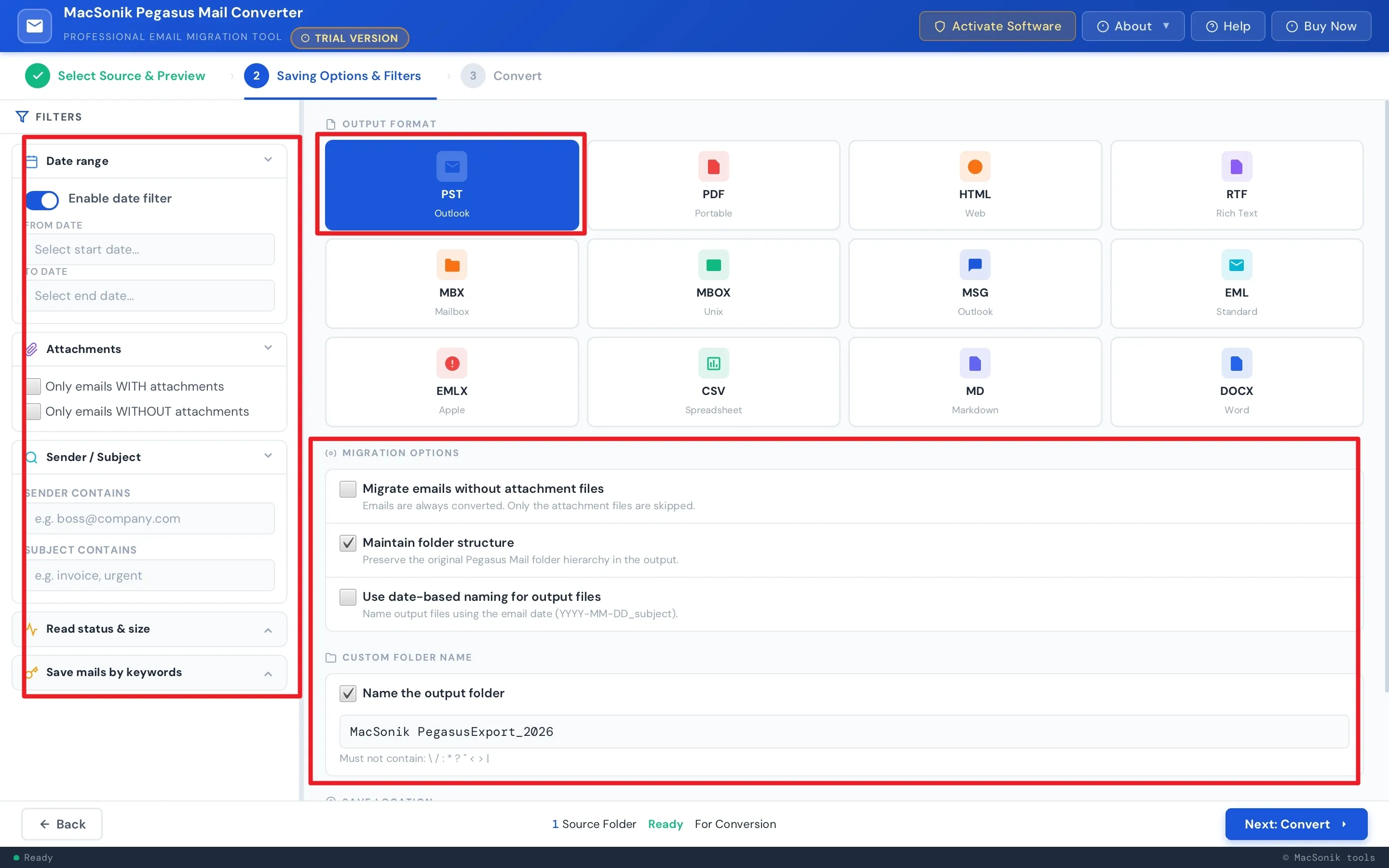
Easily Convert Pegasus Mail to Outlook PST, PDF, HTML, MBOX, EML, EMLX, MSG, CSV, and DOCX. Whether your goal is mailbox migration, long-term email archiving, or switching to a different email client, the Pegasus Mail converter software provides the right format for every business need.

bulk-file

Accurate Bulk Conversion Performance

The Pegasus converter tool enables seamless conversion of multiple files in a single batch. Its advanced processing engine handles each file efficiently while preserving email content, attachments, and folder structure with complete accuracy. The result is reliable, high-quality output without any compromise or data inconsistency.

data

Smart Data Loading with Pre-Conversion Preview

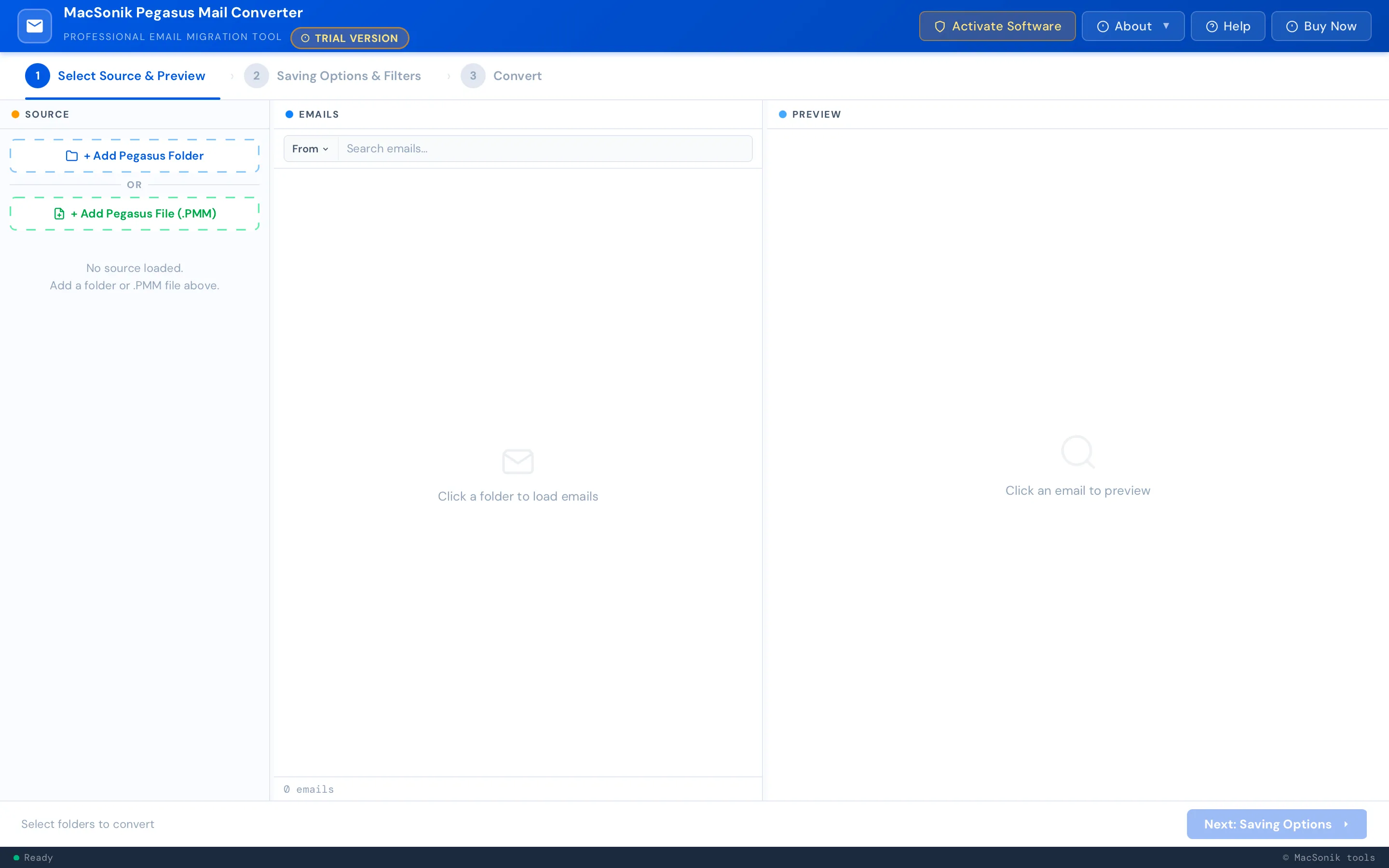
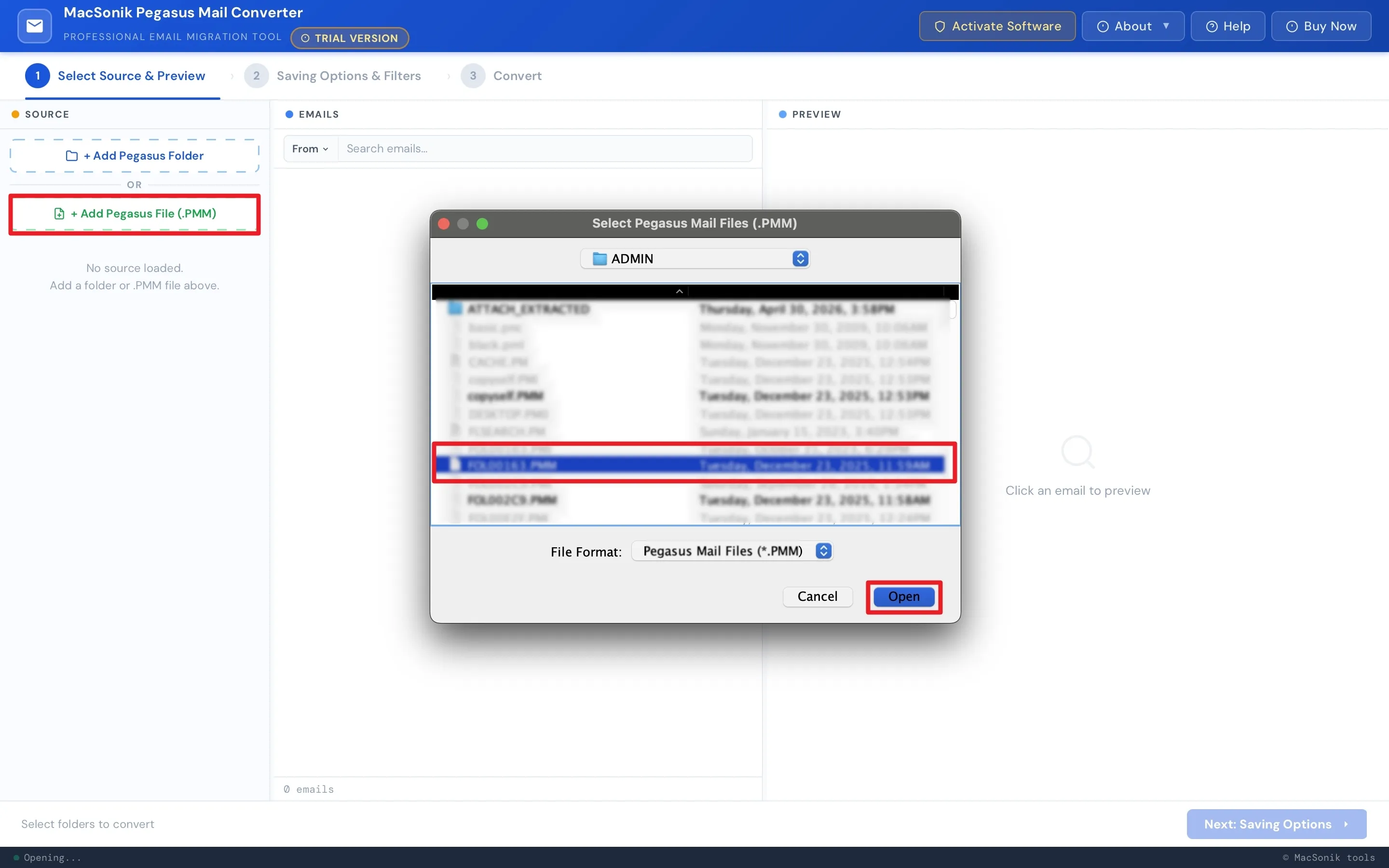
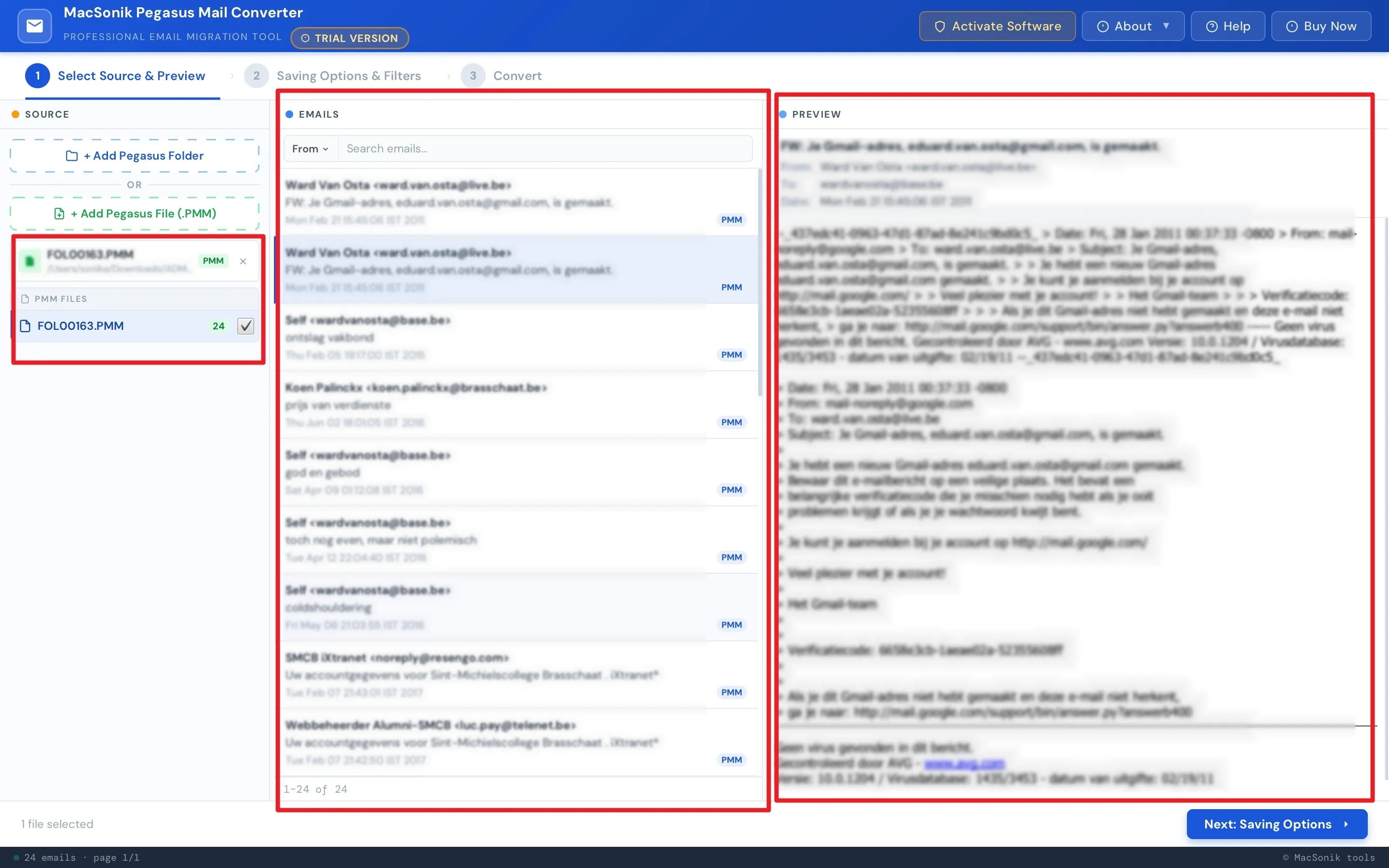
The Pegasus Mail converter software allows you to load mailbox data and review it in detail before the export process. Its preview panel lets you examine email content and attachments, ensuring accurate selection of files. This minimizes errors and improves overall efficiency during large-scale conversions.

export-file

Selective Email Export by Date Range

This reliable Pegasus converter tool allows you to define a custom start and end date to export emails within a specific timeframe. It is especially useful for compliance-driven migrations, project-based archiving, or when only a particular period’s data is required, eliminating the need to convert entire mailboxes unnecessarily.

attachment

Flexible Attachment Management

The Pegasus Mail converter software allows you to migrate emails with or without attachments based on your requirements. This is especially beneficial for organizations looking to reduce file size, manage storage efficiently, or extract data for analysis, while maintaining accuracy and control throughout the process.

date-filter

Advanced Email Selection & Data Filtering

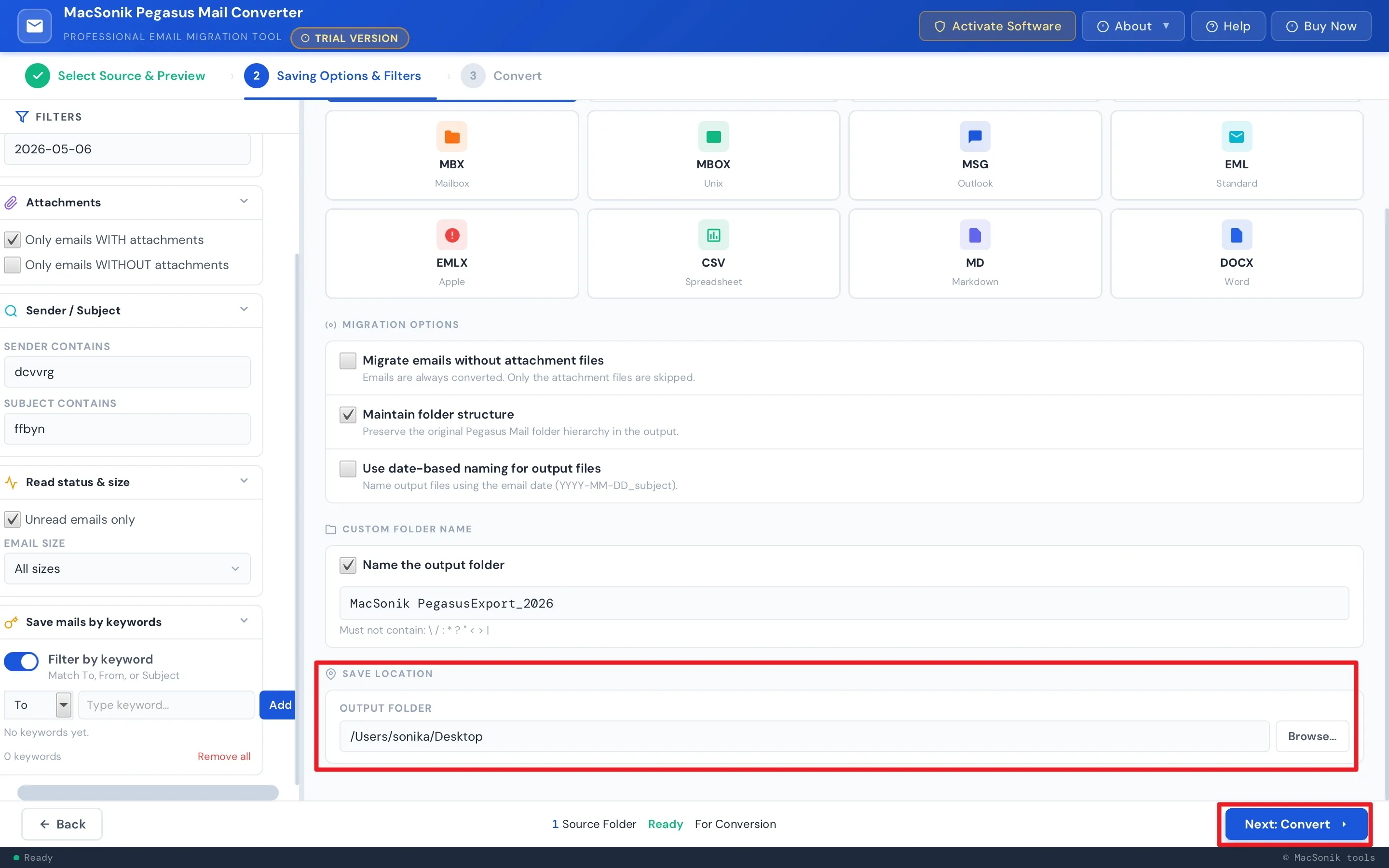
Easily filter emails by sender, subject, read status, and size to export only relevant data. This helps isolate key communications, support audits, and manage project-specific migrations. Size-based segmentation further streamlines data handling without processing entire mailboxes.

file-format

Keyword-Based Extraction & Custom File Organization

Extract emails precisely using keywords from To, From, and Subject fields for accurate, audit-ready results. At the same time, assign custom folder names and choose saving locations based on projects, clients, or departments, ensuring structured, easy-to-manage output.

user-friendly

Scalable & User-Friendly Enterprise Deployment

Carry out structured, large-scale conversions with ease using this reliable Pegasus converter tool. Built for both professionals and individual users, it offers an intuitive interface to configure migration settings, apply advanced filters, and complete conversions quickly, without requiring technical expertise or manual effort.

mac

macOS Compatibility & Free Trial Evaluation

Install the Pegasus Mail converter software seamlessly on all major macOS versions and evaluate its performance before purchase. The demo version allows you to test features, verify results, and convert up to 50 emails per folder without loss. Monitor the entire process with real-time logs and detailed summary reports for complete transparency.

MacSonik Pegasus Mail Exporter Tool- System requirements

processor-img

The trial version of MacSonik Pegasus Mail Converter Tool gives users a chance to test the tool before buying. All output formats and features are accessible in the demo, with a limit of 50 emails per folder.


processor-img

System Requirement

Hard Disk Space: 500 MB of free space required

RAM: Minimum 4 GB (8 GB Recommended)


Mac Icon

Requirements & Supported Versions For Mac

Version: 26.04

Size: 282 MB

Release Date: April 2026

License Types: Home, Administrator, Technician, and Enterprise

Processor:Apple Silicon M1, M2, M3, M4, and newer Apple Silicon processors (including M5)

Operating System: macOS 10.13 High Sierra, macOS 11 Big Sur, macOS 12 Monterey, macOS 13 Ventura, macOS Sonoma, and later versions macOS (10.15 "Catalina")


processor-img

Software Prerequisites

For Mac:

  • Ensure a stable internet connection for software activation and updates.
  • If macOS security prompts show up during installation, allow all necessary permissions.
  • Before starting the conversion process, close any open Outlook or Mail programs.

processor-img

Additional Information

To run this tool smoothly on Mac, follow the below-mentioned steps:

  1. Launch Mac OS.
  2. Go to the Finder Bar >> Go menu.
  3. Select the Applications option.
  4. Choose System Preferences.
  5. Click on the Security & Privacy.
  6. Here, select the Firewall tab, and choose to Turn Off the firewall.

If Yes! Please disable your antivirus temporarily or allow access from its setting so that the software can carry out its function.

It is advised to avoid the source file from any shared drives or networks (NAS, SAN, LAN, and WAN) as it should be on the same working machine.

Pegasus Mail Conversion: Demo vs Paid Version Comparison

Product Features Free Version Full Version
Export Pegasus Emails to PST, PDF, MBX, MBOX, and other formats Only 50 emails per folder All
Select Source Files and Preview
Bulk Email Processing
Support for Large Files
Date Range Filter
Automatic Duplicate Removal
Migrate Emails With/ Without Attachments
Filter and Convert Emails based on Specific Keywords
Custom Folder Name and Naming Convention
Save Mail by Keyword
Read/Unread Status, Subject, and Sender Filtering
macOS Compatibility
24×7 Technical Support
Download and Purchase Download Buy Now

Frequently Asked Questions

Ans: Yes, the Pegasus converter tool is built to manage large-scale migrations, allowing enterprises to convert multiple mailboxes simultaneously without performance issues.

Ans: Absolutely, it supports bulk conversion, enabling IT teams to migrate thousands of user accounts in a single operation.

Ans: It preserves email structure, attachments, metadata, and folder hierarchy throughout the conversion process, ensuring zero data loss.

Ans: Yes, it includes advanced filtering options that allow organizations to extract specific emails based on date, sender, or subject for compliance and legal needs.

Ans: Yes, the Pegasus Mail converter software supports direct migration to cloud platforms like Microsoft 365 and IMAP-based email servers without intermediate steps.

Ans: No, it works independently and does not require Pegasus Mail to be installed, simplifying deployment across enterprise environments.

Ans: Yes, it follows enterprise-grade security practices to ensure safe handling of confidential and business-critical email data.

Ans: Yes, selective migration is possible using filters, allowing targeted conversion based on business requirements.

Ans: Yes, it is designed to process large mailbox files efficiently, making it suitable for enterprises with extensive email data.

Ans: No, the Pegasus converter tool enables smooth migration without interrupting ongoing business operations, ensuring continuity for enterprise users.

avatar
Still have questions?

Can’t find the answer you’re looking for? Please chat with our friendly team.

Get in Touch

What Do Clients Say About Us?

100%
Secure Software
24× 7
Technical Support
5M+
Downloads
30 Days
Money Back Guarantee