What It Does & Who It's For

Migrate Any IMAP Mailbox to Office 365 Without PST Staging

If you're running email on Gmail, Yahoo, Zoho, GoDaddy, or any other IMAP-enabled service and need to move that mailbox into Microsoft Office 365, IMAP to Microsoft Office 365 Migration Tool connects to both ends directly no intermediate PST export, no Outlook installation, and no admin-center CSV juggling in IMAP. Migrate emails into primary mailboxes, archive mailboxes, public folders, or Exchange-based Office 365 environments while retaining the existing mailbox structure.

Most teams arrive here after the manual route stalls: configuring IMAP inside Outlook, exporting a PST per mailbox, then importing each one through the Microsoft 365 admin center works for a handful of accounts but becomes difficult at scale, can disrupt folder organization, and offers no convenient way to skip duplicates or already-migrated mail. MacSonik replaces that multi-tool process with a guided workflow. For organizations moving between Microsoft 365 environments, see our guide to cross-tenant Microsoft 365 migration for planning, mailbox mapping, and migration best practices. Sign in with the source IMAP account or bulk-import multiple users via CSV with filters, preview, duplicate removal, and direct Office 365 migration built in.

100% Local Processing: no data sent to external servers

Modern Authentication ready:Tenant-compliant admin consent

MSP & Enterprise licensed:Multi-system, multi-user tiers

Duplicate-free migration:Clean mailboxes on arrival

Complete Compatibility

Source IMAP Providers

  • Gmail · Yahoo Mail
  • Zoho Mail · GoDaddy
  • iCloud Mail · Yandex
  • Any Custom IMAP Server

Destination & Backup Formats

  • Microsoft Office 365, IMAP, G Suite
  • MBOX · PST · PDF
  • MSG · EML · CSV
Supported IMAP-Enabled Services (20+)
Gmail Yahoo Mail Zoho Mail AOL GoDaddy iCloud Mail Yandex Mail Amazon WorkMail Rediffmail Fastmail cPanel Mail Thunderbird IMAP Apple Mail IMAP Business/Custom IMAP Other IMAP Support Server
Direct OAuth 2.0/Modern Authentication || No PST Staging

Mailbox data is transferred straight from source to destination, no cloud upload to a third party, no server dependency.

Why MacSonik || Exclusive Features

Why is MacSonik the Best Choice for IMAP To Office 365 Migration?

Every feature is built to answer a real migration challenge, for individual users, IT teams, and enterprises. No Outlook required. No cloud upload. No data loss.

Main Features What Makes It Different
Direct IMAP to Office 365 Migration Directly connects IMAP to Office 365 via OAuth 2.0/Modern Authentication.
Move IMAP to Multiple Office 365 Accounts Migrate IMAP accounts to Exchange via CSV.
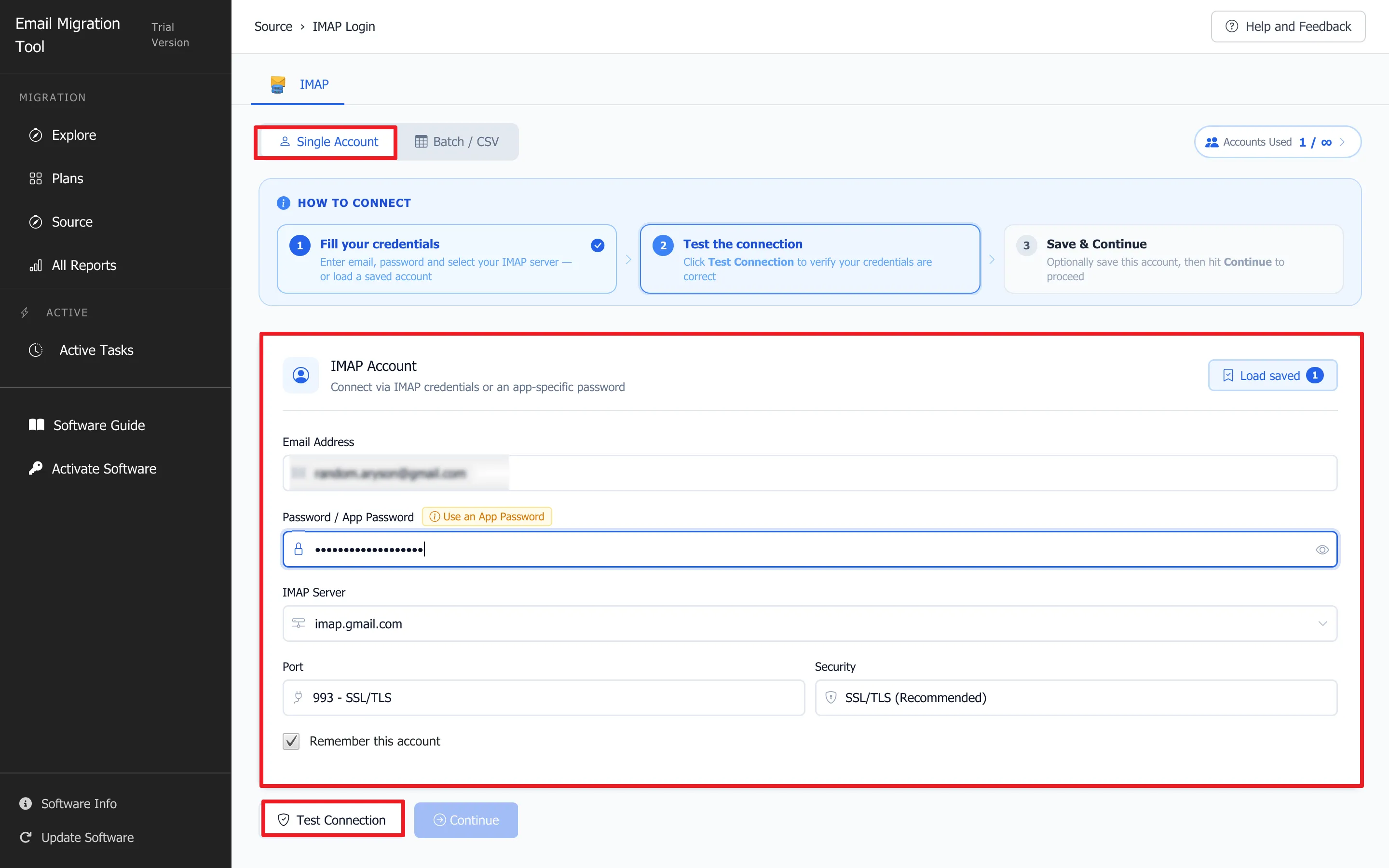
Bulk Import via CSV Import email IDs, passwords, ports, and host details for multiple mailboxes via CSV—no manual credential entry.
No Size Restriction Migrate single or multiple IMAP mailboxes in one run, with no file-size limit or manual splitting.
Enterprise Mailbox Mapping Map IMAP to Office 365 mailboxes in One-to-One, One-to-Many, Many-to-One, or Many-to-Many configurations for flexible migrations and consolidation.
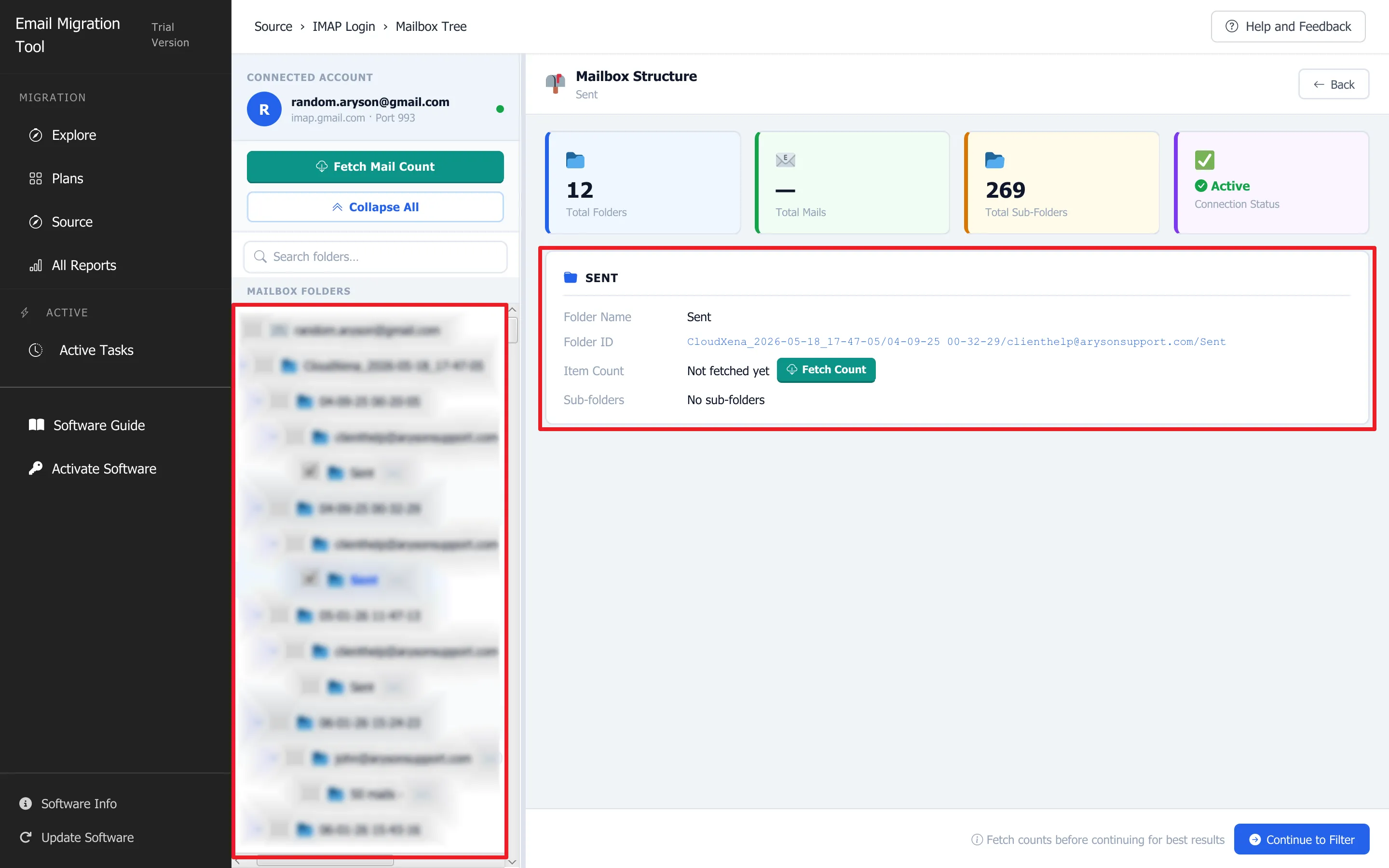
Preview Before Committing Preview IMAP data in a tree-structured folder view, select folders to migrate, and verify content before migration.
Main Features What Makes It Different
Selective Date-Range Migration Set a date range to migrate only emails within the specified period, ideal for phased migrations or recent-mail transfers.
Duplicate Email Removal Set To, From, Subject, CC, BCC, and Body criteria to identify and remove duplicate emails, keeping the destination Office 365 mailbox clean.
Attachment Handling Options Migrate emails with or without attachments, or save attachments separately as PDFs while preserving the original folder hierarchy.
Free Up Source Mailbox Remove successfully migrated emails from the source mailbox to free up storage. Move to Bin/Trash: Moves processed emails to Trash for review or recovery. Permanently Delete: Deletes processed emails without moving them to Trash and may prevent recovery.
Multiple Backup Formats Keep a local backup in MBOX, PST, PDF, MSG, EML, or CSV alongside Office 365, IMAP, and G Suite.
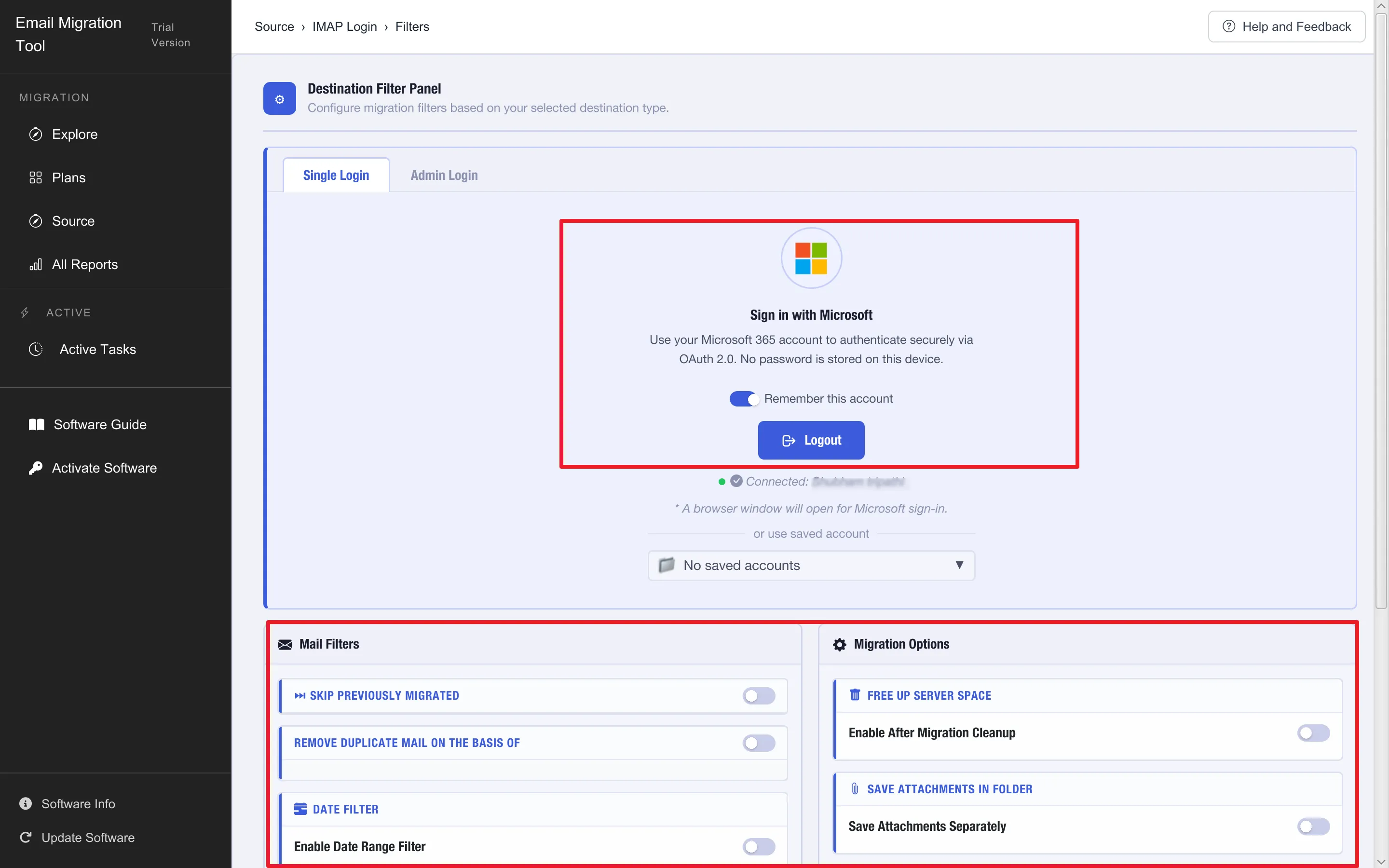
Modern Authentication & Admin Consent Sign in to the destination Office 365 tenant via Modern Authentication. Admin consent is required for organization-wide or multi-user migrations to ensure tenant compliance.
Detailed Migration Report Sign in to Office 365 via Modern Authentication. Admin consent is required for multi-user or organization-wide migrations.
Manual vs MacSonik || Competitor Comparison

MacSonik vs. Manual Methods & Competing Tools

Why MacSonik beats both the manual route and every major competitor in one view.

Task Manual (Outlook + Admin Center) MacSonik IMAP to Office 365
IMAP to Office 365 Configure IMAP in Outlook → Export PST per mailbox → Upload via M365 admin center. Outlook required. Sign in with IMAP credentials → Choose Office 365 → Migrate. No Outlook needed.
Multiple User Accounts Repeat the full export/import cycle per mailbox hours per user. Import CSV once migrates dozens of accounts in a single run.
Mailbox Mapping Manual, one mailbox at a time in the admin center. No bulk mapping options. One-to-One, One-to-Many, Many-to-One, Many-to-Many mapping built in.
Duplicate Removal No built-in option; manual review or a third-party tool required. Built-in detection by To, CC, BCC, sender, subject, and body before migration.
Selective Migration No native date filter must sort emails manually before export. Date-range filter migrates only the emails you choose.
Attachments All-or-nothing PST export always carries every attachment. Include, exclude, or save attachments separately as PDF.
Time & Skill Hours to days per batch. PST staging, admin-center CSV mapping. Minutes. Guided workflow, no command line, no PST staging.
Feature MacSonik SysTools BitRecover Stellar Kernal
Mac & Windows Both Both Win only Both Win only
Direct IMAP → Office 365 PST route only PST route only
No PST staging required Partial
Bulk CSV import (multi-user)
Mailbox mapping modes All 4 1–2
Duplicate removal
Date range filter Limited
Local backup fallback (MBOX/PST/PDF) Partial Partial
Free up source after migration
Trial limit (per folder) 100 Emails 25 25 25 25
Customization From $39 Home/ Corporate/ Technical/ Enterprise plans with customization options are also available From $39 From $49 From $49 From $49

Based on publicly available information at the time of publication. Competitor capabilities may change.

Step-by-Step Guide

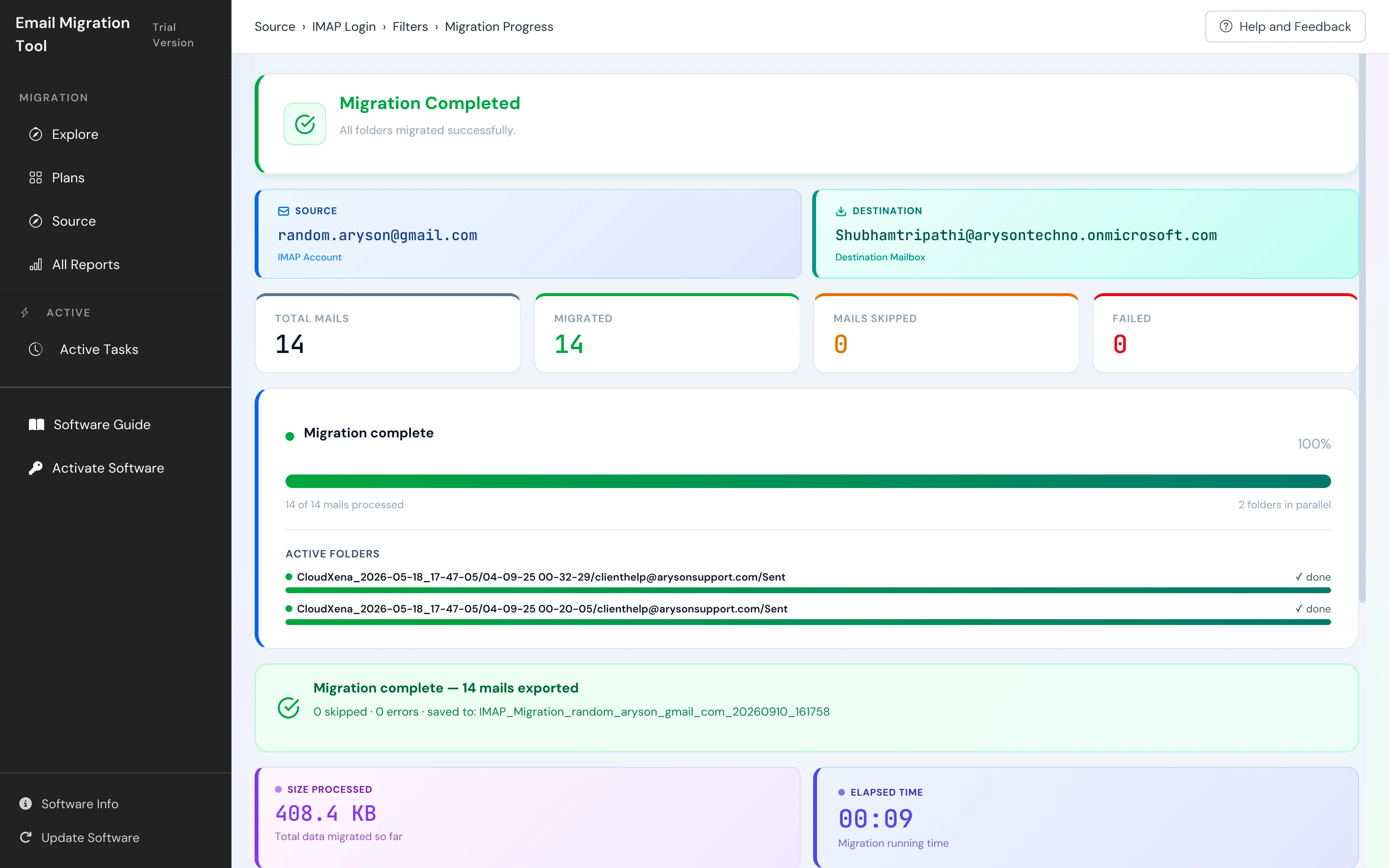
How IMAP to Office 365 Migration Software Works Using MacSonik

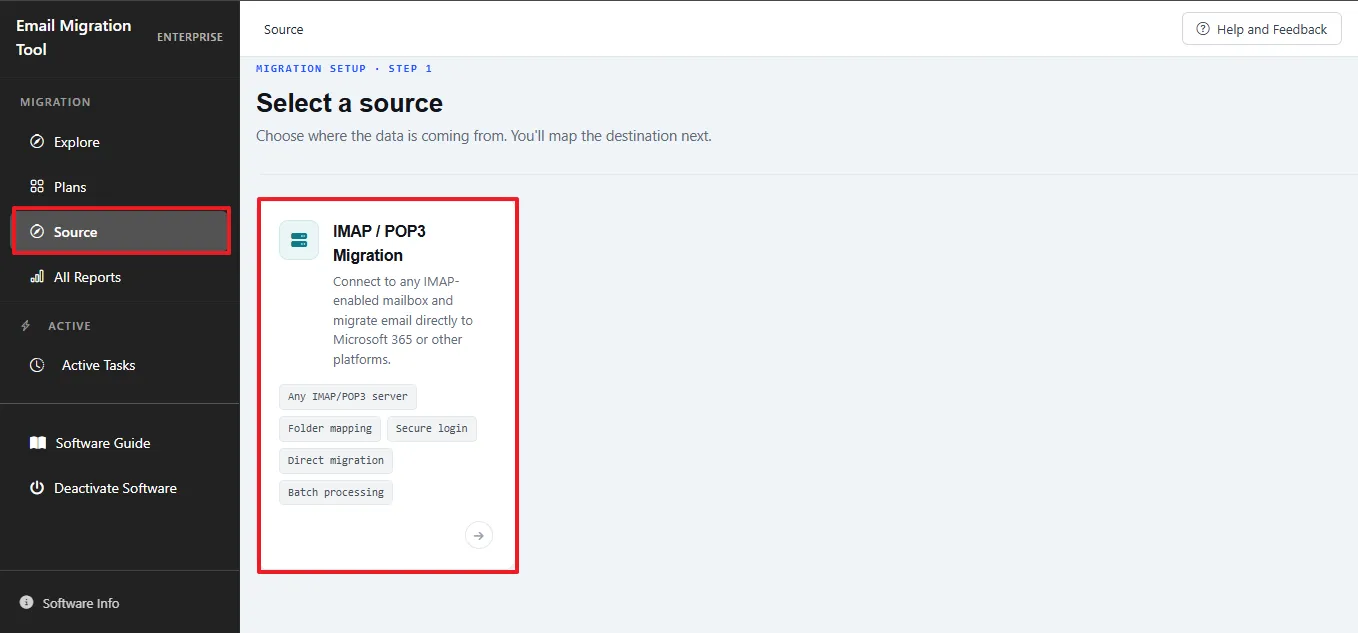
Click any step to see the exact UI screenshot from signing in to downloading your migration report

Download and Launch MacSonik
Add MBOX Files
Preview MBOX Data
Select Output Format
Need the full walkthrough?The complete guide covers every setting, filter, and destination option in detail.
View Software Guide
VIDEO TUTORIAL

Full Conversion Walkthrough

Covers File Mode, Folder Mode, output format selection, filters, duplicate removal, and the HTML export report end to end in one take.

Enterprise & MSP Use Cases

Built for IT Teams, MSPs, and Large-Scale Office 365 Rollouts

Common scenarios where MacSonik replaces manual processes or multi-tool stacks. For MSPs and growing businesses handling tenant consolidation or client migrations, explore our guide to Office 365 tenant-to-tenant migration for MSPs and SMBs.

Org-Wide IMAP → M365 Rollout

Migrate hundreds of user mailboxes from Gmail, Zoho, or GoDaddy IMAP into Microsoft 365 using many-to-many mapping one source mailbox routed to its matching Office 365 account, driven by a single CSV import.

Compliance Backup Before Migration

Back up IMAP mailboxes to PDF or PST before migrating to Office 365, preserving a local retention copy alongside the live migration. For existing Microsoft 365 environments, see how to export Microsoft 365 shared mailboxes to PST for additional backup and archival options.

MSP Client Onboarding

Technician licenses cover multiple systems run IMAP-to-Office-365 migrations across several client tenants from one installation, with a downloadable report per job for client sign-off.

Need volume licensing or a custom deployment? Corporate and Technical licenses cover multi-user and multi-system migrations. Contact us for MSP volume pricing.

Planning a larger Microsoft 365 consolidation? Learn more about Office 365 tenant-to-tenant migration, including identity mapping, domain cutover, licensing, and migration planning.

Universal System Specification for Mac/Windows

Specs macOS Windows
STORAGE 1 GB free disk space 1 GB free disk space
RAM 4 GB minimum (8 GB recommended) 4 GB minimum (8 GB recommended)
PROCESSOR Apple Silicon M1, M2, M3, M4, M5 and newer Apple Silicon processors Intel® Core™ 2 Duo CPU E4600 @ 2.40GHz 2.39GHz
MACOS VERSION High Sierra, Big Sur, Monterey, Ventura, Sonoma+
WINDOWS VERSION Win 11, Win 10, Win 8.1, Win 8, Win 7 Server 2022, Server 2019, Server 2016
Version 26.08 26.08
SIZE 412 MB 353 MB
RELEASED Aug 2026 Aug 2026
LICENSE Home, Admin, Tech, Enterprise Home, Admin, Tech, Enterprise

Trial Limitation

The trial version of MacSonik IMAP to Office 365 Migration Tool lets users test the tool before buying. All output formats and features are accessible in the demo, with a limit of 100 emails per folder.

IMAP to Office 365 Migration Software: Free Trial vs. Licensed Version

Evaluate the IMAP to Microsoft Office 365 Pro before using the full version for your mailbox conversion requirements.

Feature Aspects Trial Version Licensed Version
Migrate IMAP to Office 365 & More Up to 100 emails per folder Unlimited
Backup IMAP to PST, MBOX, PDF, and More Up to 100 emails per folder Unlimited
Import Multiple Users via CSV
View & Move Selected Folder
Delete Duplicate Emails
Transfer Emails Without Attachments
Selective (Date Range) Migration
Save Attachments Separately as PDF
Free Up Source Mailbox After Migration
Assign Required Name & Save Location
Mailbox Mapping (All 4 Modes)
Safe & Secure
24*7 Technical Support
Scenario

A mid-size law firm switching from Zoho Mail to Office 365

A 60 member law firm, who just happens to be running Zoho Mail, decides to switch to Office 365 in order to get better Team integration and better compliance tools. Their setup's a bit of a mess and includes 60 active primary email accounts, 12 archive mailboxes for old employees and closed cases, 3 shared public folders (Litigation, Real Estate, Client Intake) and a clunky old legacy Exchange server from a firm that they acquired years back but never actually got around to properly decommissioning.

The poor admin tries their best by going down the manual route of configuring each Zoho account in Outlook via IMAP, exporting a PST, then uploading through the Microsoft 365 admin center. After the first 10 mailboxes, folder structures start flattening for some users, and with no way to check what's already migrated, duplicates begin piling up.

Switching to MacSonik IMAP to Microsoft Office 365 Migration Tool, the admin bulk-imports all 60 primary mailboxes and 12 archives via CSV, applies a date filter to skip older mail, migrates the 3 public folders with hierarchy intact, pulls in the leftover Exchange mailboxes, and runs duplicate detection to clean up the earlier failed attempt. What was shaping up to be a multi-week, multi-tool project gets done in a few guided sessions with folder structure, read/unread status, and permissions preserved.

FAQ

Frequently Asked Questions

Find answers to common questions about MacSonik MBOX Converter.

Only email messages and folder structure are migrated from IMAP. Calendars, contacts, tasks, and rules are not available over IMAP and are not migrated.

Yes. Using EWS on the Exchange side, we can write to primary mailboxes, shared mailboxes, archive mailboxes, and public folders (subject to Microsoft’s 2026 public folder EWS restrictions).

We connect to the IMAP server using standard IMAP host, port, SSL/TLS, and user credentials. Only mail folders and messages exposed by IMAP are accessible.

Target mailboxes (user, shared, archive) and public folders are pre‑created by the admin. The migration tool uses EWS to migrate IMAP to Office 365 and recreate the IMAP folder hierarchy and write messages into those targets.

IMAP does not carry Exchange‑style permissions. All delegations, Send As, Full Access, and folder permissions must be configured in Exchange/Entra ID by the admin. The migration account is granted EWS and mailbox rights to write data.

Yes, if archive mailboxes are enabled and the migration account has EWS and mailbox permissions to those archives. Messages can be written directly into users’ archive mailboxes.

Shared or departmental IMAP folders are mapped to Exchange public folders or shared mailboxes, with email content written via EWS. Plan before October 2026 due to upcoming EWS restrictions on Exchange Online public folders.

Migration is copy‑based; messages remain on the IMAP server until you delete or decommission it. This allows validation and incremental passes before cutover.

The engine tracks message identifiers (e.g., IMAP UID) to avoid re-copying the same messages. You can run a full pass followed by incremental passes to catch new mail before final cutover.

A service account is enabled, plus Full Access/impersonation rights to target mailboxes, shared mailboxes, archives, and public folders. Network access to the EWS endpoint is also required.

Yes. Microsoft is restricting EWS access to Exchange Online public folders from October 2026, and EWS is subject to throttling in Exchange Online. Migrations should be designed with batching and planned before the public folder cutoff.

No. IMAP is an email‑only protocol, so only messages and folders are migrated. Calendar, contacts, and tasks require a different source or migration path.

Yes. The account used for migration must have Owner permission on the target public folder in Exchange/Exchange Online. Without Owner rights, the tool cannot create subfolders or write messages into the destination public folder. Ensure the migration account is added as an Owner on each public folder before starting the migration.
RESOURCES & SUPPORT

Helpful Resources for Every Step

Access guides, pricing, migration tools, troubleshooting help, and expert support whenever you need it.

User Guide

Backup & Restore Guide

Learn more →

Pricing

Flexible User Licensing

Learn more →

Contact Sales

Speak with a Specialist

Learn more →

Migration Tools

Explore Migration

Learn more →

Troubleshooting Guide

Quick Backup Solutions

Learn more →

Video

Watch Guides & Tutorials

Learn more →

Activate

Activate & manage software license

Learn more →

EULA

Review the terms and conditions

Learn more →
100%
Secure Software
24× 7
Technical Support
5M+
Downloads
30 Days
Money Back Guarantee