Why Choose MacSonik Mac EML to PST Converter Tool?

Keeps Email Structure Intact

Handles Large EML Files Easily

Safe and Reliable Process

Saves Time and Effort

Accurate Results Every Time

Key Features of EML to PST Conversion Tool

MacSonik EML to PST Converter is a dependable solution built to convert EML files into PST format with ease, ensuring complete accuracy while keeping the structure unchanged across both Mac and Windows systems.

eml-file-conversion

Open EML Files in Outlook

Converting EML to PST is the easiest way to access your EML files directly in Microsoft Outlook. MacSonik EML to PST Converter makes this process straightforward and stress-free. It transfers all the EML files components and makes sure the smooth and convenient access within MS Outlook.

convert-pst-files

Convert EML to PST in Bulk

Manual file-by-file conversion is time-consuming and risky. MacSonik lets you load and convert EML to PST in a single session in bulk, saving both time and effort. The tool processes all selected files simultaneously without causing any data loss or disturbing the original email formatting.

eml-files-to-other-email

Convert EML to Other Formats

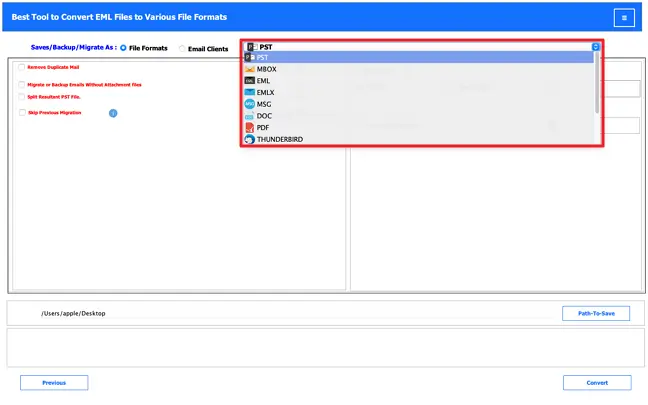
Beyond PST, MacSonik EML Converter gives you the flexibility to save your EML data in multiple formats. You can export emails to PDF, MSG, MBOX, CSV, HTML, EMLX, and more. This feature allows users to access your email data on different platforms.

preview

Preview EML Files for Free

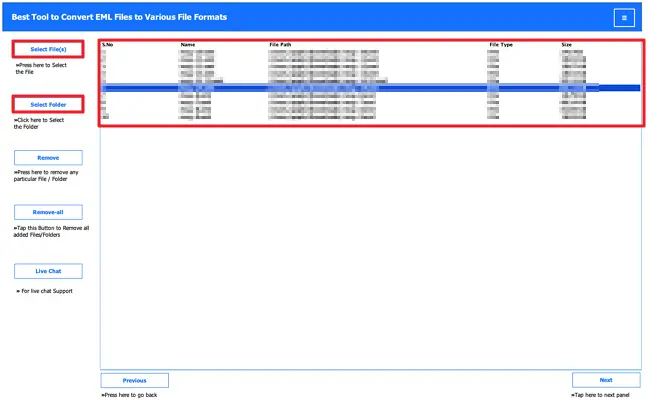
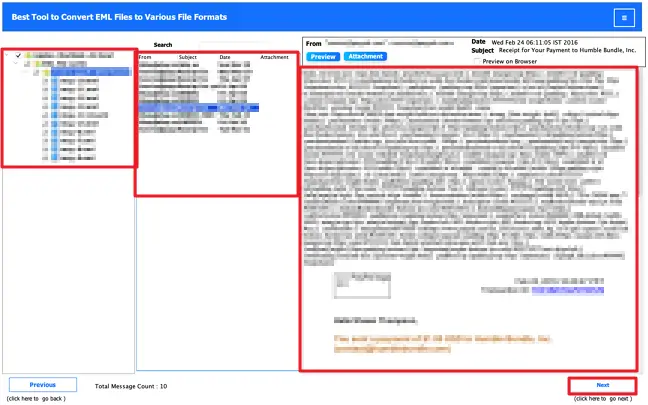
MacSonik offers a built-in Preview panel so you can browse through your EML emails at no cost. The preview displays emails in a tree hierarchy structure, allowing you to review both messages and attachments. After that, proceed to the next step.

Bulk Data Migration

EML to Cloud-based Platforms

If you want to migrate your EML files to any cloud-based or web email platforms. This tool supports direct migration to cloud-based services like Office 365, Gmail, G Suite, Thunderbird, Yahoo Mail, and various IMAP accounts.

Date Filter & Duplicate Removal

Date Filter & Duplicate Removal

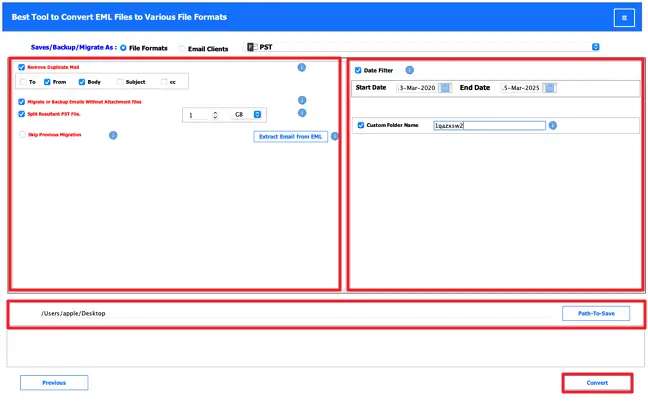
MacSonik includes smart built-in filters to give you better control over your conversion output. Use the Date Range Filter and Duplicate Email Removal to export only those emails that fall within a specific time period and to automatically delete repeated emails.

Save Each Event individually as a PDF

Split Resultant PST File

Large PST files are more vulnerable to corruption and harder to manage. MacSonik addresses this by offering a PST Split feature that lets you divide the output into smaller files based on a size limit you define in MB or GB. This keeps your data safe, manageable, and less prone to any file-level damage.

Manage Saving Attachments

Manage Saving Attachments

MacSonik gives you full control over how attachments are handled during conversion. You can prefer any output option, you can enable the option to exclude attachments, or the option to include attachments with emails, according to your requirements and preferences.

Supports Bulk Transfer

Supports Various EML Types

EML files can originate from a wide range of email applications, such as Windows Live Mail, Thunderbird, and others. The advanced tool allows you to handle EML files from any email clients that store files as EML.

Supported Versions

Compatibility and Ease of Use

MacSonik EML to PST Converter is designed to run smoothly on all major versions of MacOS, as well as Windows OS. Its clean, intuitive interface is easy to use for beginners as well.

Free vs Paid version of EML to Outlook Converter Tool

Product Features Free Version Full Version
Convert EML files to PST for Outlook 50 emails per folder Unlimited
Export EML to formats like PDF, MSG, MBOX, CSV, HTML, etc. 50 emails per folder Unlimited
Migrate EML files to Office 365, IMAP, and other platforms 50 emails per folder Unlimited
Add and convert multiple EML files at once
Supports large EML files without size issues
Preview emails and attachments before conversion
Remove duplicate emails during conversion.
Filter emails by date for selective conversion
Option to convert emails without attachments
Compatible with Mac and Windows systems
Technical support and secure processing
Download and Purchase Download Buy Now

MacSonik EML to PST Converter Software - System Requirements

processor-img

Demo Version

Try the free demo of the MacSonik EML to PST Converter to see how it works in real time. The trial version lets you convert up to 50 emails per folder, so you can check its features and output before upgrading.


processor-img

Requirements & Supported Versions For Mac

Version: 25.7

Size: 282 MB

License Types: Home, Administrator, Technician, and Enterprise

Operating System: macOS 10.13 High Sierra, macOS 11 Big Sur, macOS 12 Monterey, macOS 13 Ventura, macOS Sonoma, and later versions of macOS (10.15 "Catalina")

Processor: Apple Silicon M1, M2, M3, M4, and newer Apple Silicon processors (including M5)

Ram: 8 GB of RAM (8 GB is recommended)


processor-img

Requirements & Supported Versions For Windows

Version: 25.8

Size: 284 MB

License Types: Home, Administrator, Technician, and Enterprise

Hard Disk Space: 256 GB of free hard disk space required

Processor: Intel® Pentium 1 GHZ Processor (x86,x64) or equivalent

Ram: 8 GB of RAM (8 GB is recommended)


software-prerequisites

Software Prerequisites

  • If you are operating Windows OS 11, 10, 8, or 7 (32-bit or 64-bit),then you must launch the tool as an Administrator.
  • Turn off the Windows Firewall for proper installation.
  • Disable the Antivirus programs

processor-img

Additional Information

To run this tool smoothly on Mac, follow the below-mentioned steps:

  1. Launch Mac OS.
  2. Go to the Finder Bar >> Go menu.
  3. Select the Applications option.
  4. Choose System Preferences.
  5. Click on the Security & Privacy.
  6. Here, select the Firewall tab, and choose to Turn Off the firewall.

If Yes! Please disable your antivirus temporarily or allow access from its setting so that the software can carry out its function.

It is advised to avoid the source file from any shared drives or networks (NAS, SAN, LAN, and WAN) as it should be on the same working machine.

Frequently Asked Questions

Ans: Yes, it runs fine on macOS — older versions and newer ones both work without any trouble.

Ans: Yes, just add all the files at once, and the tool processes them together. No cap on how many files or how big they are.

Ans: Yes — PDF, MSG, MBOX, CSV, HTML, and EMLX are all supported output options.

Ans: Yes. You can try the tool for free and convert up to 50 emails per folder to check if it fits your needs.

Ans: It helps you narrow down which emails get exported. Set a from and to date, and only those emails will be included in the output.

Ans: There is an option to leave attachments out during conversion. Just enable it, and only the email body gets exported.

Ans: Outlook 2007, 2010, 2013, 2016, 2019, and Microsoft 365 all open the output file without any issues.

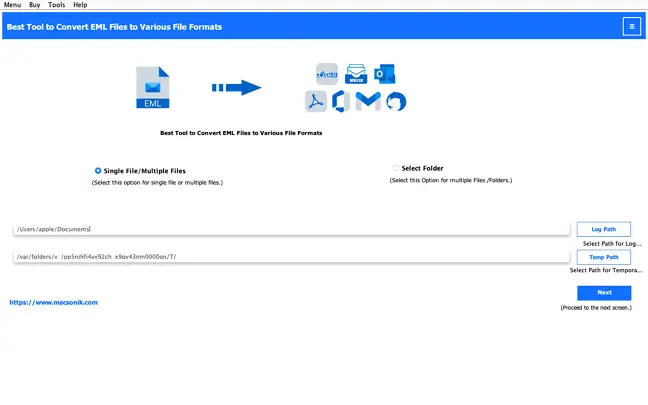
Ans: Download the trial, install it, add your EML files, pick PST as the format, and hit Convert. Done in minutes.

avatar

Still have questions?

Can’t find the answer you’re looking for? Please chat with our friendly team.

Get in Touch

Client Testimonials for MacSonik EML to PST Converter Tool

100%
Secure Software
24× 7
Technical Support
5M+
Downloads
30 Days
Money Back Guarantee