Tailored with precision and extensively tested by forensics, the smart tool guarantees safe, consistent, and user-focused conversions in accordance with real-world needs.
Unlimited Batch PST Conversion
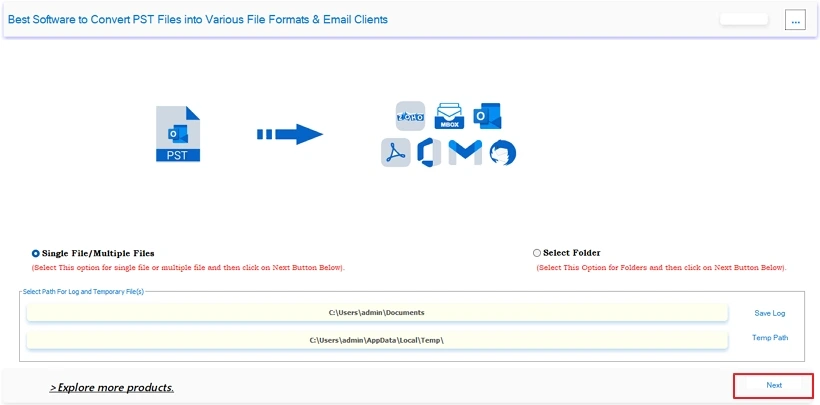
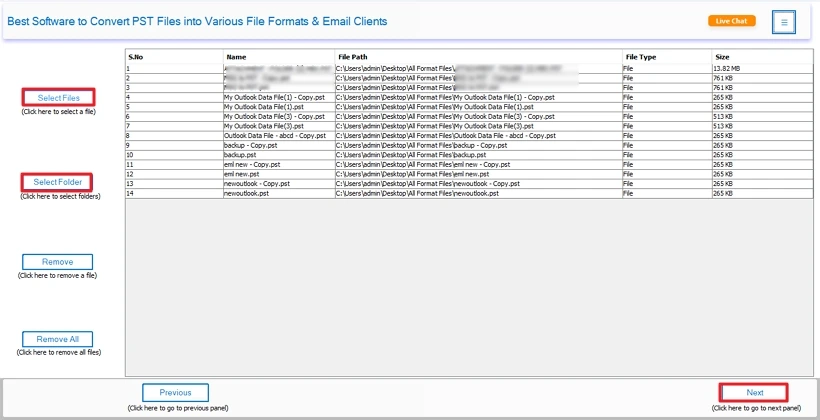
Load and process single or multiple PST files quickly and without hassle by anyone directly into MacSonik PST to EML Conversion Tool. Whether small or large, the process will take much less time than is typically required for transferring PST files between individuals and organisations.
100% Data Feadilty Preservation
All folder structure, metadata, and other elements associated with the source PST will remain intact, including To/From/Date, HTML formats, hyperlinks, embedded images, and attachments. PST File to EML Converter validates all files and ensures no loss of content during conversion.
Outlook-Free PST to EML Conversion
The excellent software doesn’t require MAPI or Outlook setup; simply load the appropriate ANSI (1997-2002 PST) or Unicode (2003-2021 PST), including password-protected files, for a simplified process to backup PST files in EML format.
Format Export and Direct Migration
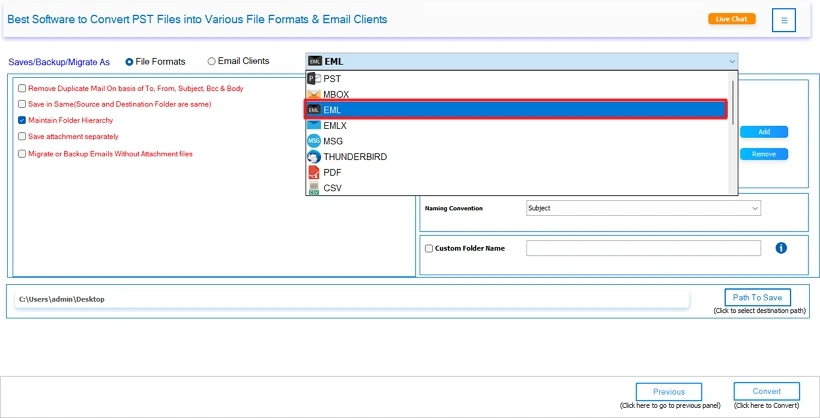
Use the Outlook PST to EML Converter Software and save emails into EML, PDF, MBOX, MSG, HTML, CSV, DOCX, etc. Transfer straight to Gmail, Office 365 (Outlook.com), iCloud, Yahoo, Thunderbird, Zoho, IMAP, etc., securely without any loss or risks.
Advanced Tree Structure Data Preview
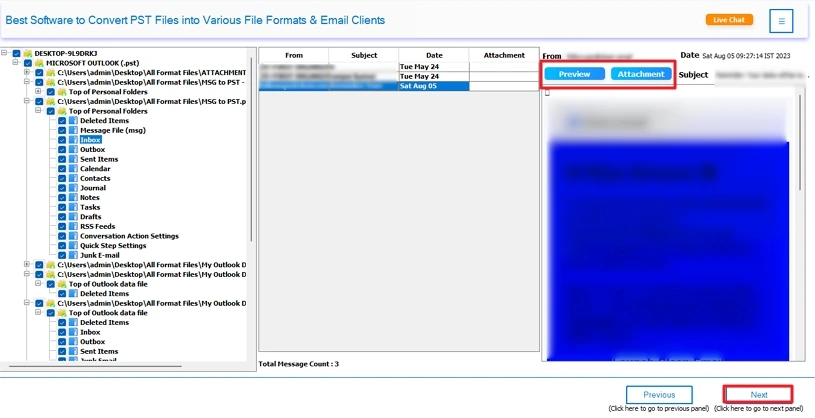
Using the MacSonik PST to EML Converter for Mac, view the entire mailbox hierarchy, email properties, and attachment information to choose only those emails you want to convert without errors. Also, ensure that data is kept intact and maintained without alterations.
Smart Filter and Duplicate Removal
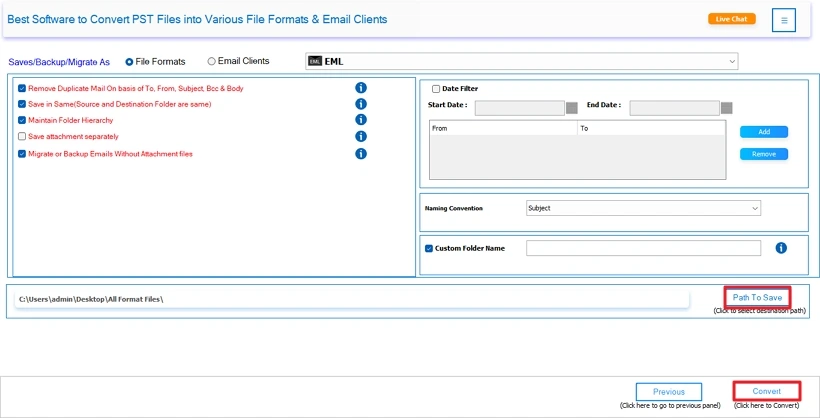
Establish Date Range (start to end) and select the emails you wish to transfer for the specific period. Moreover, use the Remove Duplicate filter to exclude similar emails on the basis of Subject, Body, Sender, or BCC so that you only have the unique emails in your new system.
Flexible PST Attachments Handling
Save the attachments into separate folders or migrate emails without them with the advanced PST File to EML Converter. The Migrate or Backup Emails without Attachments filter will only transfer the body content in EML and not the embedded attachments of the email.
Customizable Control Over Output
Set the emails and folders to be converted with a specified Naming Convention (for example: Subject_Date_From), or give a Custom Folder Name. Additionally, create a path to save converted emails or use the Save in Same filter for easy-to-find, searchable results for your new file.
Free Demo with Complete Support
Test the conversion process by converting the first 50 emails within each folder for free with the trial version of MacSonik PST to EML Converter. Have unlimited access with a Single, Administrator, Technician, or Enterprise License; all have lifetime updates, and you can reach 24/7 via email or chat for risk-free trials.
Operating System Optimization
Built for both Windows and Mac OS, this user-friendly specialized tool works on all the latest and earliest versions with full compatibility to Convert PST to EML and other formats securely and efficiently. With the intuitive GUI and fast processing speed, convert PSTs for all Outlook versions in bulk at once.
Demo Version
Explore the free trial version of the well-known PST to EML Conversion Tool for functionality and performance evaluation. Also, convert upto 50 emails per folder at no cost.
System Requirement
Hard Disk Space: 500 MB of free hard disk space required
RAM: 4 GB of RAM (4 GB is recommended)
Processor: Intel® Core™ 2 Duo CPU E4600 @ 2.40GHz 2.39GHz"
Supported Windows: Windows 11 & its below versions
Requirements & Supported Versions For Windows
Version: 25.9
Size: 204 MB
Release Date: 02 november 2025
License Types: Home, Administrator, Technician, and Enterprise
Hard Disk Space: 256 GB of free hard disk space required
RAM: Minimum 4 GB (8 GB Recommended)
Processor: Intel® Pentium 1 GHZ Processor (x86,x64) or equivalent
Requirements & Supported Versions For Mac
Version: 25.9
Size: 233 MB
Release Date: 02 november 2025
License Types: Home, Administrator, Technician, and Enterprise
RAM: Minimum 4 GB (8 GB Recommended)
Processor: Apple Silicon M1, M2, M3, M4, and newer Apple Silicon processors (including M5)
Operating System: macOS 10.13 High Sierra, macOS 11 Big Sur, macOS 12 Monterey, macOS 13 Ventura, macOS Sonoma, and later versions macOS (10.15 "Catalina")
Software Prerequisites
Additional Information
To run this tool smoothly on Mac, follow the below-mentioned steps:
| Product Features | Free Version | Full Version |
|---|---|---|
| Convert PST Files to EML | 50 Items Per Folder | All |
| Batch Conversion | ||
| Preview Before Conversion | ||
| Preserve Folder Hierarchy | ||
| Eliminate Duplicate PSTs | ||
| Selective Conversion with Date Filter | ||
| Migrate with or Without Attachments | ||
| Windows and Mac Compatibility | ||
| 24*7 Tech Support | ||
| Download and Purchase | Download | Buy Now |
Ans: You do not require Microsoft Outlook or any other email client to scan, preview, or convert PST files. With the MacSonik PST to EML Converter, you are able to create files safely and securely without having either of these programs running.
Ans: Yes, you can convert any number of PST files, regardless of size, in a single process. You may add multiple PST files or entire folders, which will save you time when converting multiple PSTs into your EML file format.
Ans: Yes, MacSonik PST to EML Conversion Tool keeps your data 100% intact and maintains your folder structure and email attributes. Also, emails (To, CC, BCC, Subject, Date), as well as any attachments, are preserved in the same way as stored in PST files.
Ans: Yes. The PST to EML Converter for Mac has sophisticated functions for allowing users to filter e-mails based on their sending/receiving information, subject title, and view each filtered message in an organizational tree. Also, its Date Range filter helps you with the conversion of specific messages for a particular period.
Ans: With the demo version, you will be able to scan through and view all items found in your inbox. However, you will only be capable of exporting a total of 50 email messages from the first folder for free. If you require continuous scan and full export, upgrade to the premium version for continuous access to all the features.
Can’t find the answer you’re looking for? Please chat with our friendly team.
Get in Touch