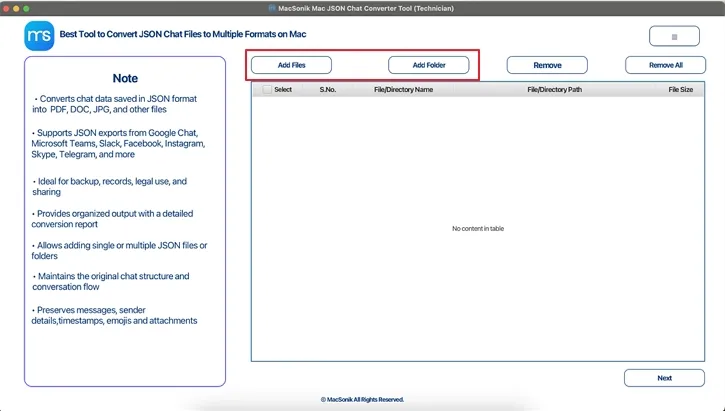
MacSonik JSON Converter is a professional-grade solution designed to convert complex and nested JSON files into usable formats with speed, accuracy, and complete data integrity.
JSON Conversion in Many Formats
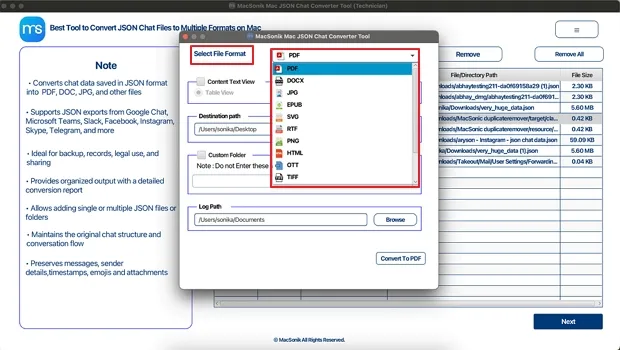
Easily convert JSON files into PDF, DOCX, JPG, EPUB, SVG, RTF, PNG, HTML, and other widely used formats. This ensures seamless interoperability for analytics, reporting, documentation, and database management without any manual rework. Versatility ensures data can be used across different applications without requiring manual intervention.
Bulk and Large JSON File Processing
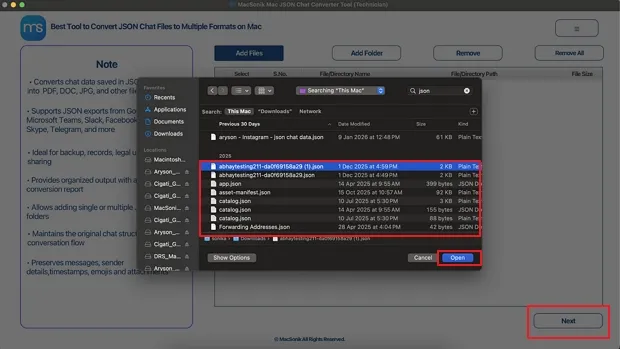
MacSonik JSON Converter supports single and bulk JSON file processing, allowing users to convert large and complex datasets efficiently without performance loss. Also, it provides high-conversion capabilities without performance degradation. Using efficient memory and quick conversion algorithms, the unique tool is intended for enterprise environments.
Preserving JSON Data Fidelity
The tool intelligently preserves nested JSON objects and arrays while converting, ensuring original hierarchy, values, and relationships remain intact. This ensures users get clean and intact original values and the new key-value pairs created after the JSON file conversion.
Advanced Output Data Viewing
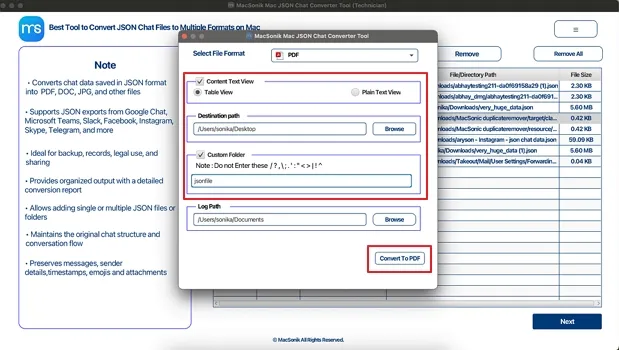
The JSON Chat Converter Tool ensures you can save the resultant data easily and view converted JSON data in structured Table View or Plain Text mode for better readability. This feature is supported in PDF, DOCX, and RTF formats only for easy validation and analysis.
Custom Naming and Saving
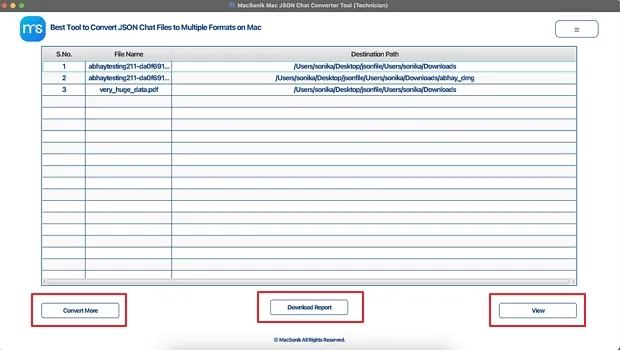
Assign custom folder names and choose a preferred destination path with the JSON Converter Tool to organize converted JSON files efficiently for faster access.
Offline and Secure JSON Conversion
All JSON conversions are performed locally on your system. No cloud uploads or third-party servers are used, ensuring maximum data privacy and security.
Multiple Application Support
The excellent application supports users to easily import JSON files from WhatsApp, Skype, Slack, Telegram, Instagram, Facebook Messenger, Microsoft Teams, and other platforms with no file size or count restrictions. Users can convert JSON data from anywhere as desired with ease.
Smart Conversion Analysis
JSON Converter & Viewer enables all users to securely convert JSON data into a file format of choice and saves them independently at a chosen location. Generate detailed CSV log reports for every conversion to verify results, track processing details, and support audits or compliance needs.
User-Friendly Converter Tool
Designed for both technical and non-technical users, the tool offers an intuitive interface with a free demo that converts up to 20 key values for evaluation. This intelligent JSON File Converter Tool secures raw and nested complex JSON files in organized and universal file formats without hassle, time, effort, or extra cost.
Software Compatibility
The ultimate converter solution is fully compatible with Windows (including Windows 11 ), macOS, and Linux systems, ensuring smooth and accurate JSON conversions across all environments. The software requires no technical skills and works flawlessly across all systems, ensuring accurate and precise conversions.
Demo Version
Try the free demo of MacSonik JSON Chat Converter to evaluate its features, accuracy, and performance. The demo lets you convert up to 20 key values at no cost, helping you verify results before upgrading.
System Requirement
For Mac:
Hard Disk Space: 500 MB of free space required
RAM: Minimum 4 GB (8 GB Recommended)
Processor: Apple Silicon M1, M2, M3, M4, and newer Apple Silicon processors (including M5)
Mac Operating System: macOS 10.13 High Sierra, macOS 11 Big Sur, macOS 12 Monterey, macOS 13 Ventura, macOS Sonoma, and later versions macOS (10.15 "Catalina")
For Windows:
Processor: Intel or AMD (64-bit recommended)
RAM: 1 GB minimum (2 GB recommended for large JSON files)
Disk Space: 500 MB free space
Architecture: 64-bit preferred for optimal performance
Windows Operating System: Windows 11, Windows 10, Windows 8.1, Windows 8, Windows 7, and earlier versions
About Software
Version: 26.01
Size: 268 MB
Release Date: January 25, 2025
License Types: Home, Administrator, Technician, and Enterprise
Installation Notes
Windows security settings may block new applications. If required, allow MacSonik JSON Chat Converter through Windows Defender Firewall or your antivirus trusted list. You can keep system protection enabled after installation.
Software Prerequisites
Additional Information
To run this tool on a Mac without interruption, do the following:
Note: You usually don’t need to turn off the macOS firewall. If required, simply allow the app in security settings instead of disabling protection.
| Product Features | Free Version | Full Version |
|---|---|---|
| Convert JSON Files | 20 key values only | All |
| Save to PDF, RTF, SVG, PNG, DOC, BMP, etc. file formats | 20 key values only | |
| Bulk JSON File Conversion | ||
| Check JSON File Details | ||
| Maintain original structure and flow | ||
| Content Text View | ||
| Custom Folder Name | ||
| Destination Path | ||
| 24*7 Tech Support | ||
| Download and Purchase | Download | Buy Now |
Ans: No. The JSON Converter Tool preserves all JSON structure, values, and metadata.
Ans: Yes. JSON can be converted into PDF, DOC/DOCX, and HTML formats.
Ans: No. All conversions run 100% offline on your system.
Ans: Yes. It supports bulk processing and large datasets without data loss.
Ans: No. The interface is designed for non-technical users.
Ans: Use Table or Plain Text preview and CSV conversion reports.
Ans: You can convert up to 20 key values to evaluate accuracy.
Ans: Yes. Intelligent parsing handles incomplete or complex files.
Ans: No. The software runs fully offline.
Ans: Yes. Custom folder names and destination paths are supported.
Ans: No. One-time license with instant activation.
Ans: Yes. Metadata and structure are preserved accurately.
Can’t find the answer you’re looking for? Please chat with our friendly team.
Get in Touch