Import OLM to Office 365 Account on Mac: Easy Approach

Amelia James
May 11th, 2026
User-Query:
I have an OLM file exported from Outlook for Mac and want to import it into my Microsoft 365 account. However, manual methods seem complicated and time-consuming, especially for large files. Can anyone recommend a reliable professional tool that can migrate OLM file data to your Microsoft Office 365 account, including emails, attachments, contacts, and calendars without any data loss?
Summary: OLM file format is the native language of Outlook for Mac, and Outlook PST is the default format for Windows PC. Accessing an OLM file in Windows will pose a language translation issue. Therefore, the best solution is to import OLM to Office 365 and move the data to a universal cloud format. Now, the operating system no longer matters. Continue to read this article to know why users choose to import to Office 365 and how one can perform this execution. An expert tool, the MacSonik OLM Converter is also introduced for a hassle-free and reliable migration experience.
Important Reasons to Migrate OLM to Office 365
One of the primary requirements to migrate the OLM file to Office 365 is to access the OLM data on a Windows PC. Below are the reasons why users migrate to Office 365:
- With Office 365, users can access their emails and metadata from a centralized cloud-based platform.
- After move mac outlook emails to office 365, the emails can be accessed anywhere across devices.
- Microsoft O365 provides advanced data protection features and ensures safer storage in comparison to local OLM files.
- Office 365 integration ensures improved team collaboration by efficiently sharing emails, contacts, and calendars.
- The cloud-based storage reduces the dependency on system-based storage, protecting important data.
Manual Technique to Import OLM to Office 365 Account on Mac
In this manual approach, the user has to first import the OLM file into Outlook for Mac. And then it will be synced to an Office 365 Exchange email account.
Use the step-by-step instructions to begin the process:
- On your macOS, launch Outlook for Mac.
- Then, go to File and choose the Import option.
- After that, select the Outlook for Mac archive file (.olm) > Continue.
- Next, find and locate the OLM file you wish to import and click Import.
- Now, go to Tools > Accounts and configure Office 365 Exchange account credentials.
- In the On My Computer local folder, locate the imported OLM file.
- Select the OLM email data and drag and drop them into the Office 365 mailbox.
- Allow some time to sync the data to Microsoft 365.
Limitations:
It requires effort and time to manually bulk import OLM file to Office 365. In the drag-and-drop approach, there can be chances of duplicate items. The proper synchronization process requires a stable internet connection.
An Expert Solution to Import OLM to Office 365 Account
The MacSonik OLM Converter is a feature-rich software that securely imports OLM files to an Office 365 account. This tool is also used to convert OLM to ICS, PST, MBOX, EML, and more to access data in different platforms. In addition to this, it supports migration to multiple email services. Furthermore, the tool is equipped with advanced features such as splitting large PST files, single and batch mode conversions, attachment handling, and many more.
Quick and simple steps to move mac outlook emails to office 365:
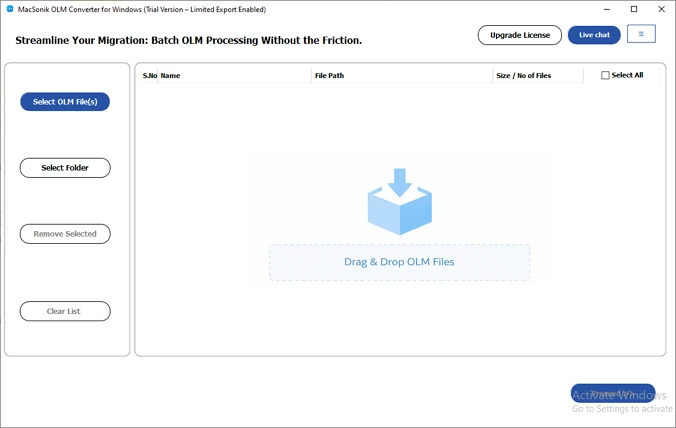
- First, download and execute the application on your system.
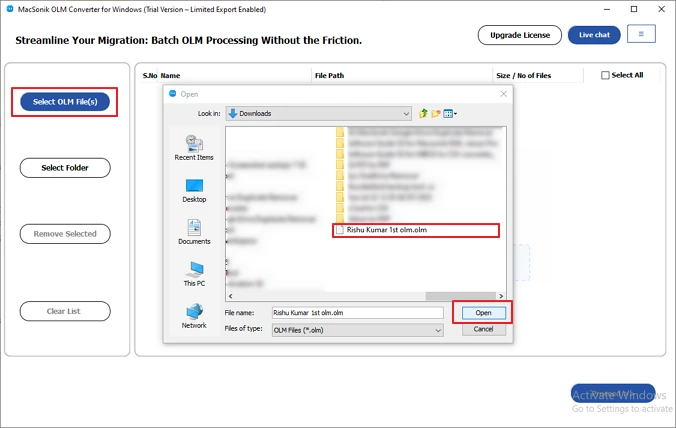
- Then, click on the Select Files, locate the OLM file, select it, and open it to add it. Select the file and click Next to continue.
- Now, expand the folder hierarchy and pick the folders to preview their contents by double-clicking on them.
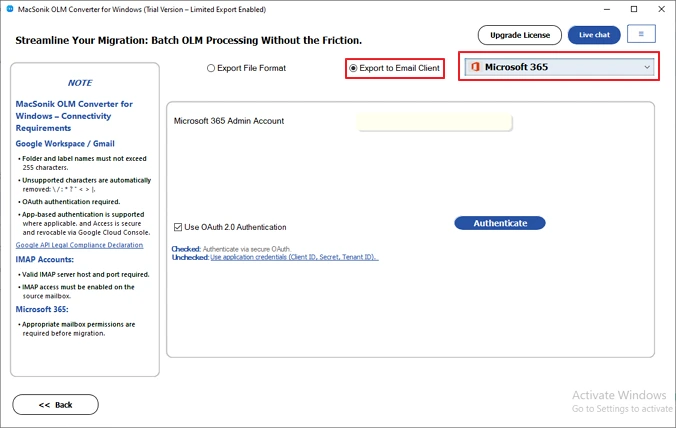
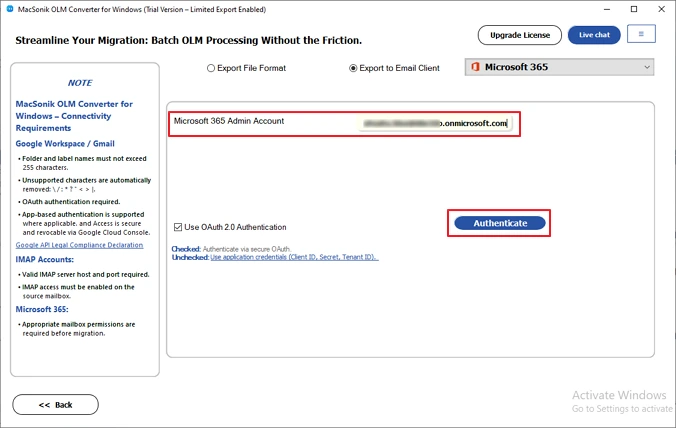
- From the Export to Email Client drop-down list, pick Microsoft 365.
- Authenticate with the Microsoft 365 Admin account credentials. On your browser, complete the on-screen instructions.
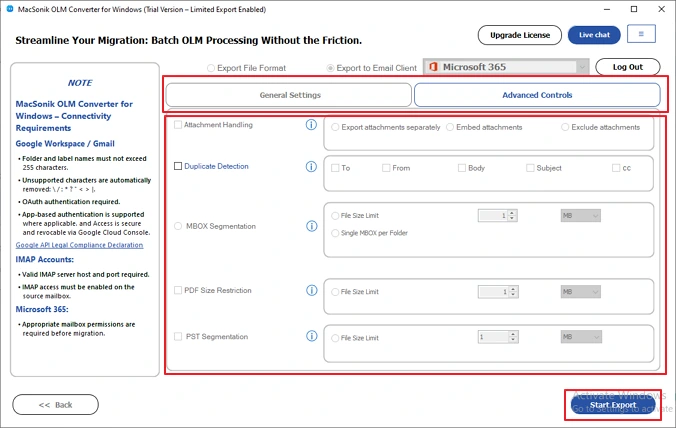
- Set all of the Advanced Filter settings and click on the Start Export button.
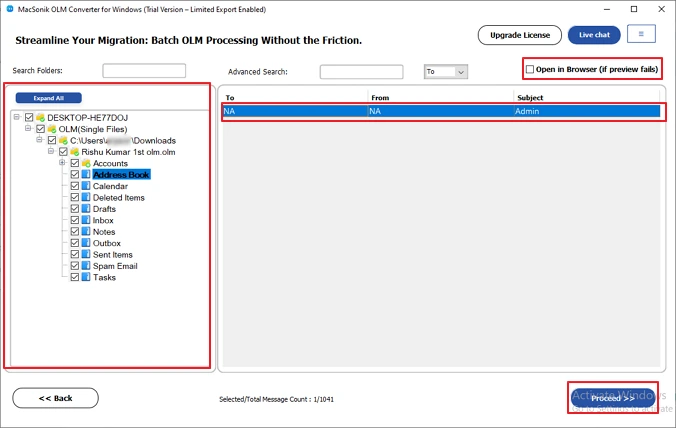
An IT professional needed to migrate OLM data from Outlook for Mac to Microsoft 365 after her company moved to the cloud. Manual methods were slow and complex, especially for large files with important emails and attachments. She used the MacSonik OLM Converter to complete the migration quickly, ensuring accurate and secure data transfer without any loss. Moreover, it offers a feature to view OLM file on Mac without Outlook with the “open in Browser” feature or by double-clicking the OLM file.
Conclusion
Both small and large businesses import OLM to Office 365 account for improved accessibility, security, and productivity. Through this technical article, we have understood the reasons for OLM to Office 365 account import and the execution process. The manual execution is a bit complicated and comes with multiple limitations. On the other hand, with the help of the OLM File Converter, users are assured of data integrity and preserving the original folder structure. Users can download the free trial version of the tool to decide to upgrade it premium version.
Frequently Asked Questions
Ans- No, you cannot directly upload an OLM file to Microsoft 365. You must first import it into Outlook for Mac or convert it into a compatible format before migrating it to Office 365.
Ans- Yes, it is possible to import OLM files with attachments into Microsoft 365. However, you need to use MacSonik OLM Converter to ensure attachments are migrated properly.
Ans- Yes. You can migrate selective emails from OLM to Office 365. This can be done using Outlook for Mac by manually selecting specific folders or emails during the transfer process.
Ans- The best approach to move OLM files to Microsoft 365 is by importing them into Outlook for Mac and syncing with an Exchange account. For large or complex migrations, using a professional MacSonik OLM Converter Tool ensures faster, accurate, and hassle-free data transfer.
About The Author:
Amelia is the mistress of the webmail clients like Office 365, Gmail, Yahoo, Hotmail, and Opera Mail. Her research on downloading emails from webmail is outstanding. She has given the solution to download emails from webmail clients to a Mac device with all the mailbox items. She’s been into webmail solutions since 2010. In her free time, she reads books and writes technical blogs.
Related Post
