Top Methods to Import PST to Google Workspace on Mac [2026]

Neeru Kuchhal

July 28th, 2026
User-Query:
User Query: “I have a 28GB Outlook PST file containing over 45,000 business emails, 8,500 attachments, and multiple archived folders. I now want to import this PST file into my Google Workspace account on my MacBook. What is the safest and fastest way to import PST to Google Workspace without losing any data?”
— Posted by “Ryan Thompson”
Introduction: On average, business users store PST mailbox data anywhere between 10 GB and 50 GB. However, PST files are locally dependent and often become difficult to manage, especially for Mac users who prefer cloud-based access. This is where Google Workspace becomes useful. Google Workspace is used by over 9 million businesses worldwide, offering Gmail, Calendar, Drive, and collaboration tools. Migrating Outlook PST files to Google Workspace on a Mac system allows businesses to improve accessibility, security, and team collaboration.
Moreover, this write-up provides the professional and manual solutions to migrate from Outlook to Google Workspace.
PST to Google Workspace: Why Mac Users Make the Switch?
- Access emails from any Mac device or browser.
- Reducing the dependency on Outlook.
- Centralize business communication.
- Improving collaboration among teams.
- Get cloud storage instead of a local PST dependency.
- Also, to simplify long-term email management.
Good to Know: Studies show that 78% of businesses moving to Google Workspace report faster team collaboration and 35% lower email management overhead.
Manually Import PST to Google Workspace on Mac
The manual process involves Outlook and IMAP synchronization to complete this task. However, carrying out this process may take time and resources.
- First, open Microsoft Outlook on your Mac.
- Then, import the PST file into Outlook.
- Configure your Google Workspace account using IMAP.
- After that, create mailbox folders in Gmail.
- Drag emails from PST folders to Gmail folders.
- Further, wait for complete sync.
- Lastly, verify the migrated emails.
Common Challenges During PST to G Suite Migration
- Gmail does not directly support PST files.
- Large PST files (20GB+) take time to upload.
- There is a risk of attachment loss.
- Sometimes the folder hierarchy mismatches.
- High risk of duplicate emails during sync.
- Internet interruptions in manual migration.
Mac-Compatible Solution to Import PST to Google Workspace
Want a trusted solution to transfer bulk PST files into Google Workspace?
The MacSonik PST File Converter Tool is an ideal solution. This utility allows direct migration with no Outlook installation. It preserves the complete folder hierarchy and maintains attachments with zero data loss. Businesses migrating 50,000+ emails can complete the process in significantly less time compared to manual methods. In addition, this software helps users to extract attachments from Outlook PST if needed.
Need to Know: For testing purposes, the MacSonik tool includes a demo version that converts 50 emails from every folder.
One-Time Migration Service Option
If you don’t want to handle the migration yourself, MacSonik offers a one-time migration service where experts securely transfer PST to Google Workspace on a Mac. This is ideal for bulk migrations or hassle-free transfers.
One-Time Service for Just $25 – Supports Files Up to 10 GB
With this affordable option, users can migrate a single PST file up to 10 GB without purchasing the full software, while ensuring data accuracy and folder hierarchy.
A Mac User’s Guide to Import PST to Google Workspace
- Firstly, download and launch the MacSonik PST Converter Tool.
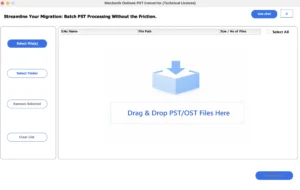
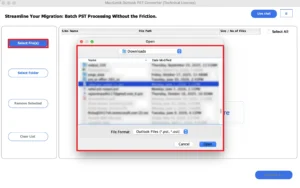
- Select Files or Folders to load the PST file that you want to convert.
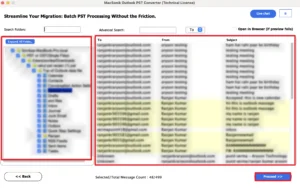
- Now, drag the structure and preview the mailbox folder, and click Next.
- After that, choose Google Workspace as the email saving platform.
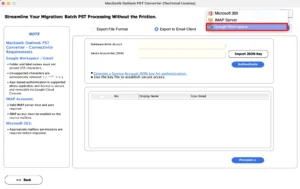
- Authenticate using the Google Workspace account credentials and load the .json file.
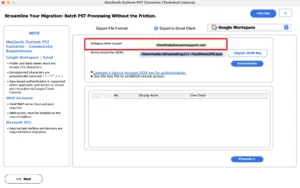
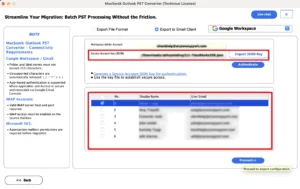
- Furthermore, select any one user from the JSON file.
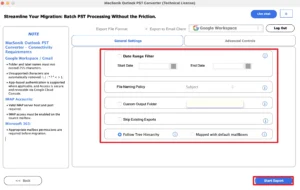
- Finally, apply additional filters and click Start Export to begin the process.
Compare Before You Buy: MacSonik PST Converter vs RecoveryTools
|
Native Features |
MacSonik PST Converter |
RecoveryTools PST Converter |
|
Fully optimized for Mac (Intel & M-series) |
Limited Mac optimization |
|
Unlimited |
Limited |
|
High |
Low |
|
Date, sender, receiver, and subject filters |
Basic filtering only |
|
Google Workspace, Microsoft 365, IMAP, Gmail |
Limited cloud options |
|
Faster for enterprise mailboxes (up to 40% quicker) |
Moderate speed |
|
Detailed preview before migration |
Basic preview |
|
More features at competitive pricing |
Similar pricing with fewer enterprise features |
|
Available |
Not commonly offered |
Why is MacSonik Worth Buying?
- Built specifically for Mac users, unlike many cross-platform tools.
- Better for large enterprise PST files (50GB–100GB+).
- Higher data accuracy with a 99.9% preservation rate.
- Faster migration engine for bulk email conversion.
- Better cloud integration support.
- Advanced duplicate handling saves storage space.
- Stronger ROI with advanced services for businesses because of faster processing and less manual work.
Real-Life Case Study
A digital marketing company with 65 employees had over 32GB of PST archives and needed to move all old business communication into Google Workspace for centralized access.
Using the manual IMAP method, the estimated migration time was 12+ hours with duplicate risks. Using MacSonik PST Converter on Mac, the entire migration was completed in under 3 hours while preserving all attachments, folder hierarchy, and metadata.
Read Also: Import PST Files to New Outlook
Conclusion
In this blog post, the migration on Mac is essential for better cloud accessibility, easier collaboration, and long-term mailbox security. While the manual Outlook IMAP method can work for smaller mailboxes, it becomes inefficient and risky for large PST files. If you are handling 20 GB+ and want to import PST to Google Workspace, the PST Converter is the better choice. As it offers:
- Faster migration speed
- 99.9% data accuracy
- Bulk and large PST support
- Advanced migration filters
- Duplicate management
- Complete Mac compatibility
- Local system processing for maximum privacy
For personal users, small migrations may work manually. But for business and enterprise users on Mac, MacSonik provides the most practical and cost-effective solution to upload PST to Google Workspace.
Frequently Asked Questions
Ans. For enterprise-level migration, the best approach is to use a professional PST migration tool that supports bulk mailbox mapping. This allows administrators to assign multiple PST files to their corresponding Google Workspace accounts using CSV mapping or manual account linking, which saves time and reduces errors.
Ans. Yes, an advanced PST migration tool can directly migrate PST to Google Workspace while preserving complete mailbox data, including emails, contacts, calendars, attachments, metadata, and folder hierarchy. This ensures a smooth migration without data loss.
Ans. Bulk migration can be performed using dedicated MacSonik migration software that supports multiple PST uploads at once. This maintains the original folder structure, subfolders, and mailbox organization, which is especially useful for business and enterprise migrations.
Ans. Yes, the MacSonik PST to Google Workspace tool provides advanced date-range filters. This allows users to migrate only selected emails based on date, sender, or folder, helping reduce unnecessary storage usage and speeding up the migration process.
Ans. The safest method is to use an enterprise-grade PST converter that supports large files. This tool can process PST files larger than 50GB while maintaining data integrity, preserving attachments, and preventing corruption during the transfer.
Ans. Yes, an automated MacSonik PST migration tool is the most efficient solution for this task. They simplify the entire process by offering bulk upload, mailbox mapping, duplicate management, advanced filters, and direct migration to Google Workspace, making them ideal for businesses and IT teams.
About The Author:
I am Neeru Kuchhal, a Technical Content Writer who focuses on turning complex ideas into clear, engaging, and impactful content. I combine creativity with strategy to write blogs, web content, and technical articles that connect with the right audience and support brand goals. I believe great content is not just written. It is thoughtfully created to inform, build trust, and drive action.
Related Post
