Convert PST to ICS without Outlook in 2026: Get Instant Results

Neeru Kuchhal

August 14th, 2026
User-Query:
“I have an Outlook PST file containing calendar events, recurring meetings, reminders, and appointments. I recently switched to a Mac and want to convert my Outlook calendar into ICS format. So I can import it into Apple Calendar, Google Calendar, or other calendar applications. How can I convert PST to ICS without installing Outlook while preserving all event details?”
— Posted by “Michael Carter”
Introduction: A PST (Personal Storage Table) file is the primary data file used by Microsoft Outlook. It is mainly used to store emails, contacts, calendars, tasks, etc. However, accessing calendar information stored in a PST file can be difficult if Outlook is unavailable for Mac users. ICS is the standard calendar format supported by various email applications. It preserves meeting information, recurring events, reminders, locations, attendees, and event descriptions. Converting PST calendar data into ICS format provides a universal solution. This guide explains the safest methods to convert PST files to ICS on mac via the MacSonik PST Converter Tool.
The Importance of Converting Outlook PST to ICS
Many Mac and Windows users convert PST to ICS because they want to:
- Import Outlook calendars into Apple Calendar.
- Move appointments to Google Calendar.
- Share calendar events with colleagues.
- Preserve recurring meetings and reminders.
- To create the calendar backups.
- Migrate Outlook data without installing Outlook.
- Also, access schedules across multiple devices.
According to workplace productivity studies, professionals spend an average of 18–23 hours each week managing meetings and calendars. This makes the reliable calendar migration essential.
How to Manually Extract ICS Calendar Files from an Outlook PST?
If Outlook is available, you can export PST files to ICS manually. However, keep in mind that this approach is highly time-consuming and has its limitations.
- First, open Microsoft Outlook.
- Now, import the PST file.
- Navigate to the Calendar section.
- Select the required calendar.
- After that, choose Save Calendar.
- Select ICS (.ics) as the file format.
- In the end, save the calendar file.
Limitations to Manually Convert PST to ICS
- This process requires Microsoft Outlook.
- Cannot process PST files without Outlook.
- The manual export for each calendar.
- Time-consuming for multiple calendars.
- It has a limited bulk export capability.
- Moreover, it is not suitable for enterprise migrations.
A business PST file may contain 10,000+ calendar entries, making manual extraction impractical.
Bulk Convert PST Calendar to ICS on Mac Instantly in 2026
For a more practical solution, using the MacSonik PST Converter Tool is highly optimal. The software directly extracts calendar items from PST files and converts them into ICS format without requiring Outlook. It preserves recurring events, reminders, meeting details, time zones, and event descriptions while supporting large PST files and batch processing. Whether you’re migrating a personal calendar or thousands of business appointments, MacSonik simplifies the process with just a few clicks.
Key Note: The demo version of this software allows you to convert up to 50 emails per folder.
One-Time Conversion Service
If you don’t want to convert PST calendars yourself, MacSonik also provides a One-Time Migration Service. The certified migration experts securely convert Outlook PST to ICS. This makes it ideal for organizations, educational institutions, and businesses managing multiple Outlook calendars.
One-Time Service for Just $25 – Supports Files Up to 10 GB
Detailed Guide: Steps to Convert PST to ICS
- Download and install the MacSonik PST Converter on mac.
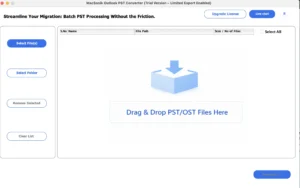
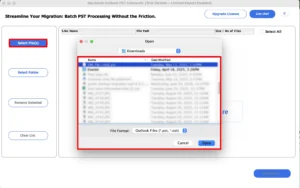
- Add the PST file or folder that you wish to convert.
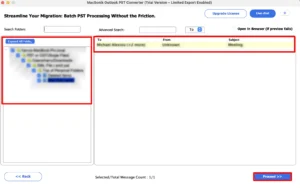
- Now, drag the structure and preview calendar folders.
- Furthermore, select ICS as the saving output format.
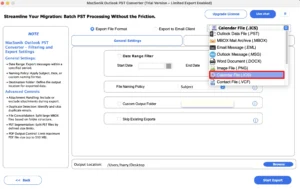
- Apply the date filters and choose the destination folder.
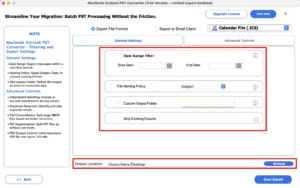
- Finally, click Convert to initiate the conversion process.
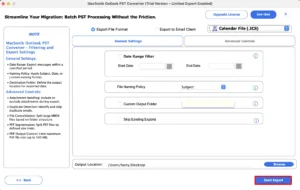
Advanced Features of MacSonik PST Converter
- Bulk PST to ICS conversion with zero data loss.
- Converts calendar events without Outlook.
- Supports PST files larger than 100GB.
- Preserves recurring meetings and reminders.
- Maintains event descriptions and attendees.
- Date-based selective conversion.
- Convert PST to MBOX and more file formats.
- Preview calendar items before export.
- Besides, it is compatible with both Mac and Windows.
MacSonik vs MailConverterTools PST Converter: A Complete Buying Guide
|
Important Factors |
MacSonik PST Converter |
MailConverterTools PST Converter |
|
Mac Compatibility |
Fully optimized for macOS (Intel & Apple Silicon M1/M2/M3/M4) |
Basic Mac compatibility with limited optimization |
|
Bulk Conversion |
Unlimited batch conversion of multiple PST files |
Supports batch conversion with slower performance |
|
Large PST File Support |
Handles 100GB+ PST files efficiently |
Recommended for standard-sized PST files |
|
Advanced Calendar Filters |
Filter calendar items by date range and folders |
Limited filtering options |
|
Preview Before Conversion |
Detailed preview of calendar items before conversion |
Basic preview functionality |
|
Multiple Export Formats |
Supports 15+ formats including ICS, PDF, PST, MBOX, EML, MSG, HTML, CSV, and more |
Supports fewer export formats |
|
Technical Support |
24×7 dedicated technical assistance |
Limited support availability |
Why Is MacSonik Worth Buying?
The MacSonik PST Converter is specifically designed to deliver a faster and more reliable experience for Mac users and enterprises. It supports 100GB+ PST files, offers 99.9% data accuracy, preserves metadata, and provides advanced filtering for selective conversion. Compared to MailConverterTools, MacSonik offers better Mac optimization, broader migration options, faster processing for large Outlook mailboxes, and 24×7 technical support. These advantages make it a smarter long-term investment for users who need a dependable, enterprise-ready PST conversion solution.
Real-Life Case Study
A consulting firm migrated over 12 years of Outlook calendar data from 85 employee PST files to Apple Calendar after adopting Mac systems.
The manual Outlook export process was estimated to take more than two weeks.
Using MacSonik PST Converter, the IT team completed the migration in less than one day. It preserves recurring meetings, reminders, attendee information, and event time zones without any data loss.
Conclusion
In the end, converting PST to ICS is the most effective way to access Outlook calendar data. Although Outlook provides a manual export option, it becomes inefficient for large PST files and enterprise environments. If you’re working with large Outlook archives, PST Converter offers a reliable solution to convert PST to ICS with:
- 99.9% calendar data accuracy.
- Bulk PST to ICS conversion.
- Support for 100GB+ PST files.
- Preservation of recurring events and reminders.
- Advanced filtering options.
- Fast processing on Mac.
Frequently Asked Questions
Ans. Yes. You can convert Outlook PST calendar data to ICS format using either Microsoft Outlook or a professional PST converter. A dedicated tool is the better option for preserving recurring events, reminders, attendees, time zones, and other calendar details.
Ans. If you have Outlook installed, you can open the PST file, navigate to the Calendar section, and use the Save Calendar option to export it as an ICS file. For users without Outlook or those handling multiple PST files, a professional PST to ICS converter provides a faster and more reliable solution.
Ans. The MacSonik PST converter can export calendar items while preserving important event information such as subject, description, location, reminders, attendees, recurring meetings, and time zones. If calendar events include attachments, supported tools also retain them during the conversion process.
Ans. You can use a batch PST converter that supports bulk conversion. Simply add multiple PST files, choose ICS as the output format, and start the conversion. This method is ideal for organizations and IT administrators managing multiple Outlook mailboxes.
Ans. The safest approach is to use a reliable PST conversion tool that maintains the original calendar structure, recurring events, reminders, metadata, and time zones. Professional software also performs a read-only conversion, ensuring the source PST file remains unchanged throughout the process.
Ans. On Windows 11, you can convert PST to ICS by using Microsoft Outlook or a dedicated PST converter. A professional MacSonik software simplifies the process by allowing you to add the PST file, preview calendar items, select ICS as the output format, and export the calendar without compromising data integrity.
About The Author:
I am Neeru Kuchhal, a Technical Content Writer who focuses on turning complex ideas into clear, engaging, and impactful content. I combine creativity with strategy to write blogs, web content, and technical articles that connect with the right audience and support brand goals. I believe great content is not just written. It is thoughtfully created to inform, build trust, and drive action.
Related Post
