Convert PST to PDF With Attachments: Complete Guide[2026]

Neeru Kuchhal

September 1st, 2026
User-Query:
How to convert Outlook PST files into PDF without data loss and format?
Quick Answer:
If you want to convert PST files into PDF, The Macsonik PST converter. It is very easy to use. It is one of the fastest and safest tools. And it directly exports emails without installing Outlook. On the other hand, manual methods work only for a few emails and are time-consuming for bulk conversion
If you want to convert your Outlook emails into a shareable & universal format, then you require a reliable way to convert PST to PDF. But if you are doing it manually inside Outlook, then you can only do small tasks, like a limited number of emails, & if you have only one or two emails, it is okay, but not for the entire mailbox. So there is a tool that does exactly that: Macsonik PST Converter. With this, you can easily convert emails, attachments & folders into PDF format. On the other hand, you have manual methods such as “Print to PDF”, but they are unreliable, time -consuming, and hard to handle when emails are present in bulk. That’s why experts suggest this tool, with which you can convert specific emails as well as entire emails in one go.
What are PST and PDF Files?
PST & MBOX are two different file formats:
|
PST(Personal Storage Table) PST is the file Outlook uses to store your emails, contacts, calendar, & attachments on your own computer |
PDF(Portable Document Format) A PDF keeps the same look and format everywhere, which makes it perfect for saving records, sharing files, & legal paperwork |
Why Convert an Outlook PST File to PDF Conversion is Needed?
- PST files need Outlook to run, but PDF files can be opened on any device without using Outlook.
- You can not share PST files with those who haven’t used Outlook, but PDF files can be shared with everyone.
- Converting files into PDF helps in permanent backup.
- PDFs have more standards & are tamper-resistant.
- PDFs preserve more formatting & are easier to read.
Manual Method to Convert PST to PDF
Method 1: Using Outlook “Print to PDF”
There is no direct method to do this in Outlook; that’s why manual methods take more time or more effort:
- Open Outlook and load the PST file.
- Select the email that you want to convert.
- Click File->Print.
- Choose “Microsoft Print to PDF” as the printer.
- Click Print and save the file.
- Repeat for each email individually.
Drawbacks of Manual Method
|
One email at a time |
No Filter Section |
Slow for large Files |
|
Outlook required |
Formatting break |
Attachment not embedded properly |
Method 2: Convert PST to PDF Using Macsonik
When manual methods come with many limitations, Macsonik PST Converter becomes a smart and reliable alternative. It is a tool that helps users to convert multiple files at once. The best thing about this tool is its very simple interface, so any non-technical user can easily operate it.
it allows the users to convert PST file to MSG seamlessly. Apart from that, users can convert 50,000+ emails in a single process, significantly reducing time and manual effort. Apart that if you want to Convert PST to MBOX
Step-by-Step Process of How It Works
- First, install the MacSonik PST Converter tool.
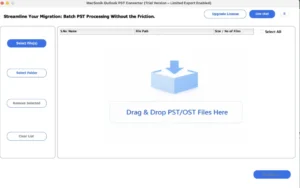
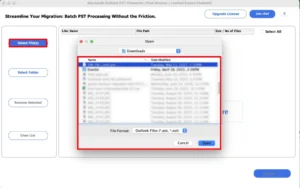
- Select the PST file/folder that you want to convert.
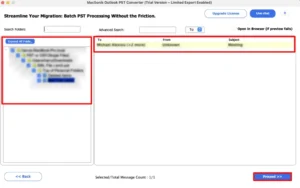
- Expand the file hierarchy and preview it; click Next.
- Further, select the PDF format.
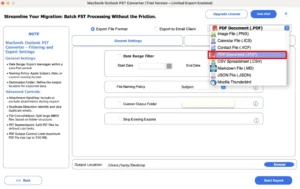
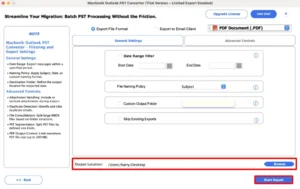
- Apply the additional filters that you want.
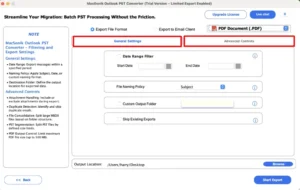
- Lastly, choose the destination path and click Start Export to start the conversion.
Comparison Table
|
Comparison Point |
Macsonik PST converter |
Manual Method |
|
Conversion Scope |
Entire mailbox at a time |
One email at a time |
|
Filter Option |
Have filter section |
No Filter Section |
|
Customer Support |
24/7 available for help |
Limited Support |
|
Duplicate Handling |
Built-in duplicate handling |
Manual duplicate handling |
|
Mac support |
Full Mac support |
Limited Mac support |
Real-Life Scenario
There is a law firm that has 45,000 archived emails stored in Outlook PST files, which contain all the communication details between clients and case documents that require some rules to be applied. & convert all the emails into PDF for record storage was non-negotiable.
If anyone does this work manually, using Outlook, it takes 3-4 weeks and requires dedicated work.
But if using the MacSonik PST converter tool, it converts 45,000 emails at once in 4-6 hours without data loss and also preserves attachments, etc.
Need a More Detailed Walkthrough?
For more detailed steps, refer to the MacSonik PST converter guide, which provides step-by-step instructions on how to convert PST to PDF & complete the migration process.
This comprehensive guide will help you avoid any kind of migration issues or data loss.
Conclusion
In the end, that is deal with how many emails are converted at a time and how much time they will take if you are using manual methods, the time taken by them is very long, and it is hard to handle many emails at once, instead of them you will use PST to PDF converter, best for Mac’s, because it handles large amount of emails easily and keep your attachments as well as sensitive data safe and work complete within hours instead of days. Convert PST to PDF is also used for both business audits and personal backup. This tool helps to save your time and effort.
Frequently Asked Questions
Ans: You can convert PST email threads with attachments to PDF by using the MacSonik converter tool for Mac. First, download the tool. Click on Select File and add your PST File, then preview your email threads and expand on the left panel. After that, select PDF format, apply a date filter, add an output location, and start the export.
Ans: Yes, the MacSonik PST converter has a built-in duplicate handler that easily handles or manages emails during the export process.
Ans: This tool allows you to add multiple Unicode PST files or entire folders and convert them in a single batch. And you can process your emails without having Microsoft Outlook installed, while keeping the original structure and applying date filters, which makes it easier to organize large amounts of PST data into PDF files.
Ans: It plays a very essential role; through this, we organize emails in a proper manner and also find out how many emails are present on a specific date.
Ans: The MacSonik PST converter preserves the structure during conversion by retaining email layouts, fonts, headers, and other elements. It reads the data directly from the PST file and converts it into PDF while keeping its elements unchanged.
About The Author:
I am Neeru Kuchhal, a Technical Content Writer who focuses on turning complex ideas into clear, engaging, and impactful content. I combine creativity with strategy to write blogs, web content, and technical articles that connect with the right audience and support brand goals. I believe great content is not just written. It is thoughtfully created to inform, build trust, and drive action.
Related Post
