How to Export WhatsApp Chat to PDF With Media & Attachments

Neeru Kuchhal

April 25th, 2026
User Query:
“I need to save important WhatsApp conversations for legal records, business discussions, and personal backup. Also, I want to keep shared photos, videos, documents, and attachments. What is the best way to export WhatsApp Chat to PDF with media and attachments on Mac?”
— Posted by “Olivia Bennett”
Introduction: WhatsApp is one of the most used messaging platforms for communication. Users exchange text messages, invoices, images, voice notes, videos, and documents daily. However, many people later need to save these conversations in a shareable format for various purposes. Therefore, PDF is one of the best formats for preserving chat content. It keeps the layout intact and is easy to open on almost any device. This guide explains the latest ways to convert WhatsApp conversations to PDF. Besides, it covers how the MacSonik JSON Converter Tool for Mac helps to complete this task.
Securing Your Conversations: Why WhatsApp Isn’t Enough?
|
Important Factors |
WhatsApp Chats |
PDF File |
|
Inside the app only |
Opens on any device |
|
Requires app |
Easy to email/share |
|
Limited |
Print-ready |
|
Depends on app/device |
Better archival format |
|
Less formal |
Professional documentation |
|
Dynamic chat view |
Fixed structure |
Key Benefits of Converting WhatsApp History to PDF Format
There are several advantages to export WhatsApp chat to PDF:
- For creating readable backup copies.
- Keep legal or business records.
- Sharing conversations professionally.
- To print important chats.
- Preserve messages outside the app.
- Also, to organize chats in folders on Mac.
How to Export WhatsApp Chat With Media to PDF Manually?
Since there are many manual solutions to complete this task, however, these methods will only work for a limited number of chats. Moreover, there is no assurance of complete accuracy.
Solution 1: Export Chat from WhatsApp
- Firstly, open the desired chat.
- Now, tap Export Chat.
- Choose with media or without media.
- Send the exported file to email or storage.
Solution 2: Convert Text File to PDF
- Open the exported chat text file on a Mac.
- After that, use the Print option.
- Lastly, save as PDF.
Solution 3: Save Media Separately
- Furthermore, download images/videos manually.
- Store them in a separate folder.
Pitfalls to Manually Export WhatsApp Chat to PDF
- Media may remain separate from PDF.
- Sometimes formatting may look basic.
- Large chats may be incomplete.
- Time-consuming for multiple chats.
- Hard to manage many attachments.
- Also, it is not ideal for business documentation.
The Stress-Free Way to Export WhatsApp Chat as PDF in Bulk
The MacSonik JSON File Converter Tool is the all-in-one solution to complete this task. This tool completes the process with data integrity while exporting a large number of chats together. With this, users can export their chat history in multiple file formats. They can convert JSON to Word with no data leakage. Additionally, it comes with a built-in preview feature to make sure that the chats have been successfully exported.
Instant Export WhatsApp Chat to PDF Seamlessly
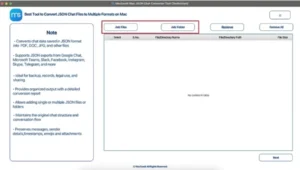
- Firstly, launch the MacSonik JSON Converter Tool for Mac and Add Files or Folders.
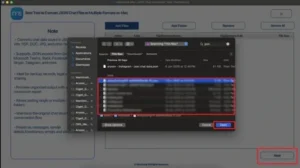
- Now, Upload and choose the file that you want to export, and click Next.
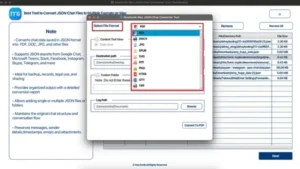
- After that, choose PDF as the file format for saving.
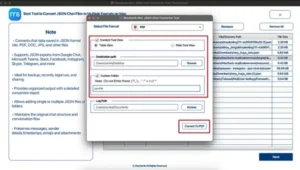
- Finally, apply the filters as needed and click Convert to PDF to start the process.
Beyond Conversion: The MacSonik Advantage
- No private chat content is shared during processing.
- Selective export of only required chats.
- Safe bulk conversion for multiple chat files.
- Keeps original records organized and intact.
- Read-only processing protects source files.
- Furthermore, it is not suitable for confidential personal or business data.
Real-Life Case Study: Client Approval Records
Client: Freelance designer managing customer approvals.
Challenge: The user needed to preserve client WhatsApp approvals with shared images.
Problem Faced: However, the screenshots were messy and hard to organize.
Solution: Then, they used the MacSonik JSON Converter for Mac solution to export WhatsApp messages to PDF.
Result:
- Chats saved in professional PDF format.
- Shared media is organized separately.
- Easy client documentation.
- Faster future reference.
Now, all project communication is archived neatly.
Conclusion
In this article, exporting WhatsApp chats to PDF with media and attachments is useful for various purposes. However, the manual methods may work for small tasks, but they are slow and less organized for multiple chats. Also, they didn’t give the expected output. The best way to export WhatsApp chat to PDF is to use a JSON file converter for professional PDF conversion on Mac. Furthermore, you can connect with our support team in case of any queries.
Frequently Asked Questions
Ans- Yes, it is possible to convert a WhatsApp conversation to PDF while keeping a clean and readable layout. A reliable MacSonik JSON converter tool helps preserve message order, timestamps, and overall structure. This is much better than taking screenshots manually. It creates professional-looking records for future use.
Ans- Yes, chats can be exported along with shared media such as images, documents, and attachments. Usually, the chat is exported first and then converted into PDF while media files are organized properly. This is useful for business records, legal use, or personal backups. The MacSonik JSON converter tool makes the process easier and faster.
Ans- No, most users do not need advanced technical knowledge to complete the process. The advanced JSON converter is designed with simple steps, such as adding files, choosing PDF format, and clicking convert. Even beginners can manage chat exports easily on a Mac. A user-friendly solution saves time and effort.
Ans- Yes, the MacSonik solution allows the selective export of only required chats or message ranges. This means you can save important conversations without converting the full chat history. Selective export helps reduce clutter and keeps records focused. It is especially useful for professional or legal documentation.
About The Author:
I am Neeru Kuchhal, a Technical Content Writer who focuses on turning complex ideas into clear, engaging, and impactful content. I combine creativity with strategy to write blogs, web content, and technical articles that connect with the right audience and support brand goals. I believe great content is not just written. It is thoughtfully created to inform, build trust, and drive action.
Related Post
