Simple Step Guide to Convert JSON to PNG Format in Bulk?

Amelia James
March 9th, 2026
User-Query:
Hello, I have a JSON file containing structured data, and I want to convert it into a PNG image for easier visualization and sharing. Can anyone suggest a reliable method or tool to do this?
Summary: In the corporate environment, rendering JSON as a PNG file is an essential move for bridging complex data structures and actionable business intelligence. Users convert JSON to PNG by mapping machine-readable content into a spatial visual format. By turning the JSON content into imagery, it elevates the raw data into a universally accessible and visually engaging format. Below, we have discussed methods to convert the raw JSON data into a PNG image format to turn JSON into intuitive snapshots. Moreover, a dedicated tool, the JSON File Converter, is recommended for a bulk JSON to PNG conversion..
Possible Needs to Convert JSON File to PNG
JSON files are hierarchical and technical. Therefore, users transform them into PNGs to make them more visually appealing and accessible. Given below are the needs where users perform this conversion:
- Pictorial Display: Users transform the JSON data into a PNG image to easily understand data visually.
- Sharing and Presentation: By sharing the data as an image, users can access it and use it in data visuals.
- Integrity of Structure: PNGs allow users to capture a snapshot of the JSON content in a fixed and non-editable form.
- Incorporating into Docs: The PNG images of JSON can be included in documentation to illustrate data structure in technical content.
Different Approaches to Convert JSON to PNG Format
After carefully reviewing the possible needs of the JSON to PNG conversion, let’s move ahead. In the following section, we will look at the various ways to convert a single or multiple JSON files in one go.
Manually Convert JSON into PNG Via MS Excel
In the Microsoft Excel application, users cannot directly open their JSON files. They can import the data, visualize it in charts, and then export it as PNG. This process is suitable for converting small or medium-sized JSON file datasets.
The following are the steps to initiate the process:
- First, the user needs to manually convert the JSON content into a table format.
- After that, open MS Excel and head to the Data tab.
- Then, go to Get Data > From File > From JSON, and then, locate and select the JSON file.
- In Power Query, transform the data by removing unnecessary columns. Click Close & Load.
- Once loaded, select the data and navigate to Insert > Charts and choose the type of chart.
- The data will be converted into a chart. Right-click on it and select Save as Picture.
- Choose the PNG format and save the file at your preferred location.
Limitations:
When converting large datasets of JSON files, the Excel application may slow down. The user needs to manually adjust the formatting post-conversion.
Bulk Convert JSON to PNG Format Using a Specialized Tool
The MacSonik JSON Converter is an all-in-one solution that converts JSON files into PNG files. It allows users to convert multiple JSON files at once without losing any quality from the resulting images. Also, it keeps all of the metadata from the original files intact throughout the entire conversion process, ensuring that your data will be completely secure. In addition to providing users with the ability to create PNG files, it also has the capability to convert JSON to JPG image format, enabling convenient access to your data. The converter has a built-in preview function that allows users to preview the resulting image of each JSON file prior to exporting, assuring correct and accurate results.
Simplified steps to change JSON to PNG:
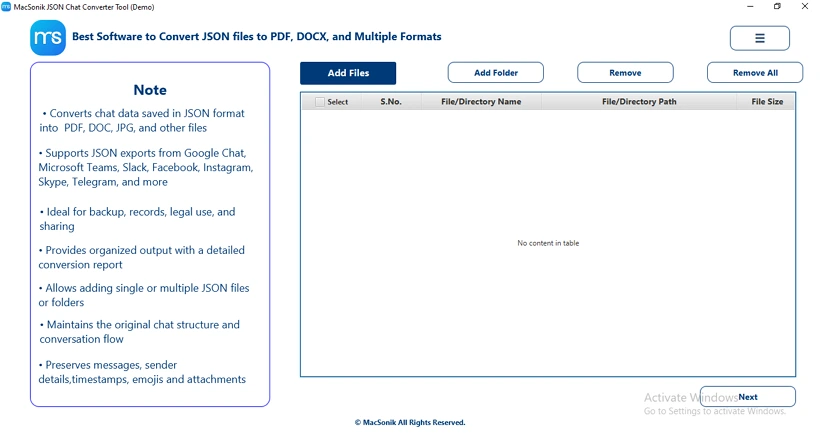
- Download and open the converter on your system.
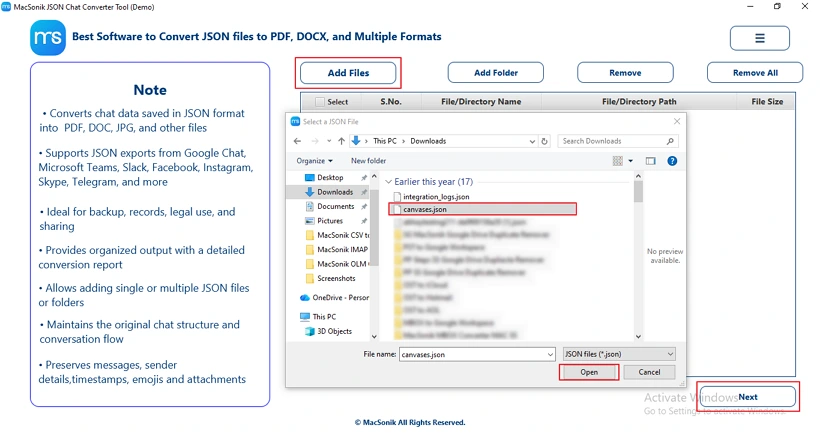
- Now, click on the Add File button to select your JSON file, and click Next.
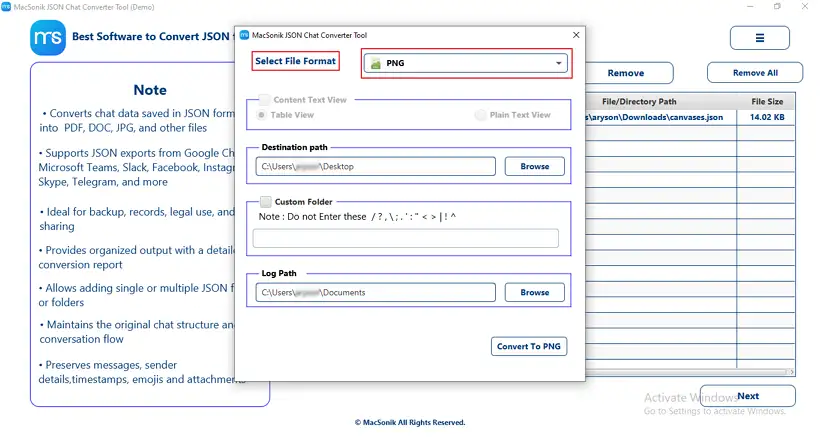
- Next, select the PNG format for saving the JSON data.
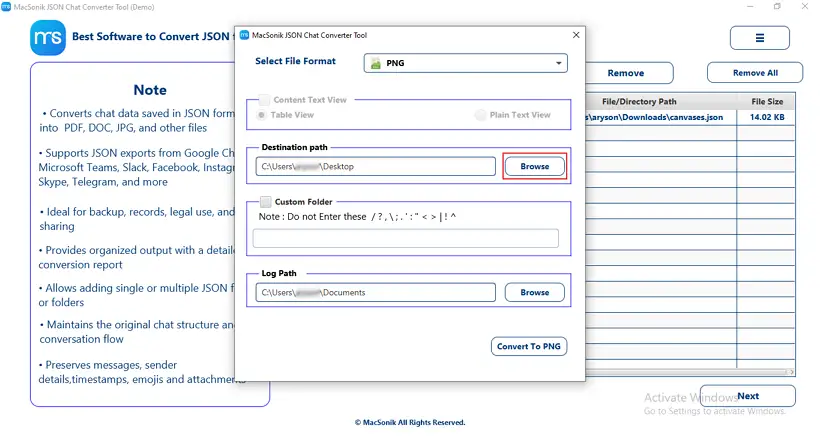
- Choose the Browse button to select the destination folder to save the file.
- Finally, hit Convert to PNG and create a PNG file from the original JSON file.
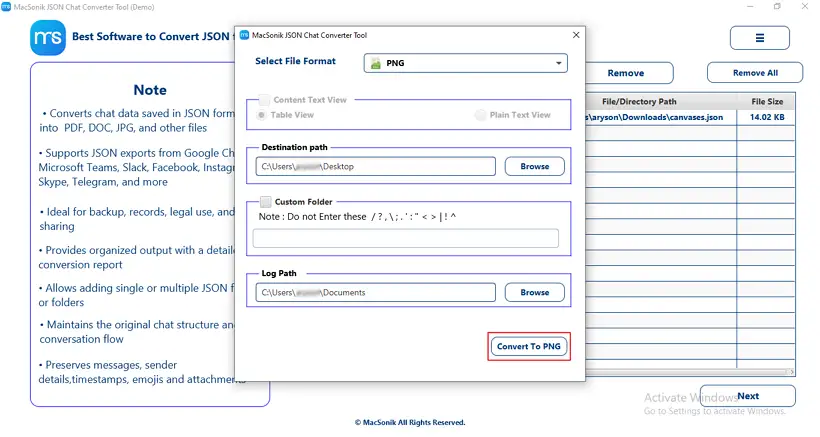
John received a large JSON file from a client and wanted to summarize it visually for a team meeting. Using MacSonik JSON Converter, he exported the structured data as a PNG, which made it easy to embed in slides and share insights efficiently.
Conclusion
The file conversion from JSON to PNG image format is essential for transforming the raw data into a visual format. Through this technical blog, we have learnt about various approaches to convert JSON to PNG format. Manual conversion of the JSON to PNG is inefficient for converting multiple JSON files. For this reason, it is recommended to use the JSON File Converter for bulk conversion of JSON files.
Frequently Asked Questions
Ans- Developers convert JSON data into PNG images to make complex data visually understandable and easier to share. This approach allows them to embed structured data in reports, presentations, or documentation without requiring others to parse JSON.
Ans- No, converting JSON to PNG does not alter the original JSON file. The PNG is simply a visual snapshot, leaving the source data intact and editable.
Ans- Yes, large JSON files can be transformed into high-quality PNG images, but it may require splitting the data or using the specialized MacSonik JSON Converter Tool.
Ans- Yes, several online tools allow users to convert JSON to PNG by formatting the data and generating visual snapshots. These tools are quick and easy for small to medium datasets, but may have limitations with very large or complex JSON files.
About The Author:
Amelia is the mistress of the webmail clients like Office 365, Gmail, Yahoo, Hotmail, and Opera Mail. Her research on downloading emails from webmail is outstanding. She has given the solution to download emails from webmail clients to a Mac device with all the mailbox items. She’s been into webmail solutions since 2010. In her free time, she reads books and writes technical blogs.
Related Post
