Effective Methods to Convert JSON to JPG Image Format?

Amelia James
June 4th, 2026
User-Query:
I need a reliable tool to convert my JSON files into JPG images. Can you recommend a software or online converter that can transform JSON data into an image format, JPG, while preserving readability?
Summary: A raw JSON file is too complex and technical, making it difficult to understand for non-technical stakeholders. In a business setup, these JSON files are ideal for backend systems, but not for a general audience. Therefore, to ensure the information is readable at a glance, users convert JSON to JPG to make it shareable in reports and documentation. In this technical blog, we’ll look at the various approaches, including manual ones and a professional tool, the JSON File Converter, for this conversion. Before looking at the solutions, let us first understand the benefits of this conversion.
Why Users Should Convert JSON File to JPG?
IT consultants often convert the JSON files to JPG to present the data in a visually shareable format. The following are the scenarios where this conversion becomes useful:
- JSON file to JPG conversion becomes crucial when sharing it with a non-technical audience or for professional documentation.
- The JSON file is complex and not understandable. Whereas the JPG images can be easily shared in emails or presentations.
- By converting the JSON content into an image format, JPPG, the information cannot be altered easily. It becomes fixed.
- Once the raw JSON data is converted into a JPG image, it can be used in tutorials, blogs, and even software guides.
- Storing the JSON file content in a JPG format can create a quick visual reference to be shared among the team members.
Methods to Convert JSON to JPG Image Format
JSON data can be exported to JPG format using different strategies. Below, we outline both manual procedures and automated solutions for conversion.
Manually Change JSON to JPG
It is a straightforward method. The user will open the JSON file in a text editor and then capture the screenshot.
Use the following instructions to begin the conversion:
- Open the desired JSON file in a text editor.
- Then, adjust the window for capturing the screen and format the data properly.
- After that, capture the screenshot of the displayed JSON data by pressing Shift+Command+4.
- Next, save the screenshot and open it in Microsoft Paint.
- Once opened, save the image in the JPG format.
Limitations:
If the JSON file is large, it requires multiple screenshots. This is a time-consuming process while managing multiple JSON files.
Effective Solution to Bulk Convert JSON to JPG Image Format
The MacSonik JSON Converter is a complete solution for converting JSON files to JPG. It offers bulk file conversions and maintains quality during the entire process. The tool also supports data integrity and keeps the metadata intact throughout the entire conversion process. Other than JPG, the MacSonik JSON Converter can convert JSON to Word format as well, making it easier to access your data. There’s also a built-in preview function for each JSON file, so you can see what the final result will look like before you export, giving you peace of mind that you will receive an error-free result.
Simple steps to transform JSON to JPG:
- Install and run the converter software on your computer.
- After that, click on the Add Files button to upload your JSON file. Click on the Next button.
- After that, select the JPG file format for saving.
- Next, select Table View or Plain Text View as the mode of display for the JPG document.
- Finally, select where you would like to save the converted file and click on Convert to JPG to create the converted document.
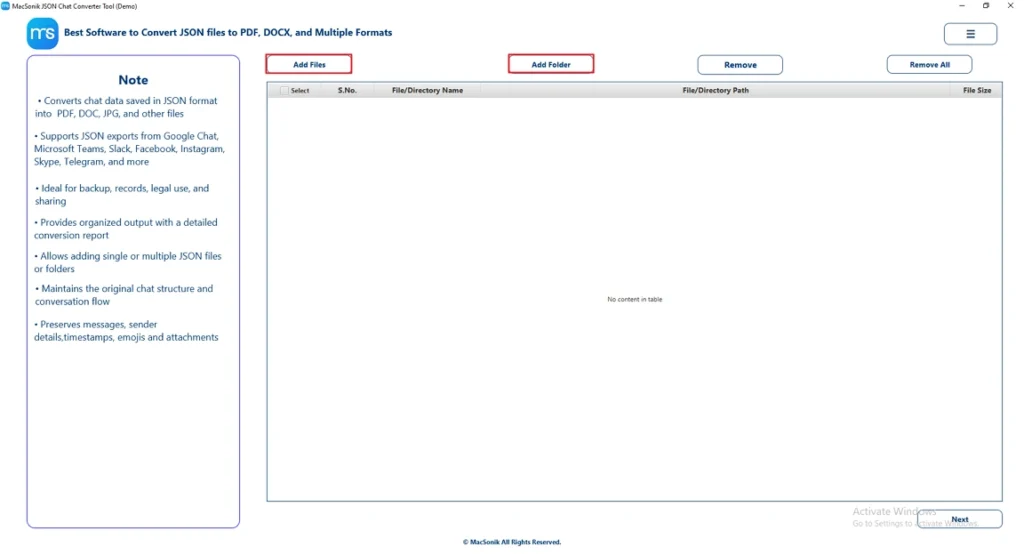
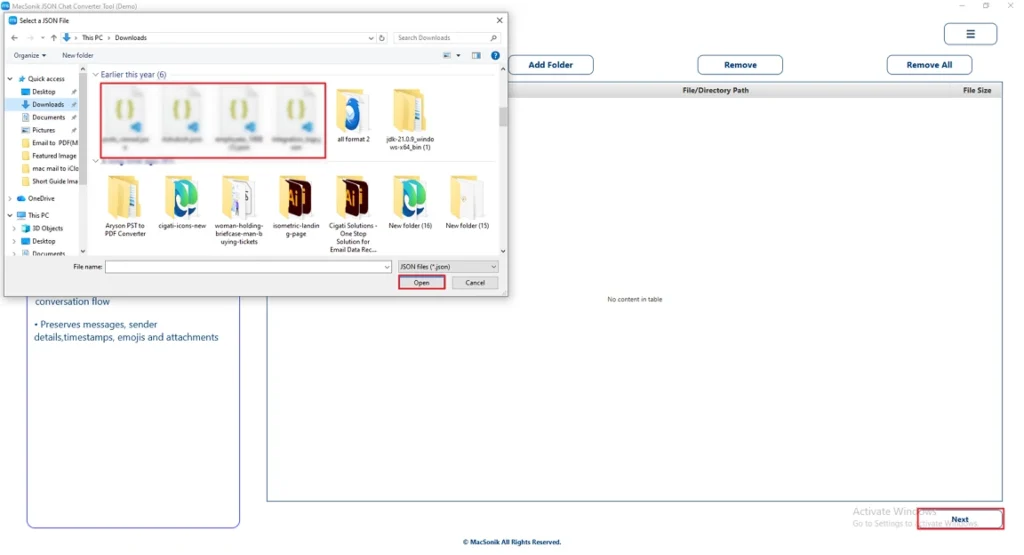
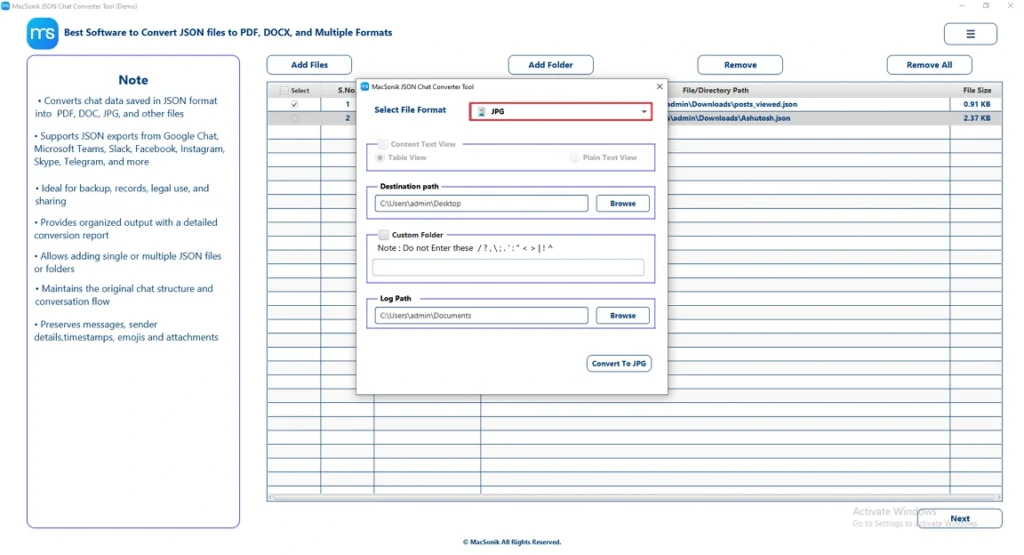
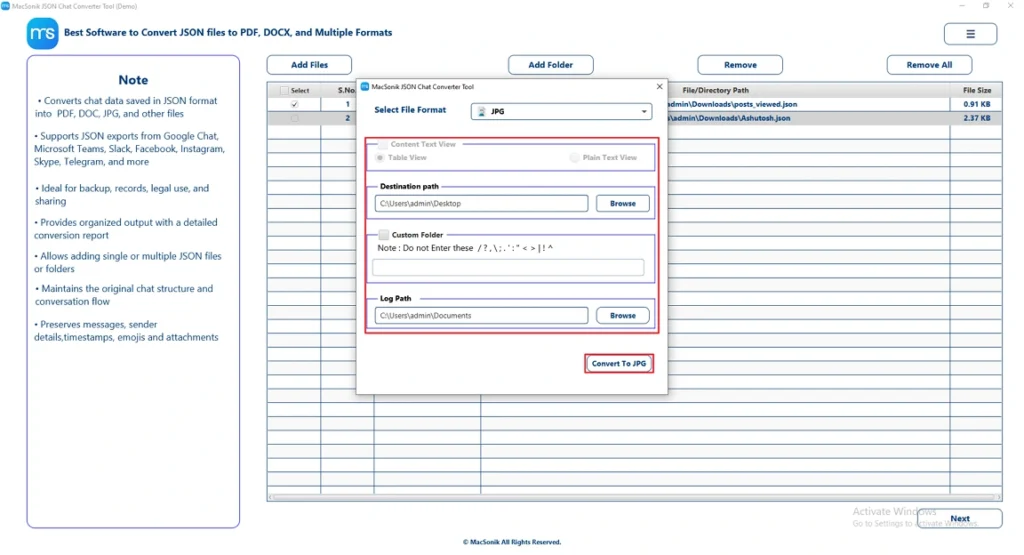
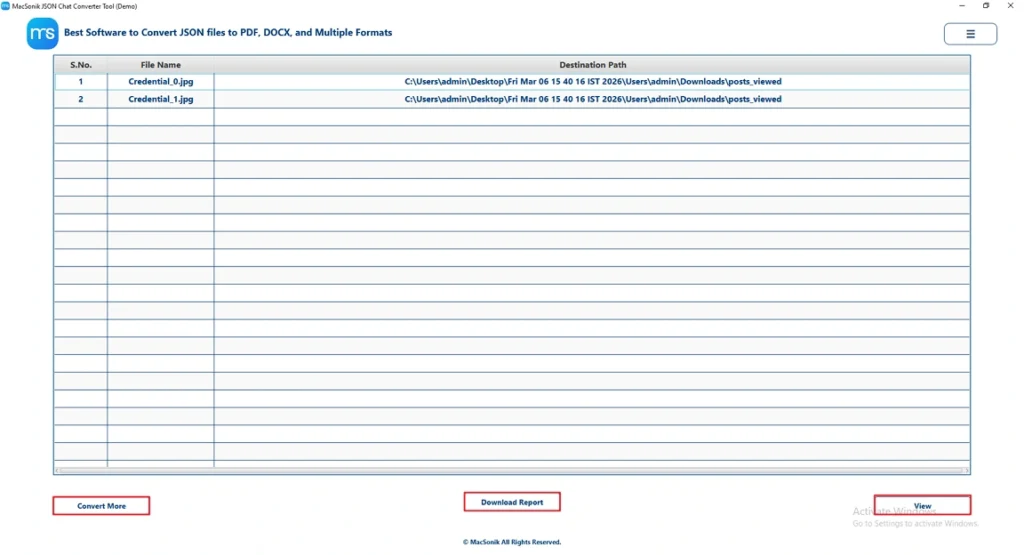
An IT professional working with data needs to include JSON information in a business report. They use a MacSonik JSON Converter to change the file into a JPG image so it can be embedded in slides and documents, providing a clear and uneditable visual representation of the content.
Conclusion
JSON to Word conversion enables better text usability. Developers utilize JSON to Word conversion for quick view parsing of typically long-winded JSON datasets. This technical blog has presented several alternate methods of efficiently converting a JSON file to JPG format, either by taking a screenshot or through professional software. In addition, JSON Converter provides the ability to bulk convert JSON to JPG. The end-user may also utilize software to convert JSON content into many other output formats, depending on the specific needs of their business.
Also Read: Export Teams Chat to PDF
Frequently Asked Questions
Ans- Yes, large JSON files can be converted to JPG, but since JPG is an image format, the data becomes a visual snapshot and cannot be edited or processed as structured data. The conversion preserves what is visible in the image, but it does not retain machine-readable JSON structure or functionality.
Ans- Users convert JSON to JPG to present structured data in a visual format that is easier to view and share with non-technical audiences. It also helps preserve the data as a static image, preventing accidental edits while enabling quick reference and documentation.
Ans- Open the JSON file in a text editor on Mac, take a screenshot of the displayed content, and save it as an image. Then, use an image editor if needed to export or save the screenshot in JPG format. For a reliable solution, use the MacSonik JSON Converter.
Ans- Converting confidential JSON files using third-party tools can pose security risks because data may be uploaded and stored on external servers. For sensitive information, it is safer to use a manual conversion method or a secure professional tool that does not require data sharing.
About The Author:
Amelia is the mistress of the webmail clients like Office 365, Gmail, Yahoo, Hotmail, and Opera Mail. Her research on downloading emails from webmail is outstanding. She has given the solution to download emails from webmail clients to a Mac device with all the mailbox items. She’s been into webmail solutions since 2010. In her free time, she reads books and writes technical blogs.
Related Post
