Export Teams Chat to PDF With Attachments – Full Guide

Neeru Kuchhal

May 19th, 2026
User-Query:
“I need to save my Microsoft Teams chats as PDF files along with attachments for legal records and future reference. Is there any simple way to export Teams Chat to PDF?”
— Asked by ‘Sarah Wilson’
Introduction: Microsoft Teams is used for workplace communication, project discussions, and file sharing. However, users sometimes need to save Teams Chat to PDF, including attachments for documentation, compliance, backup, or offline access. Unfortunately, Teams does not provide a direct option to export complete chats with attachments as a PDF. To address this concern, this guide explains the best methods to complete this task safely and efficiently. Along with this, it covers the MacSonik JSON Chat Converter for seamless migration.
The Quick Guide to Understanding Teams Chat vs PDF Formats
It is important to know both Team chats and the PDF format before moving towards the migration process.
| Major Aspects | Teams Chat | PDF File |
|
Requires Teams access | Opens on almost any device |
|
Dynamic conversations | Read-only document |
|
Platform dependent | Easy to share and print |
|
Linked to account | Ideal for permanent archiving |
|
Account-based | Can be password-protected |
Why Preserve Teams Chats in PDF Format With Attachments?
There are several reasons why users export Teams Chat to PDF:
- For creating legal or compliance records.
- Preserves important business discussions.
- Share conversations without Teams access.
- Maintain chat formatting and timestamps.
- Archive project communication securely.
- Print chats for documentation purposes.
- Also, to keep attachments with conversations.
Convert Teams Chat to PDF Using the Manual Techniques
As Microsoft Teams does not support PDF directly, you can manually complete this process. Therefore, ensure that this method is very time-consuming and has its own pitfalls.
Manual Technique: Copy and Save as PDF
This is a basic method suitable for short chats.
- Firstly, open Microsoft Teams.
- Now, navigate to the required chat.
- After that, select and copy the conversation.
- Paste it into a text editor or document application.
- Furthermore, choose Print.
- Lastly, select Save as PDF.
For attachments, download them separately and save them manually.
Pitfalls to Manually Export Teams Chat to PDF
- It is time-consuming for long chats.
- Attachments must be saved separately.
- Formatting and timestamps may change.
- This process is not suitable for bulk export.
- Risk of missing important messages.
- Moreover, difficult to manage large conversations.
Expert Solution: Export Microsoft Teams Chats to PDF
For more seamless results, users can depend on the MacSonik JSON Converter Tool. The software is designed to complete this task while preserving original content and attachments. Therefore, it simplifies the export process and helps users maintain chat structure, timestamps, and associated files without manual effort. Additionally, it supports users to export Google Chat to PDF and more formats with zero information loss.
The Quickest Way to Export Teams Chat to PDF: Step-by-Step
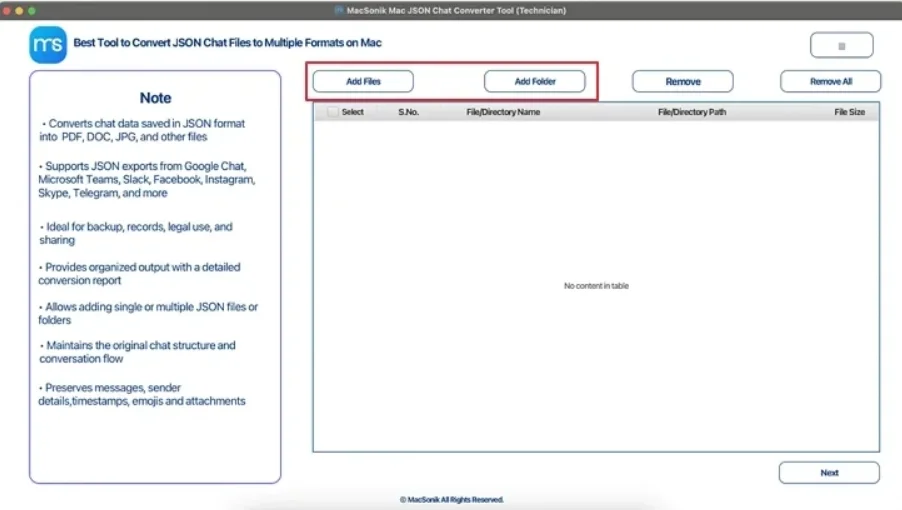
- Firstly, start launching the ‘MacSonik JSON Converter Tool’, and click ‘Add Files/Folders’.
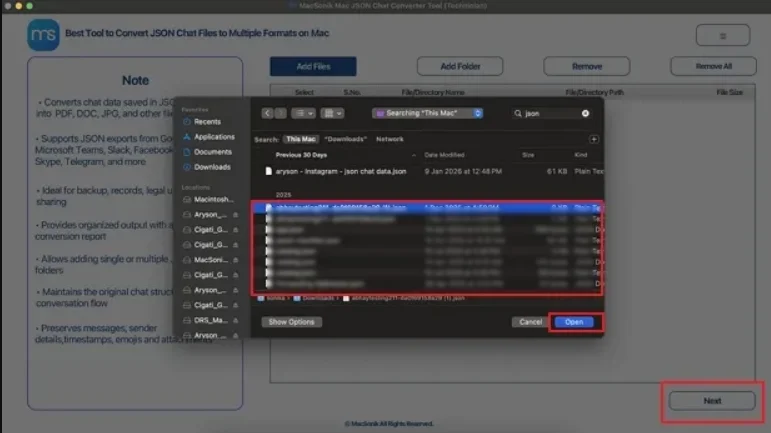
- Now, choose the ‘JSON file’ that you wish to convert, and click ‘Open’.
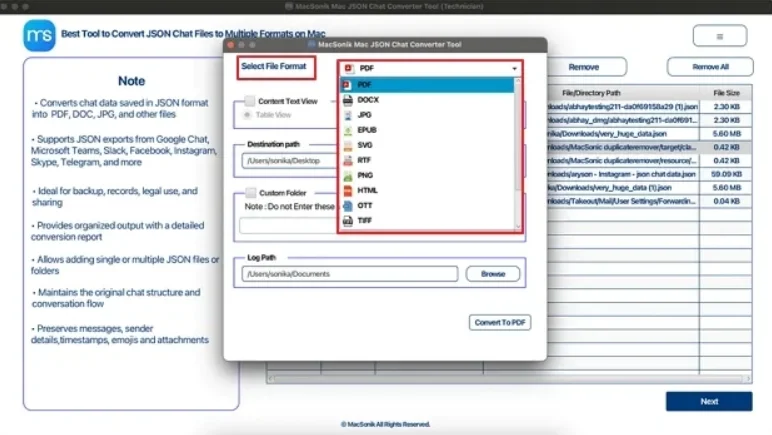
- Furthermore, select ‘PDF’ as the file format for saving.
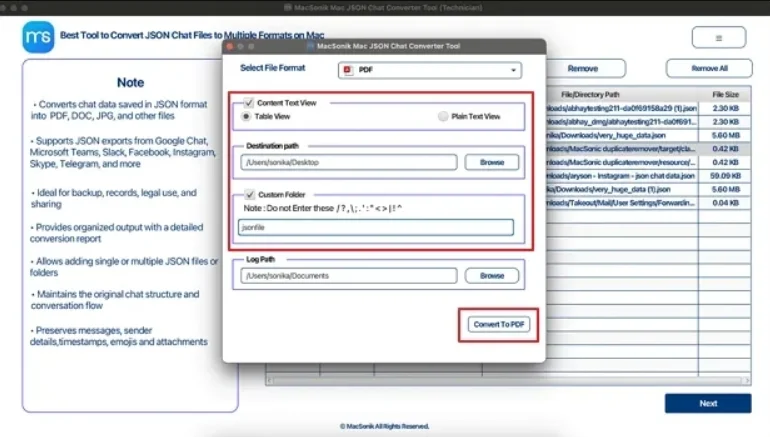
- Finally, ‘set the filters’ and ‘path’ to save the file, and click ‘Convert to PDF’ to begin the process.
Real-Life Case Study
A legal consultant needed to archive months of project communication from Microsoft Teams before an employee transition. The chats included shared contracts and approval files. However, the manual copying proved difficult and incomplete. Using a professional JSON export solution, the consultant successfully saved the entire chat history into PDF format along with attachments.
Wrapping Up
In this article, we have seen that exporting Teams chat to PDF with attachments is essential for various purposes. While manual methods are there, they may work for small conversations. But they become inefficient and unreliable for larger chat histories. An advanced JSON Chat Export Tool provides a faster and more organized approach to export Teams Chat to PDF. Moreover, ensures preserving attachments and original data structure. In case you find any issues during the process, feel free to connect with our support team.
Frequently Asked Questions
Ans. No, Microsoft Teams does not provide a direct built-in option to export chats as PDF files. Users usually rely on manual methods or use a professional JSON converter tool for a complete and accurate process.
Ans. Yes, bulk export is possible with the MacSonik JSON converter tool. Manual methods are generally suitable only for small conversations, while an advanced tool helps export multiple chats together while preserving formatting and related data.
Ans. For legal or compliance requirements, it is important to preserve chat timestamps, message structure, and attachments. A MacSonik software is usually preferred because it provides more organized and reliable records than manual copying.
Ans. Yes, Mac users can share Teams chats to PDF using manual copy-and-save methods or a dedicated JSON export tool designed for macOS. This helps save conversations for offline viewing, printing, or documentation purposes.
About The Author:
I am Neeru Kuchhal, a Technical Content Writer who focuses on turning complex ideas into clear, engaging, and impactful content. I combine creativity with strategy to write blogs, web content, and technical articles that connect with the right audience and support brand goals. I believe great content is not just written. It is thoughtfully created to inform, build trust, and drive action.
Related Post
