Convert JSON to Word (DOCX) Format? Complete Solution

Amelia James
April 21st, 2026
User-Query:
I have multiple JSON files that need to be transformed into professionally formatted Word documents. Can anyone suggest an efficient and secure conversion tool?
Summary: The data collected in JSON is great for machine processing, but it is tough for people to read in research papers. Because of this, researchers convert JSON to Word to easily access the data for peer review and publications. Moreover, the JSON data lacks the visual clarity that is required in presentations. However, the main challenge is that the users are unaware of the right conversion approach. One of the approaches is by using a professional converter tool, the JSON File Converter. The converter tool enables users to convert multiple JSON files into Word (DOC/DOCX) format.
Essential Reasons to Convert JSON Files to Word Format
JSON data is structured for machines. Users convert them to Word format to make the data easier to understand by humans. Have a look at the reasons why this conversion happens:
- The raw JSON code is structured mainly for machines. Transforming them into a Word document will present the data in a more readable format.
- JSON lacks presentation features, while Word improves data presentation. This makes it suitable for reports and documentation.
- Organizations prefer Word documents as it is a standard format to create structured documentation for business purposes.
- Clients and stakeholders generally are not familiar with JSON data. Word reports are easier to present insights from the JSON data.
- Large, raw, and unstructured JSON datasets can be summarized in a Word document to make the complex data more understandable.
Solutions to Convert JSON to Word (DOCX) Format
Users can choose from various approaches to convert their JSON file data into a Word-DOCX format. Below, we have listed a few approaches, both manual and automated.
Convert JSON Data to Word Using TextEdit
In this manual approach, we will first format, clean, and convert the JSON data into plain text format. Then, we will copy the content into a Word document. It removes unnecessary formatting and structures the data.
Use the following instructions to begin the process:
- Locate and right-click the desired JSON file.
- Then, choose Open With > TextEdit.
- Next, go to the menu bar and select Format > Make Plain Text.
- After that, check and clean the data to make it more readable.
- Now, select and copy the desired text that you wish to convert to Word.
- Open MS Word > Blank Document and paste it.
- Format the data, and then save it as a DOCX format.
Convert JSON to DOCX Format
This approach involves manually entering the JSON data into tables in a Word document. Rather than pasting the JSON content, users extract the fields and structure them in tables.
The following are the steps to initiate the conversion:
- Open the JSON file in any text editor.
- Now, analyze the data structure and identify the key data fields.
- After that, open MS Word and start a new blank document.
- Then, go to Insert > Table and create table columns.
- Next, copy the fields from JSON data and paste it into the Table columns.
- Format the table and save the file in DOC or DOCX format.
Drawbacks of the Manual Methods
- The above manual process is not suitable while converting large and complex JSON files.
- Users have to manually adjust the formatting after pasting the JSON data into Word.
- Lots of effort is required for extracting the key data fields and table creation.
- Also, the user should be aware of the JSON structure before converting it into Word.
Easy and Effective Solution to Convert JSON to Word (DOCX) Format
The MacSonik JSON File Converter automates the conversion of JSON files into the Word document format. It is designed for data integrity while converting large groups of JSON data into an easy-to-read Word-DOCX format. With this tool, users can convert JSON to HTML format. In addition to this, it maintains the metadata consistency throughout the workflow. Also, it includes a bilut-in previewer for validating the data before exporting it into a Word document.
Quick steps to convert JSON documents to DOCX:
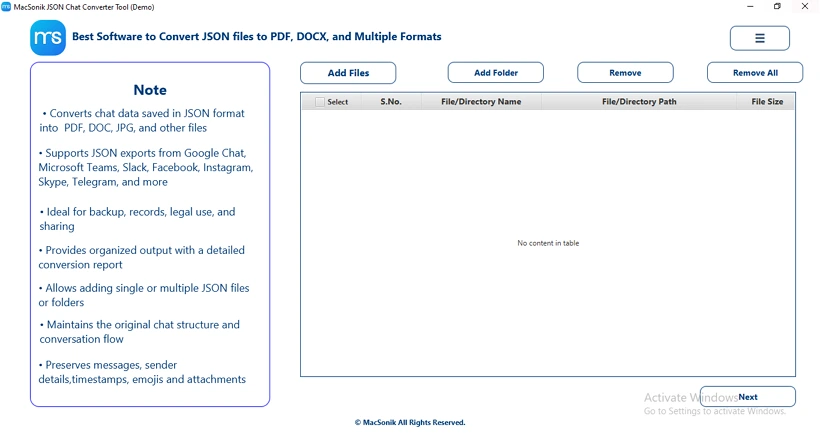
- Download and start the converter on your system.
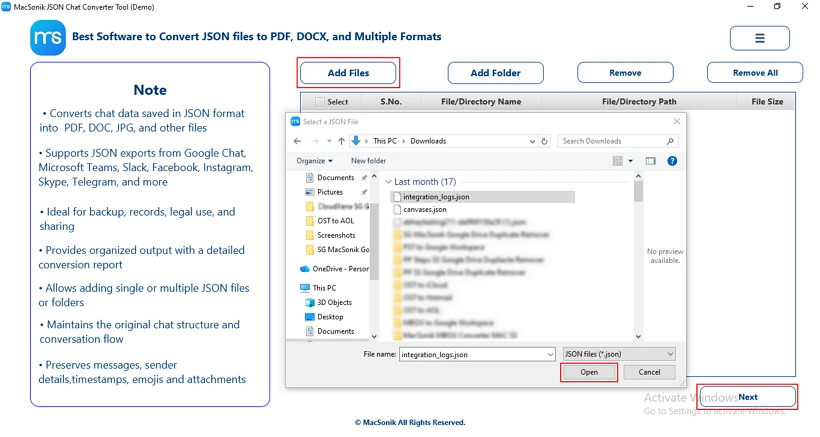
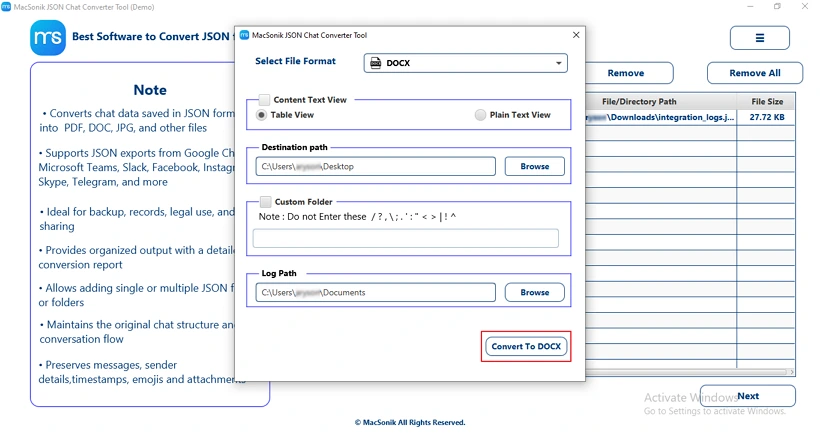
- Now, add your JSON file with the Add Files option. Then, press Open to upload it and tap Next.
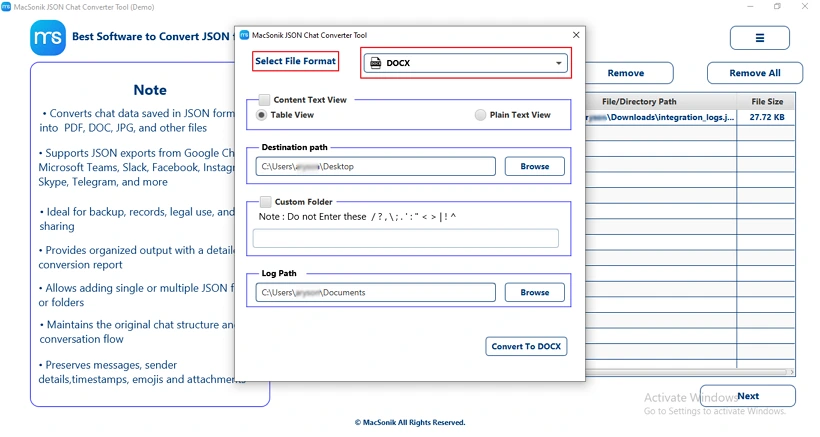
- After that, choose the saving output File Format as DOCX.
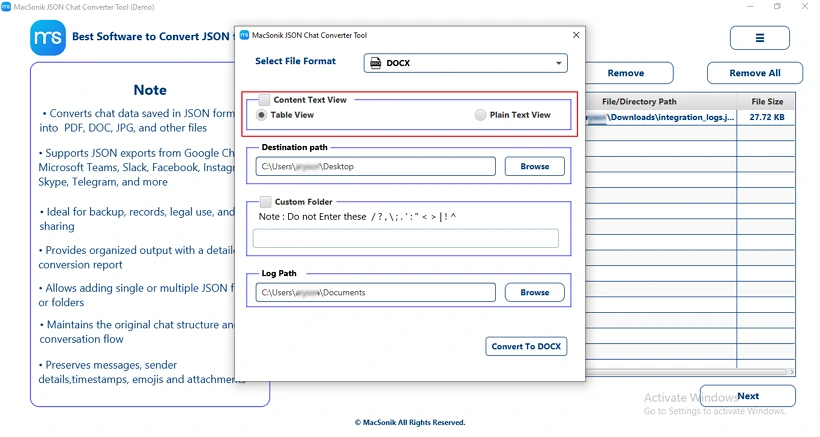
- Then, pick your preferred display mode: Table View or Plain Text View.
- Next, select the saving destination folder and press Convert to DOCX to start the conversion.
A data analyst needed to present structured JSON data in a professional report for management. Since raw JSON files were not suitable for documentation, he used MacSonik JSON Converter to convert multiple JSON files into DOCX format in bulk. The tool preserved the data structure and quickly generated well-formatted Word documents, saving him time and effort.
Conclusion
The JSON to Word document format conversion is important to ensure better readability. Developers convert JSON to Word format to make the complex JSON data more human-readable. Through this technical blog, we have provided different approaches that efficiently convert JSON files into a Word format. With the help of a professional tool, the MacSonik JSON File Converter, users can bulk convert JSON files into a Word document. The user can also convert the JSON content into various other formats such as Convert JSON to PDF, as well depending on the business requirements.
Frequently Asked Questions
Ans- You can use a professional MacSonik JSON Converter Tool that supports batch processing to convert multiple JSON files into DOC or DOCX format at once.
This tool automates formatting and structure, saving time and reducing manual effort.
Ans- Use a specialized JSON converter tool to properly format and analyze large or deeply nested JSON files. The tool helps validate, structure, and convert complex data efficiently without manual errors.
Ans- Yes, converting JSON to Word can affect formatting because JSON structure does not directly translate into Word’s document layout. Proper formatting or a reliable conversion tool is needed to maintain structure and readability.
Ans- The fastest and safest way to convert a JSON File to Word is by using a reliable professional conversion tool that supports direct JSON to DOC/DOCX export. It ensures accurate formatting, data integrity, and bulk processing without manual effort.
About The Author:
Amelia is the mistress of the webmail clients like Office 365, Gmail, Yahoo, Hotmail, and Opera Mail. Her research on downloading emails from webmail is outstanding. She has given the solution to download emails from webmail clients to a Mac device with all the mailbox items. She’s been into webmail solutions since 2010. In her free time, she reads books and writes technical blogs.
Related Post
