Convert JSON to BMP Image Format Without Data Loss

Amelia James
March 14th, 2026
User-Query:
Hi, I have several JSON files that I need to convert into BMP images for documentation and presentation purposes. Can anyone recommend a reliable tool that can change JSON to BMP format without losing the original data structure?
Summary: JSON files store an image in the form of random letters and numbers called Base64. But humans cannot read this string of letters and numbers. Hence, the users convert JSON to BMP to reassemble the strings into a viewable picture. BMP, Bitmap, is a format that acts as a perfect mirror of the original data. Now, let’s read this technical blog to learn about different ways for JSON to BMP conversion. We will also introduce a specialized tool, the MacSonik JSON File Converter, which converts multiple JSON files.
Needs to Convert JSON File to BMP
The BMP image format offers better accessibility and compatibility as it is supported by most of the image viewers. Take a look at the different needs of this conversion:
- BMP images display the structured data in a more organized, clearer, and visually understandable format.
- Users convert the JSON files to BMP image format so that they can be easily shared as a simple image file.
- Converting JSON to BMP helps users to include the data visuals in reports, presentations, or guides.
- Saving JSON as a BMP file ensures that the formatting stays unchanged when shared.
- Image formats like BMP can be opened with most of the image viewers, ensuring accessibility.
Manual Method to Convert JSON to BMP Image Format
In this method we will open the JSON file and save it to PDF file using the Save As PDF feature then convert the PDF file into BMP image format.
The following are the instructions to convert JSON chat to BMP:
- To convert a JSON file to a BMP format, you must first locate your JSON file.
- Then, open it with text editor, TextEdit.
- After that, press Command+P to open the Print window.
- Navigate to the BMP option and select Save as PDF.
- Subsequently, you need to take the PDF file into Preview app.
- export it as either a JPEG or PNG format in an image editor.
- so that you may save it in BMP format at your chosen destination.
Limitations: This approach involves multiple steps and, therefore, is time-consuming and inefficient. It is not a direct way to convert the JSON files into BMP format.
A Specialized Solution to Convert JSON to BMP Image Format Without Data Loss
MacSonik JSON File Converter makes it easy to convert the JSON files into a BMP image format. It helps maintain the integrity of the data during the conversion process and can handle high volumes of JSON Data into BMP image files. This tool can also convert JSON to PNG format. The tool preserves the consistency of your metadata throughout the conversion process. Also, it provides users with a built-in preview feature so that they can check their data before exporting to the BMP image format.
Simple steps to save JSON to BMP:
- Download and start the application on your computer.
- Now, add your JSON file using the Add Files feature and then click Open to upload it before clicking Next.
- Choose the File Format as BMP to save the data in an image format.
- Then choose your preferred destination path by clicking on the Browse button.
- Next, choose where to save the converted files and click Convert to BMP to start converting your file.
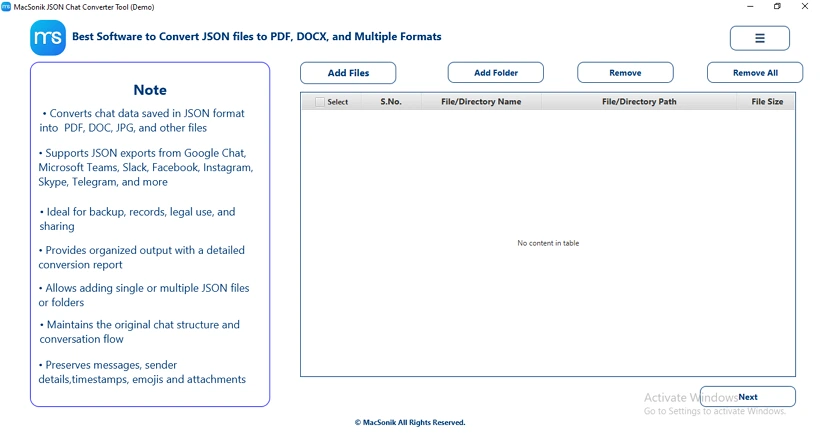
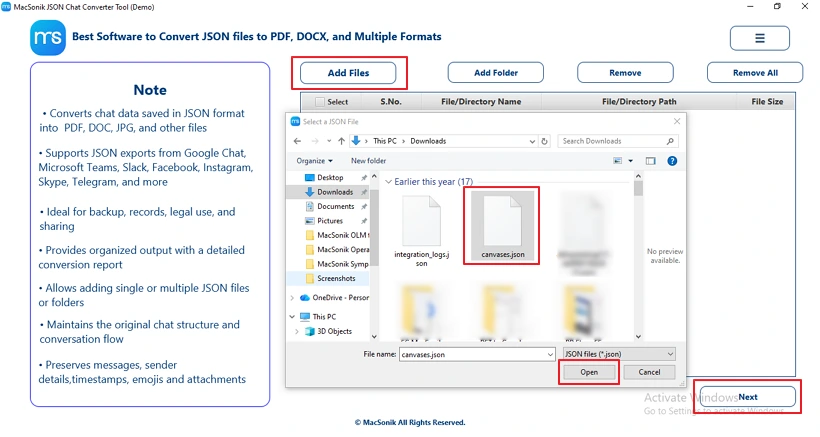
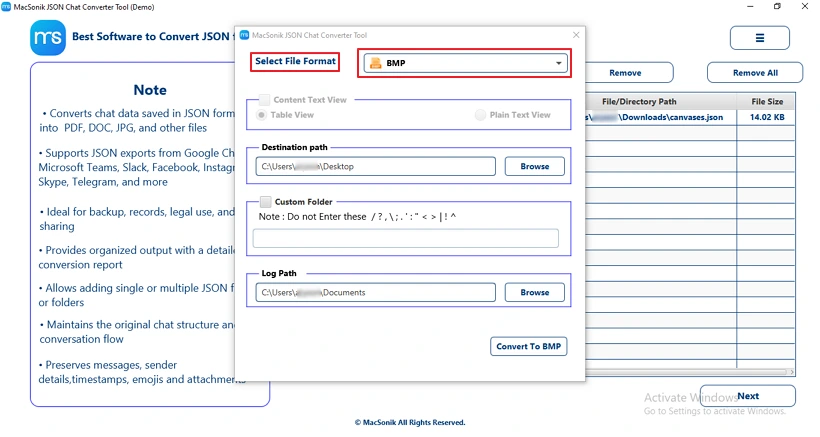
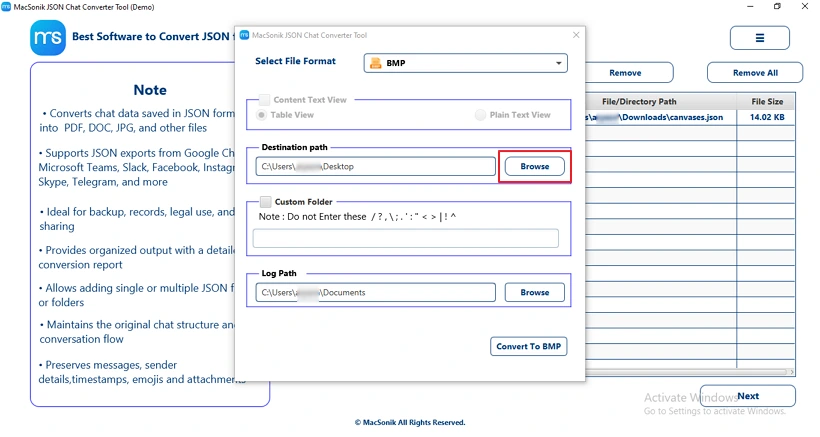
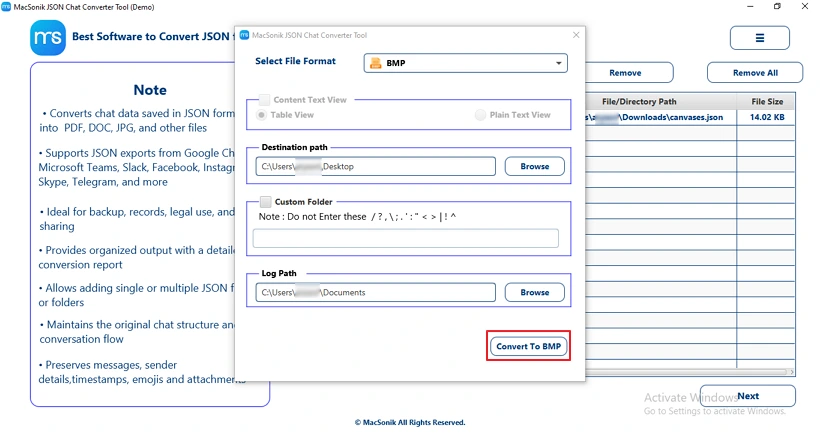
A data analyst needed to convert several JSON files containing campaign data into BMP images for documentation and presentations. To complete the task efficiently, the analyst used the MacSonik JSON Converter to convert the files into BMP format. The tool preserved the original data structure and provided a preview feature to verify the content before exporting.
Conclusion
The JSON file to BMP image conversion is important when users need a printable and archivable version of the data in the future. Through this blog, we have explained different ways to convert JSON to BMP format. A manual solution is explained, but it is not reliable and may lead to data loss. Additionally, the JSON Converter is a dedicated utility that allows users to change JSON format into BMP image file format while maintaining a high level of data fidelity; i.e., no loss of data integrity or reliability occurs during the conversion process itself.
Frequently Asked Questions
Ans- To convert JSON to BMP without losing data, first transform the JSON content into a visual format such as a table or structured text using the MacSonik JSON Converter tool. Then export or save the rendered output as a BMP image while ensuring the original formatting and metadata remain intact.
Ans- An easy way to convert a JSON file into BMP format is by using a specialized converter. These tools quickly transform JSON data into a BMP image with just a few clicks.
Ans- Yes, a reliable JSON conversion tool maintains data accuracy while converting a JSON file to BMP by preserving the original structure during the transformation process. It ensures that the displayed content in the BMP image reflects the data from the source JSON file without alteration.
Ans- Yes, it is possible to save JSON files to BMP in bulk by using a dedicated JSON Conversion Tool that supports batch processing. It allows users to add multiple JSON files at once and convert them into BMP format in a single operation.
About The Author:
Amelia is the mistress of the webmail clients like Office 365, Gmail, Yahoo, Hotmail, and Opera Mail. Her research on downloading emails from webmail is outstanding. She has given the solution to download emails from webmail clients to a Mac device with all the mailbox items. She’s been into webmail solutions since 2010. In her free time, she reads books and writes technical blogs.
Related Post
