How to Convert JSON to PDF Easily? Complete Guide

Amelia James
February 9th, 2026
Summary: Most of the e-commerce platforms maintain transaction and order information in structured JSON format. Now, they want to generate easy-to-read PDF summaries to be reviewed by accounting teams. For this purpose, they need to convert JSON to PDF. Here, in this article, we’ll cover the best approaches to convert JSON data into a PDF format. We will also highlight an effective and reliable tool, the MacSonik JSON File Converter, that simplifies the conversion. Also, a simple manual approach is explained for basic JSON to PDF file conversions.
User-Query: “I have several JSON files containing structured data that I need to convert into professional, well-formatted PDF documents. I’m looking for a reliable and secure tool that can handle JSON export to PDF conversion efficiently while preserving the integrity of the data. Can you recommend a professional solution for this?”
Common Reasons to Convert JSON File to PDF
PDF files are suitable for easy sharing, printing, and offline access. Below are the reasons users consider carrying out this conversion:
- Users convert their JSON files into a PDF format to share them with business users and clients.
- Transforming JSON data into PDF will provide a professional layout to be used by official documentation.
- To prevent unwanted edits after conversion, convert the JSON data to PDF for a more secure, read-only format.
- The PDF format is easily accessible across platforms and can be printed for meetings and audits.
- Most regulatory bodies require documents to be in PDF format. This format improves collaboration across different departments.
Learn How to Convert JSON to PDF File Format
Now, let’s start with implementing the solutions to convert the JSON file data into a PDF file format. First, the manual solution will be explained, and then we’ll look at the automated tool-based solution.
Manually Convert from JSON to PDF
For this method, users can use any modern web browser to convert their JSON file data into a PDF. After opening the JSON file, save the content in a PDF format using the “Print to PDF” feature.
Look at the steps to perform the conversion:
- Start by locating the JSON file to be converted.
- Then, right-click on the file and select Open with > Browser.
- After that, review the content of the file and adjust the screen size as needed.
- Now, press Ctrl+P in Windows and Command+P on Mac to access the Print dialog.
- Next, choose Save as PDF and modify the Page Layout Settings as per the requirement.
- Click on Save and pick the location to save the resultant PDF file.
Limitations: The resultant PDF will lack proper formatting as it retains the raw JSON structure. It does not support bulk JSON file conversions and is, therefore, time-consuming.
An Easy Solution to Convert JSON to PDF File Format
The MacSonik JSON to PDF Converter application dynamically converts structured JSON into pdf format documents. In addition, the MacSonik JSON to pdf document creation tool also provides capabilities for bulk conversion of multiple JSON documents into PDF format while preserving the integrity of any associated metadata. Finally, an integrated preview allows users to validate their JSON data before exporting it to PDF, to ensure the accuracy of the converted data. Furthermore, this tool offers full compatibility with Windows and macOS.
Simple steps to export JSON to PDF file format:
- Download and start the converter application on your system.
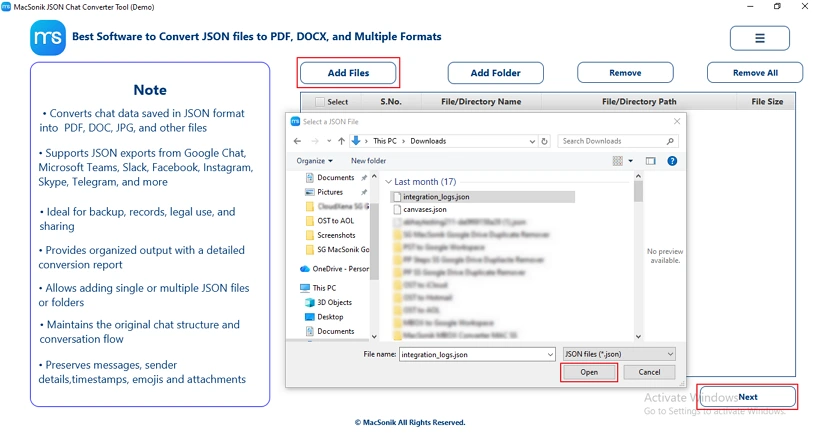
- Now, upload your JSON file using the Add Files option. Then, click on Open to add the file and tap Next.
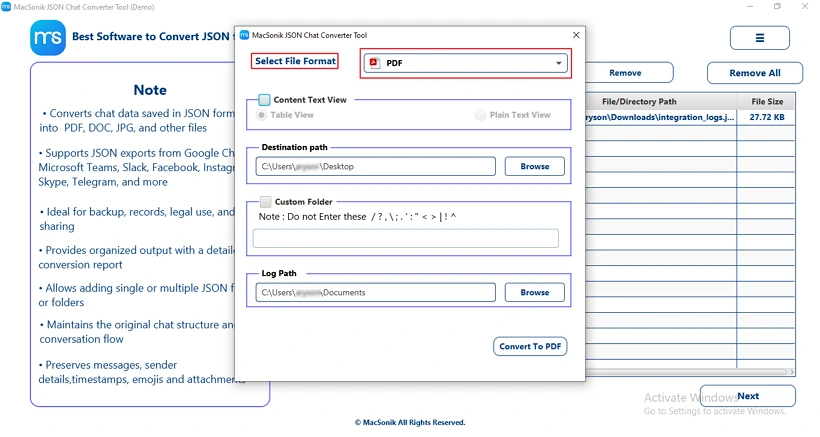
- After that, choose the target output File Format as PDF.
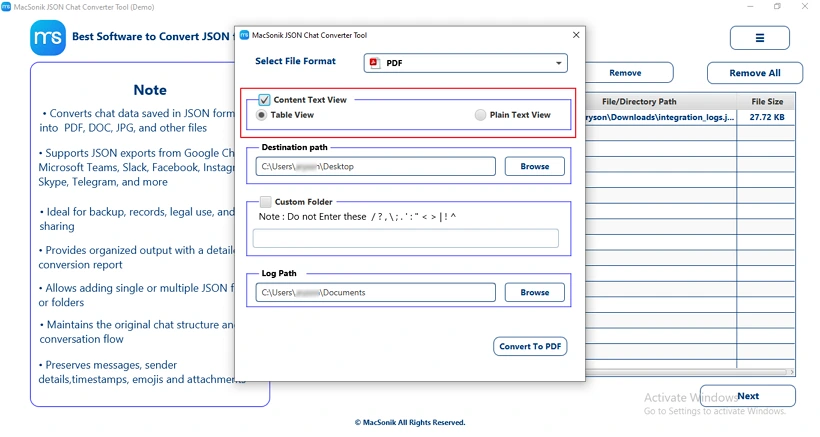
- Pick your preferred display mode: Table View or Plain Text View.
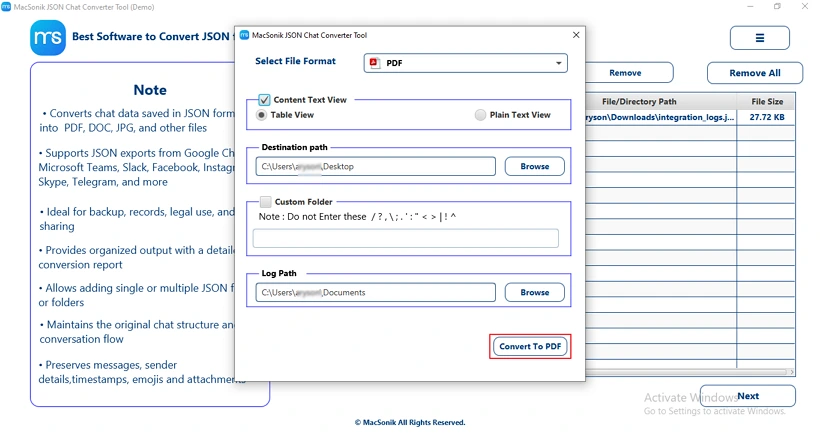
- Next, pick the saving location and press Convert to PDF to start converting.
Real-life Scenario:
A business analyst needed to turn large JSON files containing customer orders into readable reports. Using MacSonik JSON File Converter, they converted the JSON data into structured PDF files with Table View, preserving all metadata. This made sharing and reviewing data with the management and finance teams quick and effortless.
Conclusion
Enterprises convert JSON to PDF to present their data in a clear, readable layout. The PDF format is more secure and helps preserve data integrity. In this blog, we have shared the best 2 reliable approaches. The manual approach is effective for converting some JSON files to PDF. The professional tool, the MacSonik JSON Converter, provides error-free results while processing bulk operations. Download the trial version of the tool to explore its features.
Frequently Asked Questions
Ans- Converting JSON to PDF preserves the content but may not fully retain the original data structure. The hierarchical or nested format of JSON is often flattened for readability in the PDF. But by using the automated tool, the JSON to PDF conversion preserves the original data structure.
Ans- Yes. The manual method to convert JSON files to PDF is simple and easy. Just open the file in any browser, modify it if required, and save it as a PDF document. Also, with the help of a professional tool, you can convert multiple JSON files to PDF in one go.
Ans- Large JSON files can be converted to PDF using specialized software that handles bulk data efficiently. This tool maintains readability and formatting while processing high-volume or complex datasets.
Ans- Converting sensitive JSON data to PDF can be safe if you use a professional JSON converter. Avoid unverified websites to prevent potential data leaks or unauthorized access.
Ans- Yes. With the help of a professional MacSonik JSON Converter Tool, you can easily convert the API response JSON files into PDF format.
About The Author:
Amelia is the mistress of the webmail clients like Office 365, Gmail, Yahoo, Hotmail, and Opera Mail. Her research on downloading emails from webmail is outstanding. She has given the solution to download emails from webmail clients to a Mac device with all the mailbox items. She’s been into webmail solutions since 2010. In her free time, she reads books and writes technical blogs.
Related Post
