Move Apple Mail Data to New Computer in Simple Steps

Amelia James
August 11th, 2026
User-Query:
“I recently bought a new Mac and want to move all my Apple data from my old computer safely. I need a simple method that keeps everything organized without losing any important mailbox data. What is the easiest way to move Apple Mail to new computer?”
— Posted by “Ryan Cooper”
Introduction: Apple Mail is the default email application for Mac users. It is widely used for managing personal and business communication. Over time, users store years of emails, attachments, mailbox folders, and archived communication inside Apple Mail. When upgrading to a new Mac, transferring Apple Mail data becomes one of the most important tasks. However, many users struggle with missing data or mailbox synchronization problems during migration. To come out of this issue, this guide covers the easiest ways to transfer Apple Mail folders to new computer. Moreover, highlights the MacSonik MBOX Converter Tool for a quick solution.
Apple Mail Migration Explained: What Data Should You Move?
|
Main Features |
Old Mac Apple Mail |
New Mac Apple Mail |
|
Existing email data |
Fresh mailbox setup |
|
Emails and attachments |
Imported mailbox data |
|
Transfer existing records |
Continue communication |
|
Stored locally |
Accessible after transfer |
|
Current workflow |
New device continuity |
|
Existing folders |
Preserved folder hierarchy |
Common Apple Mail Migration Problems You Should Know
Many users think Apple Mail migration is automatic, but mailbox transfer can become difficult when dealing with large and multiple folders.
- Missing emails after conversion.
- Attachments are not opening correctly.
- Mailbox folders are becoming disorganized.
- Slow migration process for large mailboxes.
- There might be sync issues on the new Mac.
- Also, there is a risk of accidental data loss.
How to Manually Move Apple Mail to New Computer?
You can manually complete the task without the interference of the third-party tools. Therefore, make sure that this method has its own pitfalls that make it a time-consuming process.
Method: Copy Apple Mail Data Manually
- Firstly, open Finder on your old Mac.
- Now, go to ~/Library/Mail/folder.
- Copy the Mail folder to an external drive.
- Transfer the copied data to the new Mac.
- Paste it into the same Mail directory on the new system.
- Lastly, open Apple Mail and verify mailbox data.
Pitfalls: Copy Apple Mail to New Computer Manually
- It is time-consuming for large mailboxes.
- There is a risk of incomplete data transfer.
- Attachments may become inaccessible.
- Folder hierarchy can get disturbed.
- This process requires technical knowledge.
- Not suitable for business-scale migration.
Streamline Your Workflow: Instant Apple Mail Data Migration
To simplify the conversion process, it is recommended to use the MacSonik MBOX Converter Tool. This professional software helps users migrate Apple Mail data securely while preserving everything intact. It is specially designed for Mac users who need a smooth mailbox migration without technical complexity. Besides, it allows users to migrate Apple Mail emails without Outlook and with zero data loss.
Procedure to Move Apple Mail to New Computer Step-by-Step
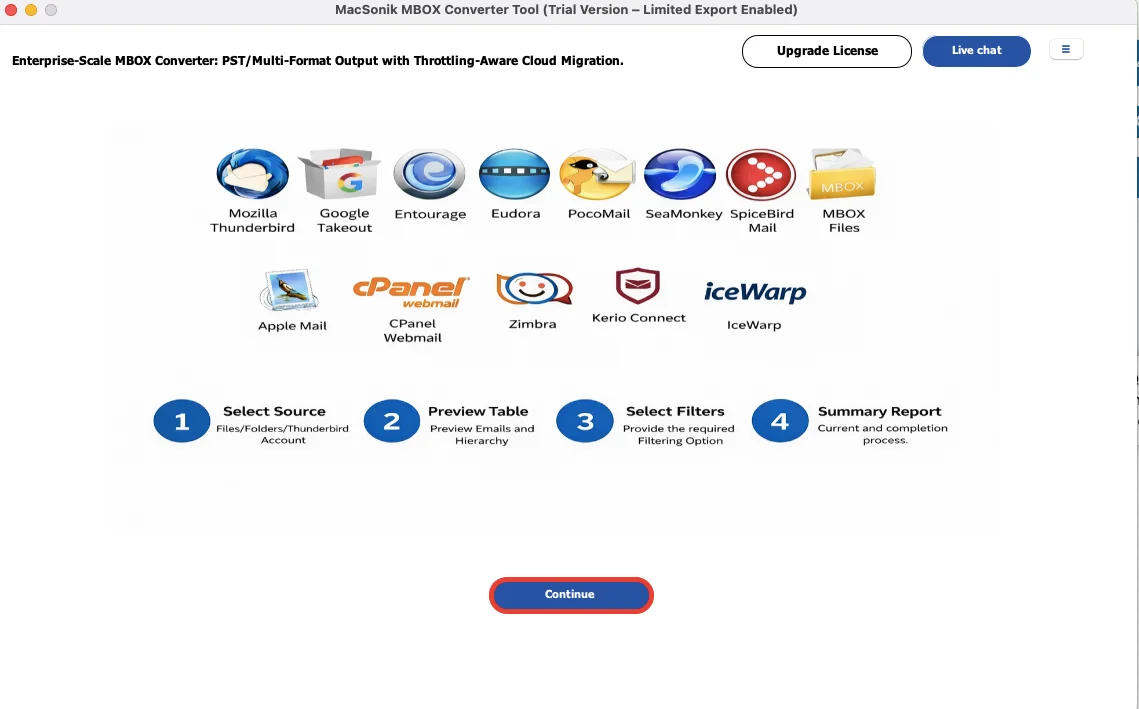
- Firstly, launch the ‘MacSonik MBOX File Converter Tool’, and click ‘Continue’.
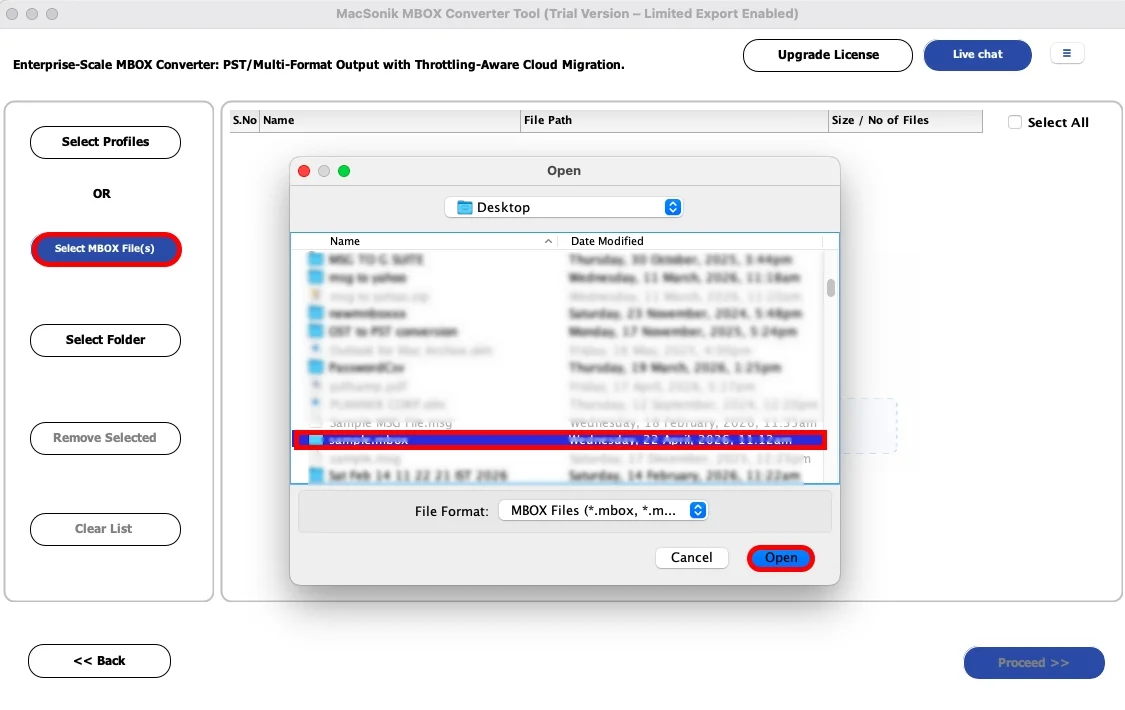
- Now, click ‘Select Files’, ‘Open’ the MBOX file that you want to convert.
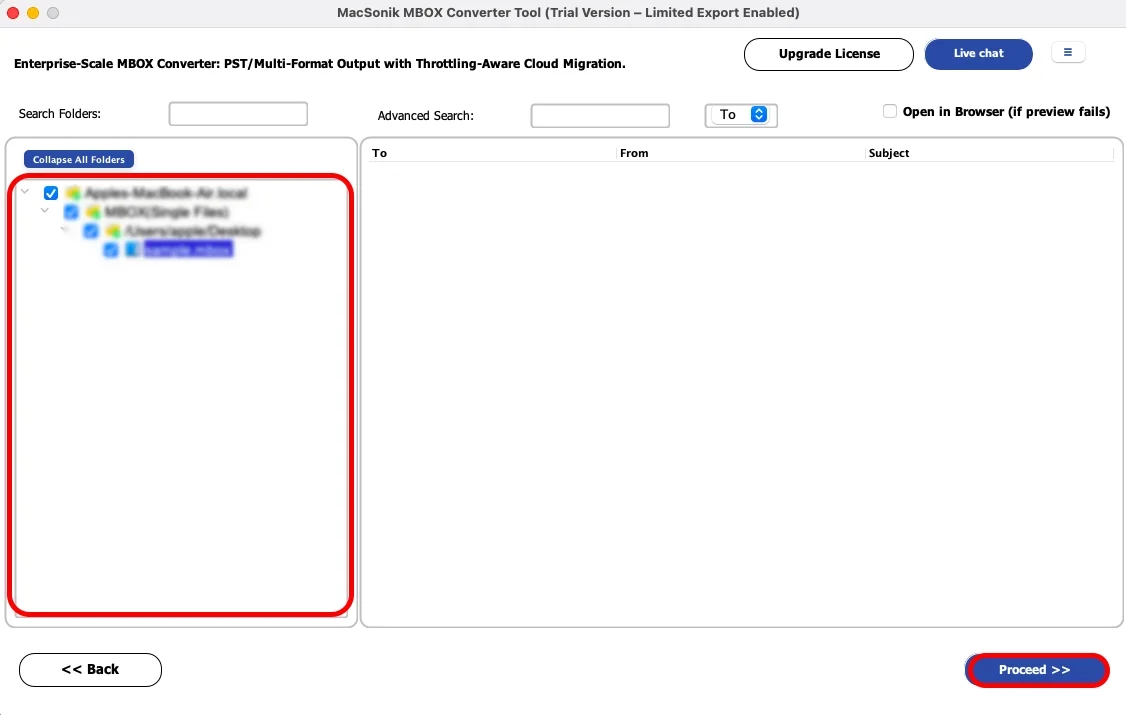
- ‘Drag’ the folder structure, ‘preview’ the mailbox, and ‘proceed’ further.
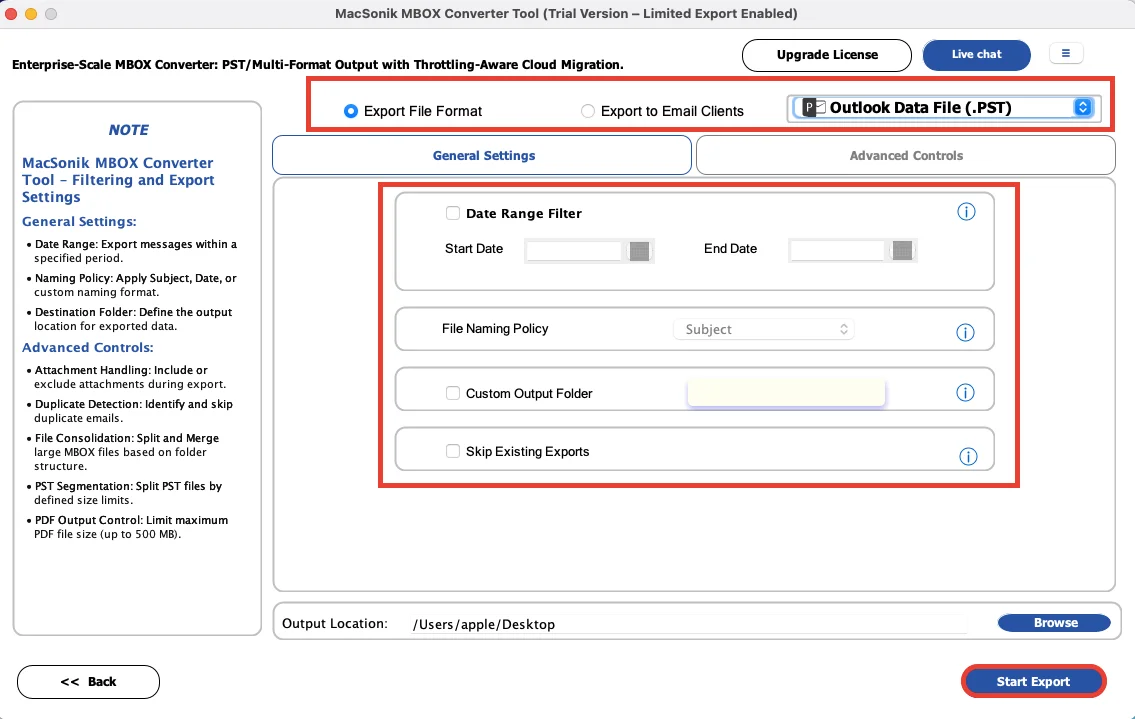
- Further, choose ‘PST’ or any required format, apply filters as per your need, and ‘Start Export’.
Top Benefits of Using MacSonik’s Software
- Upgrade to a newer Mac device.
- Preserve years of email communication.
- Maintain organized mailbox folders.
- Continue work without interruption.
- Create secure email backups during migration.
- Improve system performance with new hardware.
Real-Life Scenario: Office Mac Upgrade
A marketing agency upgraded employee systems from older Mac devices to newer MacBooks and needed to move years of Apple Mail data safely. However, the manual copying methods created folder mismatches and missing attachment issues for several users. The agency then used the MacSonik MBOX migration solution and successfully move Mac Mail to new computer while preserving email structure and attachments. Employees resumed work smoothly on their new systems without mailbox disruption..
Conclusion
To conclude, moving Apple Mail data to a new computer is essential for preserving important communication records. However, the manual methods may work for small mailbox data, but they can become difficult for larger email archives. The best solution is to use MBOX converter software to move Apple Mail to new computer. It offers a fast, secure, and hassle-free Apple Mail migration on Mac. Additionally, if you face any kind of issue, feel free to reach out to our support team.
Frequently Asked Questions
Ans. Yes, Apple Mail folders can be transferred safely to a new computer when the migration is performed properly. A reliable MBOX migration helps preserve emails, mailbox folders, and account structure during the transfer process. This ensures users can continue accessing old communication without data loss.
Ans. Yes, attachments such as PDFs, images, documents, and other files are usually transferred along with emails. The MBOX converter tool helps maintain the connection between emails and their attachments accurately. This is especially important for business and archived mailbox data.
Ans. Yes, an advanced MBOX migration solution provides selective migration options that allow users to move only specific mailbox folders. This helps reduce transfer time and avoids unnecessary data movement. It is useful when users only need important or active mail folders on the new system.
Ans. Yes, a reliable Apple Mail migration process preserves the original mailbox hierarchy and folder structure. This ensures emails remain organized exactly like the source mailbox after transfer. Maintaining folder integrity is important for productivity and easy mailbox navigation.
About The Author:
Amelia is the mistress of the webmail clients like Office 365, Gmail, Yahoo, Hotmail, and Opera Mail. Her research on downloading emails from webmail is outstanding. She has given the solution to download emails from webmail clients to a Mac device with all the mailbox items. She’s been into webmail solutions since 2010. In her free time, she reads books and writes technical blogs.
Related Post
