How to Fix “Outlook Web App Not Working” on Mac? – Issue Fixed

Amelia James
August 11th, 2026
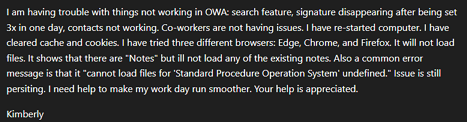
Introduction: This is a user query who was constantly facing issues because of Outlook web app not working. This isn’t just a random inconvenience, but it halts the entire regular workflow of the Outlook user. If you are also facing similar issues and need an immediate solution, then this guide will help you out. You can explore the free methods, as well as the MacSonik Outlook.com Backup Tool, to eliminate the issue and work feasibly on your web Outlook.
Understanding OWA Is Not Working
OWA (Outlook Web App) is the Outlook version that can be accessed on any browser online for free. Whether you use Safari, Microsoft Edge, Google Chrome, or Firefox on a system or a mobile device, it is easily accessible. However, it is not very immune and often faces lags and issues, suddenly stopping from working without a warning. The situation may seem general, but it can easily escalate and create chaos at the workplace.
For remote teams, cloud-first organizations, and others, this error needs an immediate fix. But before that, let’s quickly check out the causes and symptoms of this error.
How Real-Time Users Define Outlook Web App Not Working?
There are rarely clear error messages associated with the Outlook breakdown. Common indications include:
- The whole page returns a “Cannot connect to Outlook.com” message
- The Outlook.com page loads halfway and freezes
- Emails and attachments won’t open
- Calendar or People isn’t working or accessible
- Logged in, but nothing loads after that
- Sometimes, the Outlook desktop app is not working either
- A loop continues while opening a message or refreshing the mailbox
Users generally describe instances like this as:
“I can sign in to Outlook.com, but nothing responds. I click on an email, and nothing happens. The desktop app is acting weird, too. Is it the server? Is it my browser?”
The unfortunate truth is that it could be either
Why Users Can’t Read Outlook Web App Emails?
Outlook Web App is a browser-dependent interface on top of Microsoft Cloud services. Any interruptions in the browser compatibility, authentication loops, server outages, or mailbox corruption result in visible freezing. Here are the top reasons that frequently cause the breakdown:
- Faulty cache session tokens
- Extension conflicts and outdated TLS settings
- Blocked third-party cookies
- Throttling on the server side
- Overloaded user interface scripts in the mailbox
How to Fix “Outlook Web App Not Working” Error?
There are many troubleshooting tricks that you can follow to resolve the issue manually as well as professionally. All of them are discussed below in this section with the step-by-step process to follow.
Cost-Free Fixes for Outlook Web Not Responding Issue
We will go through stage by stages to completely resolve the issue in a structured way. Follow as specified below:
Stage 1: Eliminate Browser-Level Interference
OWA is sensitive to cache and cookie behavior. So, start with managing the browser surface:
- Use a private/incognito window
- Clear the Outlook cookies
- Temporarily disable any extensions
- Update the browser
This will disable extensions and cached tokens.
Just clear the Microsoft/Outlook tokens instead of the whole browser cache.
Ad blockers, script blockers, and privacy tools break Outlook Web’s UI scripts. So, disable them for some time to resume the work.
OWA’s interface depends on modern JavaScript and TLS versions. An out-of-date browser may result in the error.
If this helps fix the issue. This means conflicts were due to your stored session or browser environment.
Stage 2: Network or Authentication Validations
If your Outook web app not working still, then:
- First, switch your connection from Wi-Fi to Hotspot.
- Second, temporarily disable VPN or firewalls.
- Third, look at Microsoft’s service status page for regional throttling.
- Fourth, re-authenticate using manual authentication links rather than auto sign-in.
Furthermore, this can also be due to the password change on a different device or the expiry of the MFA, App Passwords, and Session Tokens. So you may want to recreate them to fix OWA is not working.
Stage 3: Mailbox-Level Errors
If OWA loads without displaying emails, the mailbox data has potential problems, including:
- Oversized inbox folders or corrupt mailbox items
- A sync failure due to too many concurrent active logins
You can try the following to fix:
- Temporarily switch to Outlook’s “light version”
- Load Outlook.com in basic HTML mode
- Open emails in a new window instead of an inline preview
Stage 4: Device & App-Level Conflicts
You may be facing the Outlook web not responding issue because:
- The Outlook Desktop App is stuck syncing
- The mail app on your phone has broken or expired tokens
- Multiple IMAP/POP clients are using the same mailbox at the same time
Here, restarting will often release the server-side sync locks.
Hassle-Free Fix for Outlook Web App Not Working
If setbacks are becoming a pattern in your Outlook Mailbox, creating a backup of your Outlook.com mailbox will give you an advantage in case of unplanned outages. The MacSonik Outlook.com Backup Tool allows you to:
- Free save upto 50 emails per folder with the Demo Version.
- Download mailbox data to PST, MBOX, EML, PDF, MSG, etc.
- Protect your mailbox data from sync issues and give offline access.
- Ensure you can still access emails safely and securely with ease.
- Maintains data hierarchy and works across all major versions of Mac OS.
- Offers 24*7 Technical Assistance for any concerns and issues.
Take A Backup If You Cannot Connect to Outlook.com
- Launch the Outlook.com Backup Software and sign in with your credentials.
- Then, check the folders in the panel, select to backup, and tap Next.
- Further, choose a file format in which you want to save the data. (Say, PDF)
- Or, pick an email client to directly backup to another mailbox. (Like, Gmail)
- Afterward, apply the filters, set a destination, and click Download to save.
Note: If you also use Hotmail (Outlook.com) with Apple Mail and have sync issues, you might consider reading: Fix Hotmail Not Working on Apple Mail
Conclusion
OWA (Outlook Web App) failures have a pattern to them. Fixing the Outlook Web App not working error is not just about randomly resetting the browser. It is a detailed process with fixes of multiple layers. Whether you have a personal Outlook.com mailbox or manage dozens of business accounts, stabilizing OWA begins with identifying where failure has occurred to address it correctly. Moreover, with a good backup plan, using professional software, you can prevent failures from recurring and keep your emails responsive.
Frequently Asked Questions
Ans: Many times, the OWA will freeze when the connection is stable because of browser cache, script-blocking add-ons, or failures in the authentication token. Trying private mode or clearing any Microsoft cookies, should clear this up.
Ans: Yes. Desktop sync failures can cause mailbox-level conflicts, which can impact the functioning of OWA.
Ans: No, unless the mailbox is already damaged. Backups are still a good idea as a safety net. Hence, use the Hotmail Backup Tool for secure backup in time.
About The Author:
Amelia is the mistress of the webmail clients like Office 365, Gmail, Yahoo, Hotmail, and Opera Mail. Her research on downloading emails from webmail is outstanding. She has given the solution to download emails from webmail clients to a Mac device with all the mailbox items. She’s been into webmail solutions since 2010. In her free time, she reads books and writes technical blogs.
Related Post
