How to Convert MBOX to PST Without Losing Data

Neeru Kuchhal

August 29th, 2026
Quick Answer:
To convert MBOX to PST locate the MBOX file and create a backup copy of it without losing data. Load the mailbox with a specialised MBOX converter, view mails & attachments, select PST as export format & start conversion. A good converter should preserve the email content, attachments, folder structure, headers, dates and other mailbox metadata in the process.
Microsoft Outlook uses PST as its native data-storage format, while MBOX is used by email applications such as Thunderbird, Apple Mail, and other mail clients. Since Outlook does not provide a direct built-in option to import MBOX files, users generally need an intermediate conversion method.
Introduction: “I’ve been asked to help migrate a number of legacy Google Workspace accounts that were archived to MBOX up to Office 365 accounts. Can anyone recommend a reliable MBOX to PST conversion so I can hand off the PST files to the Office 365 team for import? I’m hoping to keep the folder/label structure intact, since each label is an MBOX from Google Takeout.”
Therefore, in this guide, we will explain how to convert MBOX to PST and a professional MacSonik MBOX to PST Converter Tool.
What Are MBOX and PST Files?
MBOX and PST are two different mailbox-storage formats.
|
MBOX is a popular format used by email clients such as Thunderbird, Apple Mail, Eudora and others, and it contains multiple email messages in a single mailbox file. |
PST (Personal Storage Table) is the Microsoft mailbox data file format used by Outlook to store emails, contacts, calendars, tasks, and other mailbox data. |
Solved: Why Do Users Convert MBOX to PST File?
Users may need to do this for several practical reasons:
- Moving emails from Thunderbird to Outlook.
- Migrating Apple Mail data to Outlook.
- When individual emails are required as separate files, users can convert MBOX to MSG instead of creating a single PST archive.
- Open Archived MBOX Emails in Windows Outlook
- Old email archives to PSTs merging.
- Getting mailbox data ready for eDiscovery or compliance review.
- Migrating emails from one email platform to another.
- Also, keep a backup of old mailbox data in Outlook format.
Migrating emails from one email platform to another. If the migration involves moving data between Microsoft 365 tenants, you can also refer to the Office 365 Tenant-to-Tenant Migration for the complete migration process.
Essential Checklist Before Converting MBOX to PST
Before starting the process to convert MBOX to Outlook, prepare the source files properly.
- Find the MBOX Files: Locate the actual MBOX mailbox files on your Mac or Windows PC. Do not confuse the mailbox file with an application profile or folder that contains unrelated configuration information.
- Make a Backup: Always keep an original copy of the MBOX file untouched.
- Verify the File Size: Large MBOX files can take a considerably longer time to process. Ensure that the destination drive has sufficient free space to store the resulting PST files.
- Remove Unwanted Data: If there are unwanted emails in the archive, find them out before conversion, instead of processing unwanted data.
- Check Folder Structure: Look at the source mailbox folder structure before you convert, to help you compare it to the resulting PST.
Method 1: Convert MBOX to PST Manually
There is no simple way to do this task built directly into Outlook. The manual way is usually either the original email client or an intermediate format.
Steps-by-Step Process to Migrate MBOX to PST
- Firstly, open the MBOX file in a compatible email client.
- Now, configure or add the required mailbox.
- Export or move the emails into a format supported by Outlook.
- Import the resulting data into Outlook.
- Create or save the mailbox as a PST file.
- Lastly, check the converted emails and attachments.
Pitfalls to Manually Export MBOX to PST
|
A few intermediate steps |
email-client requirements |
Manual folder management |
Restricted bulk processing |
|
Formatting inconsistencies |
Issues with attachment |
Problem handling multiple MBOX files |
More time to process |
For a few emails, manual handling may be acceptable. For thousands of messages or multiple MBOX archives, a dedicated converter is generally more practical to transfer MBOX to PST.
Method 2: Convert MBOX to PST Using MacSonik
The MacSonik MBOX to PST Converter provides a direct way to convert MBOX files into PST format without requiring Outlook to be installed for the conversion process. The software can also convert MBOX to CSV and other formats and email clients, depending on the version and supported output options. The software has a preview feature that allows users to inspect the source mailbox before creating the PST. It can be useful when you need to process:
|
A single MBOX archive |
Multiple MBOX files |
Large email archives |
|
Specific folders |
Selected emails |
Multiple mailbox sources |
Steps to Convert MBOX File to PST Without Losing Data
- Install and open the MacSonik MBOX to PST Converter Tool.
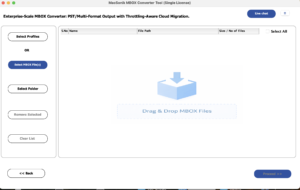
- Click Add File and select the MBOX file you want to convert.

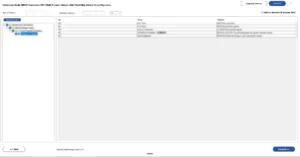
- Drag the structure and preview the mailbox before conversion.
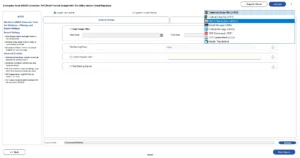
- After that, choose PST from the available saving options.
- Apply available filters and select the destination to save the file.
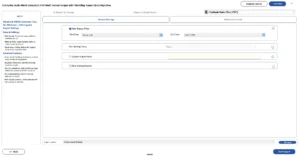
- Finally, click Convert to begin the MBOX-to-PST conversion.
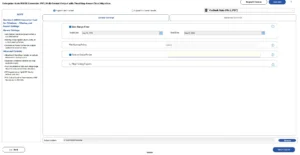
For a more detailed walkthrough, refer to the MacSonik MBOX to PST Converter guide.
Why Choose a MacSonik MBOX to PST Converter?
- Direct Conversion: Convert MBOX files to PST without relying on a complicated multi-step workflow.
- Bulk Processing: Process multiple MBOX files in one conversion session.
- Preview Before Conversion: Review mailbox folders, emails, and attachments before generating the PST.
- Selective Conversion: Convert only the emails or folders you need.
- Preserve Mailbox Structure: Maintain the available folder hierarchy during conversion.
- Multiple Output Options: Depending on the software version, MBOX data can also be exported to formats such as EML, MSG, PDF, HTML, and others.
- Windows and Mac Support: MacSonik provides editions for supported Windows and Mac environments, making it useful for cross-platform email migration projects.
Need to Migrate MBOX Directly to Microsoft 365? If the final destination is Office 365 rather than a local PST file, users can skip the intermediate conversion and follow this guide on how to import MBOX to Office 365. It explains the available approaches for transferring MBOX mailbox data into Microsoft 365.
Real-Life Scenario: Converting an MBOX to PST
A small consulting company had several years of archived emails stored in MBOX files created from an older email application. The organization had recently standardized its email workflow around Microsoft Outlook and needed the historical messages in PST format.
The IT administrator initially considered manually opening the MBOX files and moving emails into Outlook. However, the archives contained thousands of emails organized into multiple folders, making the manual approach impractical.
The administrator used a dedicated MBOX converter to load the archives, preview the mailbox structure, select PST as the output, and process the required folders. After conversion, the resulting PST files were opened in Outlook and sample emails were checked for attachments, dates, headers, and folder organization.
The test-first approach helped the team verify the converted data before retiring the old MBOX archives.
Conclusion
In the end, converting MBOX to PST doesn’t have to mean losing emails, attachments, or mailbox organization. Manual methods can work for small archives, but they become difficult when you have thousands of emails, multiple folders, or several MBOX files. A MBOX to PST converter provides a more direct workflow to convert MBOX to PST.
For important archives, the safest approach is simple: keep a backup, test the conversion, verify the output, and only then proceed with the complete migration.
Frequently Asked Questions
Ans. Yes, it maintains the original mailbox folder structure and hierarchy in the resulting PST file.
Ans. Yes, the software supports Unicode data and helps preserve emails containing special characters and non-English languages during conversion.
Ans. Yes, important email properties such as To, From, CC, BCC, Subject, Date, and Time are maintained throughout the conversion process.
Ans. Yes, the converter processes supported MIME content to retain email bodies, attachments, headers, and embedded elements in the output PST.
Ans. Yes, if the date filter feature is available, you can define a date range to export only emails matching the specified period.
Ans. Yes, users can add multiple supported MBOX files or folders and convert them in bulk, reducing the need to process each mailbox individually.
About The Author:
I am Neeru Kuchhal, a Technical Content Writer who focuses on turning complex ideas into clear, engaging, and impactful content. I combine creativity with strategy to write blogs, web content, and technical articles that connect with the right audience and support brand goals. I believe great content is not just written. It is thoughtfully created to inform, build trust, and drive action.
Related Post
