Safe Methods to Fix PST File Too Large to Open on Mac Error

Neeru Kuchhal

April 27th, 2026
User-Query:
“I have a large PST file from Outlook Windows that I transferred to my Mac. But it won’t open properly. Outlook shows errors such as ‘pst file too large to open Mac’ or freezes. I need a safe way to fix this error without losing emails or attachments. What should I do?”
— Posted by “James Anderson”
Introduction: A PST file is used by MS Outlook. It is used to store emails, contacts, calendars, attachments, and other mailbox data. Many users try to access them on a Mac using Outlook for Mac. However, a common issue arises when the PST file becomes too large to open on a Mac. This leads to errors, freezing, or failure to load mailbox data. In this guide, we will explain the safe methods to fix the “Outlook PST File Too Large to Open Error” and how MacSonik PST Splitter Tool helps users to solve this error efficiently.
Identifying the Oversized PST Issue
The problem usually occurs due to excessive mailbox data, large attachments, etc. Because PST files are created for Microsoft Outlook on Windows and Mac systems.
As a result, users may face several issues, such as:
- Outlook freezes or crashes while opening the file.
- Slow loading of emails and folders.
- Missing mailbox items or inaccessible data.
- Import failures in Outlook for Mac.
- Performance lag due to limited Mac storage.
- Higher risk of PST corruption over time.
Top Reasons Why PST File Too Large to Open on Mac?
Here are the common causes:
- PST file exceeds recommended size limits.
- Corrupted mailbox structure due to heavy usage.
- Incompatible Windows PST format on Mac Outlook.
- Excessive emails and attachments are stored in one file.
- Improper conversion from Windows to a Mac system.
- Outdated Outlook for Mac version.
- Also, there is a lack of sufficient Mac storage or memory.
Native Solutions: Fix “PST File Too Large in Size Issue Manually”
There are several manual fixes to solve this issue. But this method has some drawbacks that make this process slow and time-consuming.
Fix 1: Split PST File (Windows Required)
- Open Outlook on Windows.
- Use the archive feature to split data.
- Create smaller PST files.
- Transfer again to Mac.
Fix 2: Use Archive Feature
- Move older emails to archive folders.
- Reduce the primary PST file size.
- Re-import into Outlook for Mac.
Fix 3: Repair PST Using the Inbox Repair Tool
- Run ScanPST.exe on Windows.
- Repair a corrupted PST file.
- Export the repaired file again.
Drawbacks: Manually Solve PST File Too Large to Open Mac
- It requires access to a Windows system.
- Time-consuming for large mailboxes.
- There is a risk of partial data loss.
- Does not always fix large file issues.
- Not suitable for enterprise-scale PST files.
- Moreover, technical knowledge is required.
Enterprise-Grade Solution: Outlook PST File is Too Large Error
To get free from the manual drawbacks, it is highly recommended to use the MacSonik PST Splitter Tool. You can split multiple files together with no information leakage. Also, you can split large PST files into smaller files with complete accuracy and end-to-end security. This software has a simple and intuitive interface that can be used by both tech and non–tech users.
Advanced Features of MacSonik Software
- Convert large and multiple PST files easily.
- Maintains original folder hierarchy and layout.
- Preserves emails, contacts, and attachments.
- Fast scanning and conversion speed.
- Furthermore, it has secure data handling.
Quick Fixes: PST File Too Large to Open Mac
- Firstly, start launching the MacSonik PST Splitter Software.
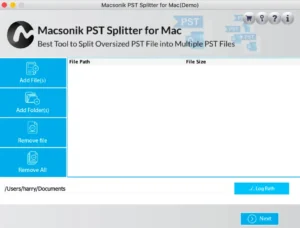
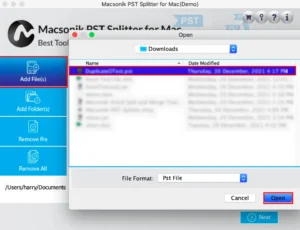
- Click Add Files to open the PST files that you want to split.
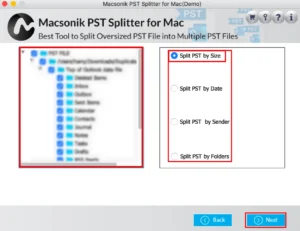
- Drag the structure, preview the data, and select the criteria by which you want to split the file.
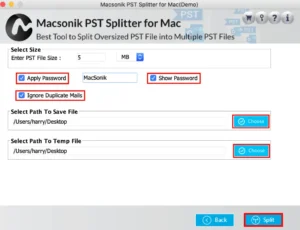
- Finally, select the size and other useful features, set the path to save the file, and click Split.
Real-Life Case Study: Corporate Email Migration
Client: Financial Services Company Using Archived PST Files.
Challenge: The large PST files fail to open on Mac systems.
Problem Faced: Therefore, manual splitting caused data inconsistency and delays. Also, didn’t produce accurate output.
Solution: They used the MacSonik PST splitter solution to open large PST file on Mac.
Result:
- Successfully opened oversized PST files.
- Maintained complete email structure.
- Improved migration speed.
- Avoided data loss and downtime.
Now, the company manages archives smoothly on Mac.
Conclusion
In the end, large PST files often cause performance issues and compatibility errors on Mac systems. While there are manual methods like splitting or repairing PST files that may work in some cases. They are not always reliable or efficient. The best solution to solve pst file too large to open Mac is to use PST splitter software. This ensures open, convert, and manage large PST files without data loss or technical complexity.
Frequently Asked Questions
Ans- You can reduce PST file size by removing unnecessary emails, deleting duplicate messages, saving attachments separately, and archiving old mailbox data. Splitting a large PST into smaller files is also a common solution. However, manual methods can take time and may require Windows Outlook in some cases. Many users prefer the professional MacSonik PST Splitter for faster and safer management.
Ans- Yes, many users save PST files on Mac without installing Microsoft Outlook by using a dedicated PST Splitter Tool. This allows you to preview emails, contacts, calendars, and attachments directly. They are especially useful when Outlook is unavailable or the PST file is too large to import normally. It is a practical option for quick mailbox access.
Ans- Outlook may crash when a PST file is oversized, partially corrupted, or contains years of mailbox data with heavy attachments. Large files consume more memory and system resources, which can slow performance on Mac. Compatibility issues between Windows-created PST files and Mac Outlook can also trigger crashes. Reducing file size or using a specialized tool often helps.
Ans- The safest approach is to archive old mailbox data regularly, split oversized PST files into manageable sizes, and keep secure backups. Organizations often use professional solutions like MacSonik PST Splitter Tool for controlled processing and accurate results. This helps preserve folder structure, reduce corruption risk, and simplify long-term email management. It is ideal for compliance and business continuity needs.
About The Author:
I am Neeru Kuchhal, a Technical Content Writer who focuses on turning complex ideas into clear, engaging, and impactful content. I combine creativity with strategy to write blogs, web content, and technical articles that connect with the right audience and support brand goals. I believe great content is not just written. It is thoughtfully created to inform, build trust, and drive action.
Related Post
