Migrate Yahoo Mail to Google Workspace: A Complete Guide

Amelia James
August 11th, 2026
Introduction: Once the titan of emails, Yahoo Mail, has now lost ground to Google Workspace’s powerful, dynamic, cloud ecosystem. Imagine freeing your business’s email from old inboxes and moving towards productivity, teamwork, and security. This guide discusses the manual ways and the professional MacSonik Yahoo Backup Tool to migrate Yahoo Mail to Google Workspace. And all of this while overcoming large mailbox sizes and sync issues to make migration smooth, safe, and super effective.
“I’m switching my small business from Yahoo Mail to G Suite and need help migrating emails, contacts, calendars, etc., for 10+ users. Can you provide a step-by-step guide to ensure I migrate Yahoo Mail to G Suite smoothly?“
Dan Paul
What Motivates to Transfer Yahoo to Google Workspace?
Migration is not only about the platform switch but a strategic move to ensure long-term access and continued workflow. Considering this, take a look at the general factors for which individuals, IT admins, and enterprises switch:
- Google Workspace provides real-time collaboration together in documents and meetings.
- Workspace has spam controls, 2FA, and high-level compliance built into the service.
- G Suite can scale up in size from an individual to a business with 500 employees without difficulties.
- Admins have the ability to apply policies for users, access permissions, and data storage resources.
- Yahoo may be free, but it does not provide anything close to advanced productivity.
- Google Workspace helps businesses achieve an ROI through better productivity.
Google Workspace, unlike Yahoo, provides easy merger with CRM, project, and task management, and accounting apps. This is extremely important for businesses trying to scale up in the global markets.
How Do You Migrate Yahoo Mail to Google Workspace?
Transferring one email client to another is not as simple as exporting a file. It requires careful consideration and effective methods. Here, we will study a manual solution and an expert tool to perform the migration. Along with that, we will know which one among them is the better option. But first, let’s check out the pre-requirements for migration.
Prerequisites for Yahoo Mail to Google Workspace Migration
- Enabled IMAP access
- Active Google Workspace account with admin licence
- Enabled Two-step verification and generated App Password
- Stable internet connectivity
Manually Migrate from Yahoo Mail to Google Workspace
In this section, find out all the possible freeways available for Yahoo Mail transfer. These are briefly explained, but have their own unavoidable loopholes.
1) Through Google’s Data Migration Service
- Log in Google Admin Console and browse to Tools.
- Then, choose Data Migration Setup and pick Emails/Contacts.
- Further, opt for IMAP Server as your source and enter these details:
(Server: imap.mail.yahoo.com with Port: 993 and Security: SSL/TLS)
- Next, provide Yahoo Mail credentials and authenticate with G Suite.
- Choose to migrate all emails or select a Date Range.
- Finally, tap Start to migrate Yahoo Mail to Google Workspace.
Pros: Ideal for a large organization migrating data for multiple Yahoo users.
Con: Cannot manage migrating calendars, only supports email and contacts.
2) Using Gmail Import Feature
-
- Within Gmail, sign in with your Workspace credentials and open See All Settings.
- Next, head to the Accounts and Import tab and locate Check mail from other accounts.
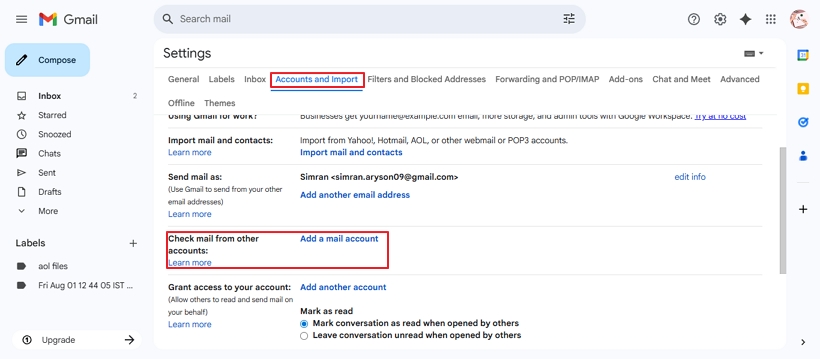
- Thereafter, choose Add a Mail Account and enter your Yahoo credentials.
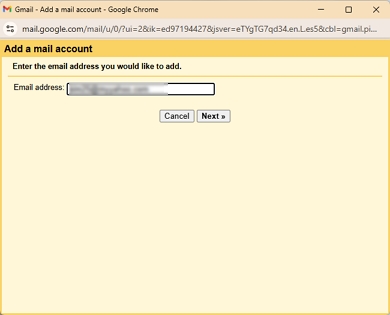
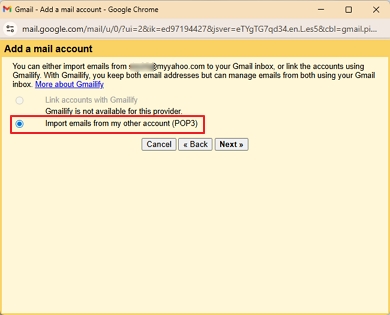
- Click Next, and further, click Import emails from my other account (POP3).
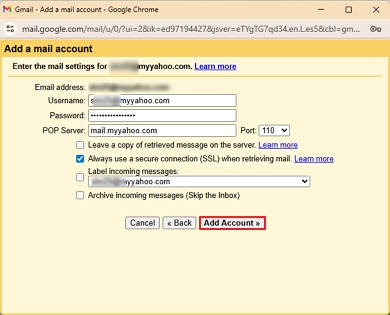
- Press Next and enter the following details for your POP3 account:
(Username and password of Yahoo account with Server: pop.mail.yahoo.com and Port: 995)
6. Lastly, check Always use a secure connection (SSL) and tap Add Account >> Finish.
Pros: Ideal for small teams and individuals with a POP3 connection.
Con: Time-consuming, especially with a large volume of Yahoo mailbox data. Also, only fetches the incoming mails for the next 30 days.
3) Transfer Yahoo Mail to G Suite (Contacts)
-
- Sign in to your Yahoo Mail account and proceed to Contacts.
- Further, click More (…) and opt for Export to CSV file.
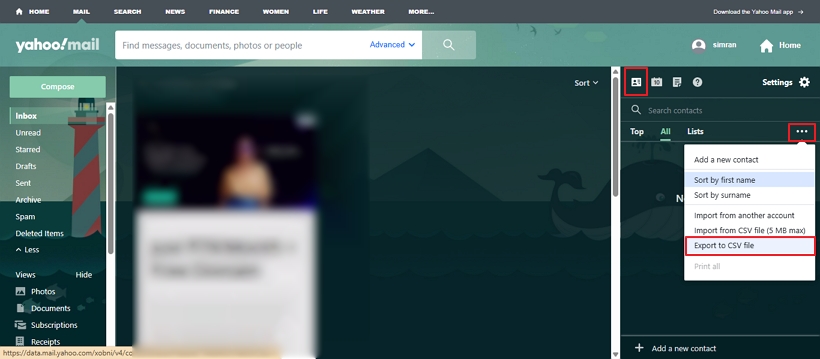
- Next, open Google Contacts (contacts.google.com) and from the left, click Import.
- Choose the downloaded Yahoo Contacts CSV and press Import.
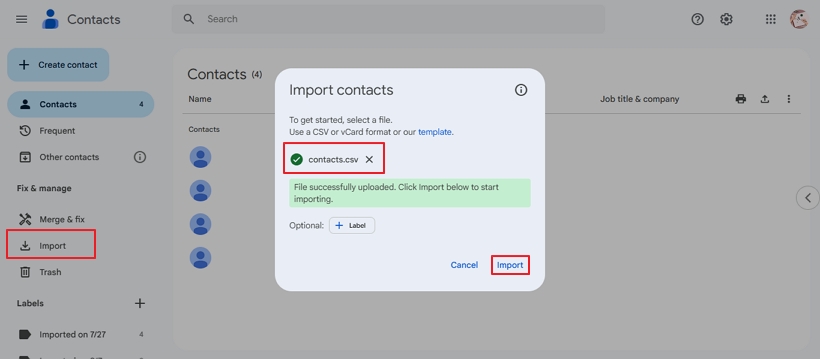
Pros: It is easy and convenient with the built-in Export and Import features of Yahoo and Google.
Con: The structure of CSV is not retained, and loss of crucial data from contacts is possible.
Hassle-Free Migrate Yahoo Mail to Google Workspace
MacSonik Yahoo Backup Tool is an effective solution to directly transfer emails, calendars, and contacts altogether to G Suite. It is designed for users at all levels and supports bulk processing of many user mailboxes at once. Additionally, with its unique features and simple interface, the process is simplified and quickly completed. Moreover, this tool preserves the data, gives 100% accurate results, and has a demo version for a few free migrations.
Note: For those who wish to access Yahoo emails in other email clients like Thunderbird or Apple Mail. They can export Yahoo email to MBOX with this tool, too.
Steps to Migrate Yahoo Mail to G Suite
- Launch the MacSonik Yahoo Mail Backup Software and log in to your Yahoo account.
- Further, select the folders from the tree structure to migrate and >> tap Next.
- After that, select G Suite from the list of Save/Backup/Migrate As.
- Sign in to your Google Workspace account and pick the filters needed.
- At last, press Convert and migrate Yahoo Mail to Google Workspace.
Isn’t this more feasible than the manual method? You can even download Yahoo emails to Hard Drive with it.
Why Users Prefer Automatic Migration Over Manual?
When you transfer Yahoo to Google Workspace for free, some common challenges occur that you don’t have to face with the automated tool. This is why the tool-based solution is considered best for all cases. The challenges overcome are as follows:
- Size Limit of Yahoo Mailbox– In manual transfers, it reaches 10 GB and causes timeout errors, whereas the tool has no size limits.
- Loss of Attachments– The manual method skips large and non-standard file types, but expert software retains them all.
- Issues with Account Sync- Users need technical knowledge and may have difficulty syncing accounts manually.
- Mapping of Yahoo Mail Folders– Yahoo’s custom folders don’t align with Gmail’s labelling system when transferred manually.
So, all of these are handled effectively with the software without extra effort, and it even saves time and is cost-effective. So, choose wisely to ensure your data gets transferred without loss or issues.
Conclusion
The ability to migrate Yahoo Mail to Google Workspace is a must if you are looking for scalability, teamwork, and security. Manual methods are free and commonly used; however, there are restrictions. If your business processes sensitive data or bulk data and is worried about its safety, consider a dedicated tool. It ensures data transfer compliance and increases accuracy, speed, and no downtime.
Frequently Asked Questions
Ans: Yes, as long as you use a MacSonik Yahoo Email Backup Tool, you will not lose attachments. Generally speaking, attached files that are of a specific size are lost if you do not transfer the emails correctly.
Ans: It depends on how large your Yahoo Mail mailbox is, as well as your network speed. A 10 GB mailbox may take up to 5–10 hours to transfer for free on G Suite. While a Yahoo to G Suite Migration Tool will transfer it faster.
Ans: Yes, of course! Google Workspace offers team apps, high-level security, central control, and other features not offered by Yahoo Mail for business.
About The Author:
Amelia is the mistress of the webmail clients like Office 365, Gmail, Yahoo, Hotmail, and Opera Mail. Her research on downloading emails from webmail is outstanding. She has given the solution to download emails from webmail clients to a Mac device with all the mailbox items. She’s been into webmail solutions since 2010. In her free time, she reads books and writes technical blogs.
Related Post
