Migrate Gmail Emails to Hotmail Account? Best Approach

Amelia James
August 14th, 2026
User-Query: Hi, I want to migrate all my emails from Gmail to my Hotmail account. What is the easiest and most reliable way to transfer complete mailbox data, including attachments and folder structure, without losing any information?
Summary: Google is often looked at as a “Shared Bucket” model. It shares its 15 GB storage space across Photos, Drive, and Email. This prompts users to migrate Gmail email to Hotmail, as Hotmail provides 15 GB storage specifically for emails. Today’s article is all about this migration process. We’ll share what makes users do this migration and how to execute it. Furthermore, we’ll end this article by introducing an enterprise-grade solution, the MacSonik Gmail Backup Tool. This tool will help large businesses to migrate email data in bulk..
What Makes Users Transfer Emails from Gmail to Hotmail?
Companies usually transfer their Gmail emails to Hotmail, as it offers advanced desktop email management features. The following are the reasons that make users consider this migration:
- Many users move to Microsoft services to integrate with the productivity tools and for better compatibility.
- Organizations often carry out email migration while switching to company-approved email platforms.
- The desktop-based users prefer Outlook.com for its advanced email organization and offline access.
- Gmail to Hotmail email migration helps users prevent data loss due to accidental deletion.
- Outlook.com provides better compatibility with enterprise tools and systems.
How do I Migrate Gmail Email to Hotmail Efficiently?
In the following section, we will look at the solutions to migrate Gmail emails to a Hotmail account. Both manual and professional tool-driven solutions are discussed. Take a look at both of them for better understanding.
Migrate from Gmail to Hotmail Using Apple Mail
In this manual process, we will first add both Gmail and Hotmail accounts to Apple Mail. After that, we’ll drag and drop the emails from Gmail to the Hotmail mailbox.
Use the following instructions to start the migration process:
- Launch the Apple Mail application on your system.
- Then, click on Mail > Add Account and choose Google > Continue.
- After that, enter the Gmail login credentials and grant permissions to start syncing emails.
- Similarly, configure the Hotmail account and let the emails sync fully.
- Now, select the Gmail emails you want to migrate to Hotmail.
- Next, drag and drop the selected emails into the preferred Hotmail account folder.
Limitations:
If the user needs to migrate large mailboxes or a large number of emails, the process becomes time-consuming. For syncing the emails properly, users need to have a stable internet connection.
The Best Solution to Bulk Migrate Gmail Email to Hotmail Account
With the MacSonik Gmail Backup Tool, users can securely migrate their emails from the Gmail account to a Hotmail account. Not only this, but it also supports email migration to various IMAP-supported platforms. Besides this, it allows users to export Gmail emails to MSG and other file formats. Throughout the migration, it ensures data integrity and offers features such as duplicate removal, selective email filtering, etc.
Simple and quick steps to transfer Gmail to Hotmail:
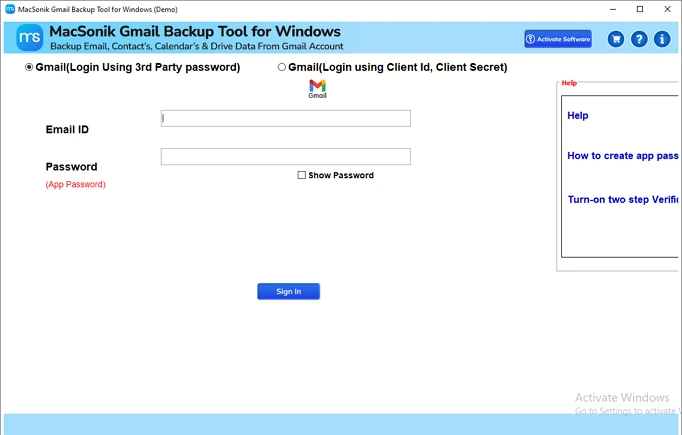
- Download and open the tool on your system.
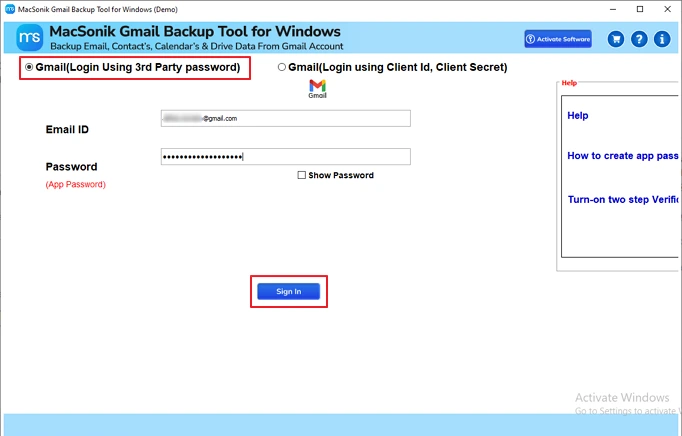
- After that, select Gmail (Login Using 3rd Party password) and sign in with your Gmail email ID and password.
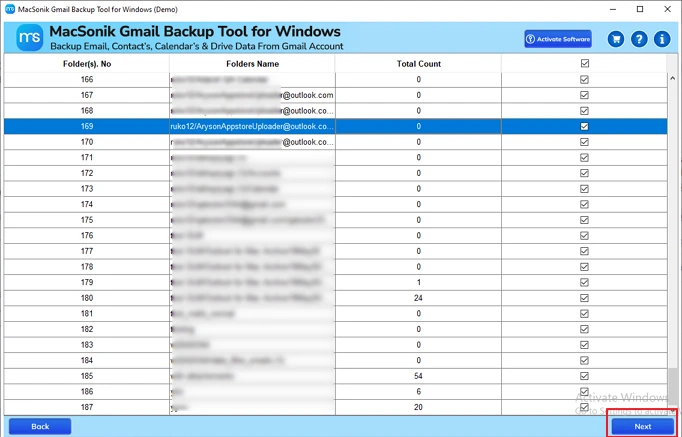
- Next, choose the emails you wish to download and click Next again.
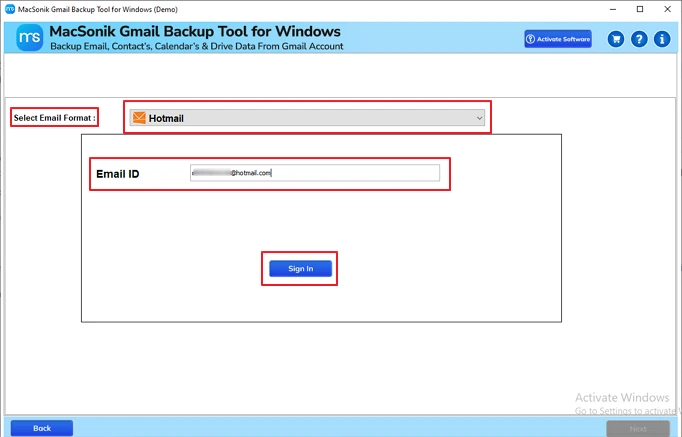
- Now, select the Email Format as Hotmail and sign in with your email ID.
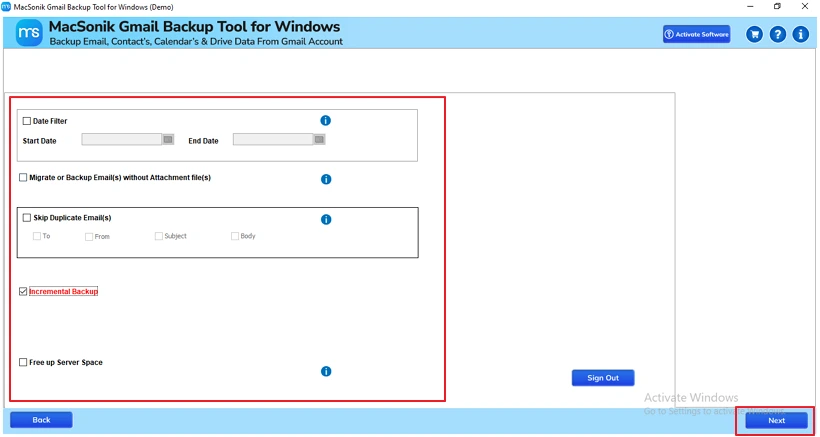
- Next, apply the necessary filters and click on the Next button to complete the process.
A marketing professional needed to migrate Gmail data to Hotmail during an organizational transition. To migrate thousands of emails with attachments, she used the MacSonik Gmail Backup Tool. The tool helped her securely transfer all mailbox data while maintaining folder structure and removing duplicates.
Conclusion
Businesses need to migrate Gmail email to Hotmail account for improved storage space. Through this blog, we have shared the best possible ways for Gmail to Hotmail email migration. The manual migration is complicated and not suitable for beginners and a non-technical audience. Conversely, with the help of the Gmail Email Backup Tool, users can easily bulk migrate emails to Hotmail. It also provides advanced features that further customize the migration process.
Frequently Asked Questions
Ans- Users migrate from Gmail to Outlook.com to benefit from better integration with Microsoft tools and a more advanced email management experience. It also helps in account consolidation, data backup, and meeting organizational or business requirements.
Ans- Yes. You can migrate emails from Gmail to Hotmail along with attachments using manual methods or automated tools. However, the success depends on the method used, internet stability, and mailbox size during the transfer process.
Ans- Yes, it is possible to remove duplicate emails while migrating from Gmail to Outlook.com, but this feature is usually available in MacSonik Gmail Backup Tool.
Manual methods generally lack duplicate detection, which may result in repeated emails after migration.
Ans- Emails from Gmail may not import into Hotmail due to incorrect IMAP settings, authentication issues, or sync errors. Other causes include poor internet connection, large mailbox size, or server-side restrictions during the migration process.
About The Author:
Amelia is the mistress of the webmail clients like Office 365, Gmail, Yahoo, Hotmail, and Opera Mail. Her research on downloading emails from webmail is outstanding. She has given the solution to download emails from webmail clients to a Mac device with all the mailbox items. She’s been into webmail solutions since 2010. In her free time, she reads books and writes technical blogs.
Related Post
