How to Import EML to GoDaddy Email (Step-by-Step Guide)

Amelia James
August 11th, 2026
Summary: In situations where the emails are lost due to a sudden system failure, a user still has EML backups. Therefore, to restore their email messages, it is best to import EML to GoDaddy email. But, how does the user ensure the authentic conversion? This article discusses techniques for importing the EML files to a GoDaddy email account. For 100% authentic conversion, we have explained a specialized tool, the MacSonik EML Converter. Now, let’s begin with the article.
User-Query:-
“I’ve saved several important emails as EML files from my old Thunderbird account. Now, I use GoDaddy for my business email and want to transfer those messages there. What’s the secure way to import them without losing attachments or content formatting?”
Why Import EML File to GoDaddy Email?
Given below are the reasons why importing EML files into GoDaddy email becomes crucial:
- Users switching from Outlook to other email clients often move their EML files to GoDaddy Email to retain them.
- In situations where GoDaddy emails get deleted by mistake, users can restore their messages quickly.
- Businesses import EML templates into GoDaddy Email to quickly send the pre-designed emails.
- To ensure that important messages are preserved, users rely on EML imports into GoDaddy Email.
- Several organizations import their EML files to GoDaddy to maintain a centralized archive for regulatory compliance.
Basic Methods to Import EML to GoDaddy Email
Let us now implement the solutions to import the EML files to your GoDaddy email account.
Manual Method 01: Via IMAP Migrations
There is no built-in feature in GoDaddy Email that directly upload EML file into GoDaddy Email. For this approach, we will use the Mozilla Thunderbird email client and add the GoDaddy email account via the IMAP protocol.
Use the step-by-step instructions to begin the process:
- Launch the Thunderbird application and add your GoDaddy email account.
- Use the IMAP protocol to connect the GoDaddy account to Thunderbird.
- Now, create a Local Folder in Thunderbird. Then, drag and drop the desired EML files into this folder.
- After that, drag the EML files from the Local Folder to the GoDaddy mailbox folder.
- Next, wait for the sync process to be successful.
Limitations: The whole process takes a considerable amount of time to sync the emails. This also needs a stable internet connection to properly sync GoDaddy emails.
Manual Method 02: By Forwarding Emails
It is a simple method that is used to forward only a few emails one by one to the GoDaddy email address.
The following are the steps to open EML file in GoDaddy Mail:
- First, open the EML file in a web browser.
- Then, navigate to the Forward button.
- After that, type in your GoDaddy email address in the recipient field.
- Now, repeat the process to forward the rest of the emails one by one.
Limitations: The above manual approach is impractical for bulk imports. Also, some of the email metadata gets altered while forwarding the emails.
A Reliable Way to Import EML to GoDaddy Email Using a Dedicated Tool
The EML Converter is an all-in-one solution that is built for both individual and business use. This converter tool seamlessly imports, exports, or converts the EML files to GoDaddy Email effortlessly. Also, this tool import EML to Yandex Mail. Whether the user is switching to the other email client or ensuring file compatibility, this tool does it all. It enables smooth migration and guarantees zero data loss. Users can also choose between single or bulk conversions.
Steps to import EML emails to GoDaddy Email:
- Begin by downloading and installing the tool.
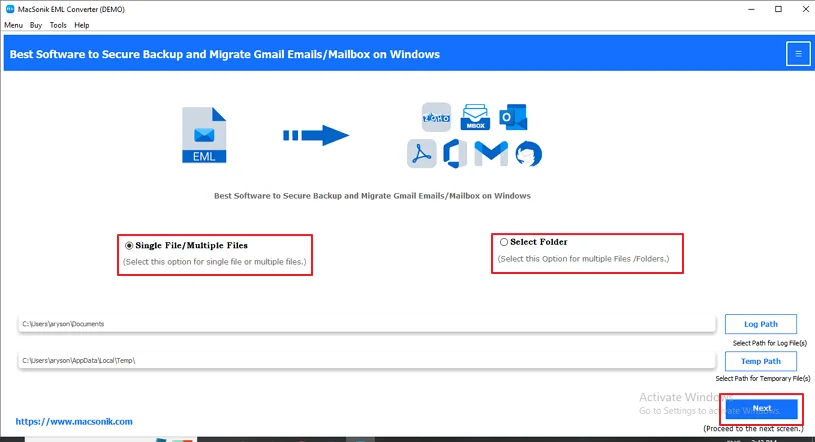
- Then, choose either Single/Multiple Files or Select Folder and hit Next.
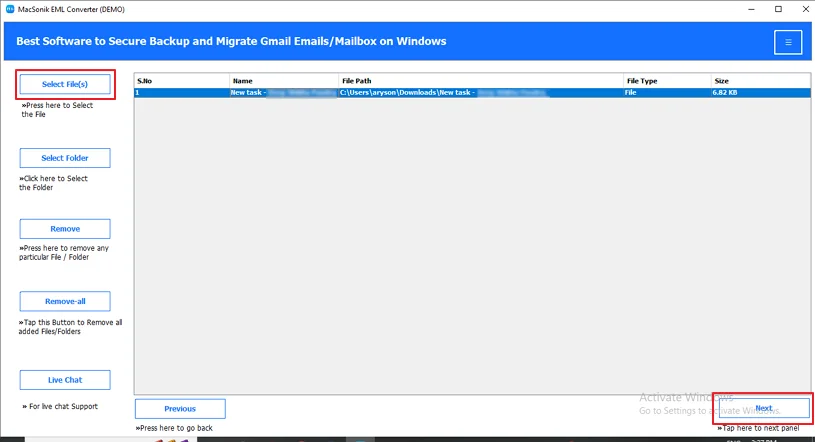
- After that, click on the Select Files option to upload the desired EML file.
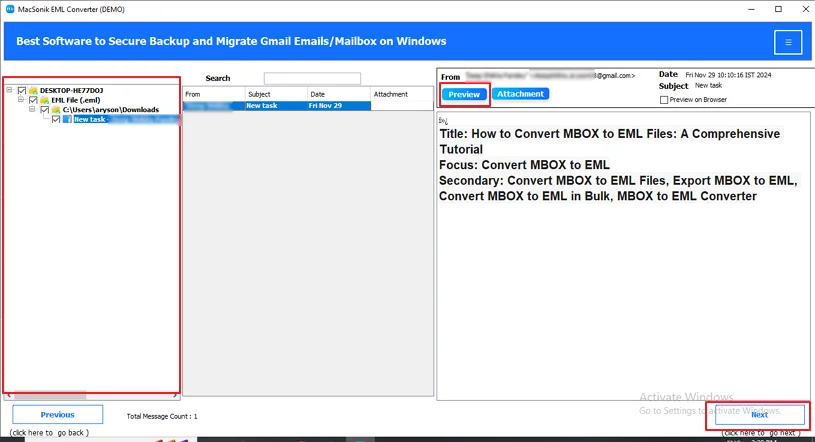
- From the tree structure, choose the folders you want to convert and preview them.
- Click Next and then choose GoDaddy Email as the Email Client.
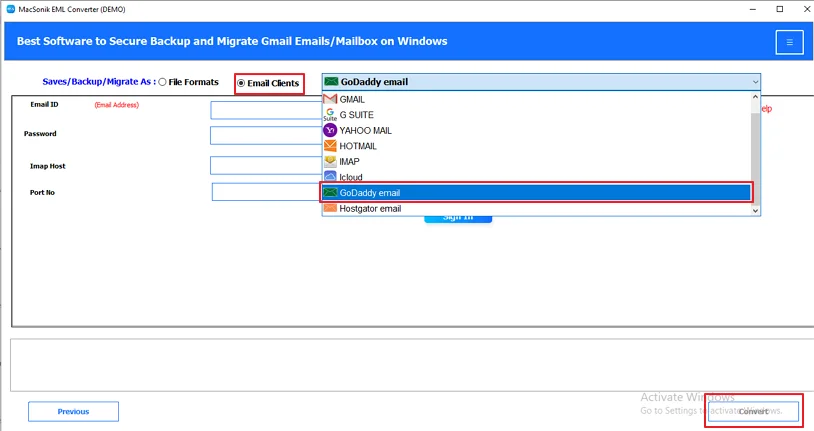
- You can also apply the additional settings if you want.
- At last, press the Convert button to start the conversion.
Real-Life Scenario:-
A small business owner decides to move their team from a desktop-based email client to GoDaddy Email after purchasing a new domain. They already have years of customer conversations saved as EML files from their old system. To ensure business continuity and avoid losing important records, the user import EML emails to GoDaddy Email using the MacSonik EML Converter Tool, making all past emails easily accessible in the new web-based mailbox for daily communication and reference.
Conclusion
Businesses often prefer the EML to GoDaddy Email conversion for improved accessibility and compatibility. This blog has successfully outlined the importance of the EML file to GoDaddy Email conversion. Also, we have explored multiple methods, manual and automated, using the EML Converter Tool to import EML to GoDaddy Email. The user can pick the most suitable method that aligns with their requirements.
Frequently Asked Questions
Ans- One of the most reliable tools for importing EML files into GoDaddy Email is the MacSonik EML Converter. It is because it supports bulk import with full data integrity and retains email structure and attachments during the process.
Ans- Yes, it is safe to import EML files into GoDaddy Email when you use a trusted and reliable professional tool. These approaches ensure email content, attachments, and structure remain intact without risking data loss or security issues.
Ans- You can open an EML file in GoDaddy Mail by opening the file in an email client or browser and simply forwarding it to your GoDaddy email address.
This method requires no technical knowledge and lets you view the email directly in your GoDaddy inbox.
Ans- Yes, you can upload multiple EML files into GoDaddy Email at once by using an email client like Thunderbird configured with GoDaddy via IMAP. However, GoDaddy Webmail itself does not support direct bulk EML uploads, so a manual workaround or professional tool is required.
About The Author:
Amelia is the mistress of the webmail clients like Office 365, Gmail, Yahoo, Hotmail, and Opera Mail. Her research on downloading emails from webmail is outstanding. She has given the solution to download emails from webmail clients to a Mac device with all the mailbox items. She’s been into webmail solutions since 2010. In her free time, she reads books and writes technical blogs.
Related Post
