Best Methods to Convert EML to MSG File Format in Bulk?

Amelia James
February 25th, 2026
User-Query:
I am near the day when our company shifts to Outlook that why I need a solution to convert my EML files to MSG format. How to move my file from EML to MSG?
Summary: So if you’re moving to Outlook, you’ll probably need to convert those EML files first. The main thing is making sure the email content, attachments, and layout stay the same. In this blog, we’ll talk about a simple way to convert EML to MSG without making things complicated. Here, we will cover the traditional method and also use the professional MacSonik EML Converter Tool to make the process simple.
Why EML to MSG Conversion is Important?
- Microsoft Outlook does not properly support EML files. It mainly works with the MSG format.
- Attachments and formatting may not display correctly when EML files are dragged into Outlook.
- MSG files are easier to manage inside Outlook. You can open, move, and organize them without issues.
- For office work or legal records, keeping emails in Outlook’s native format feels more reliable.
- It also helps when you need to import old emails into an Outlook profile without breaking the structure.
Difference Between EML and MSG (With Clear Comparison)
| Feature | EML Format | MSG Format |
|---|---|---|
| Full Form | Electronic Mail Format | Outlook Message Format |
| File Type Nature | It is an open standard format, so it works across platforms | On the other hand, it is a proprietary format developed by Microsoft |
| Outlook Support | Outlook can open it, but with limited control | However, it is fully supported inside Outlook |
| Folder Integration in Outlook | Does not behave like a native Outlook item | In contrast, it works exactly like a normal Outlook email |
| Bulk Handling in Outlook | Managing many EML files can feel difficult | Whereas MSG files are easier to organize and sort |
| Email Properties | Basic details like To, From, and Subject are preserved | Additionally, all Outlook-specific properties are maintained |
| Best Use Case | Better for sharing or storing emails across platforms | Better when you mainly use Outlook for email management |
How to Convert EML to MSG Using the Manual Method?
If you only have a few EML files, you can do it directly inside Outlook. It’s not automatic, but it works.
Steps to Convert EML Files to MSG
- Firstly, open Microsoft Outlook.
- Take your EML file and simply drag it into Outlook. Drop it into any folder.
- Then, open that email once, just to make sure it looks fine.
- Click on File in the top-left corner.
- Thereafter, choose Save As from the menu.
- Further, pick the folder on your computer where you want to keep it.
- Then, in the file type section, select Outlook Message Format (*.msg).
- Finally, click Save to change EML to MSG.
Limitations
- You have to convert emails one by one. No bulk option.
- Formatting may not always stay the same.
- You need Outlook installed and configured on your system.
- It becomes tiring and repetitive for large numbers of emails.
Advanced Method to Convert EML to MSG Easily
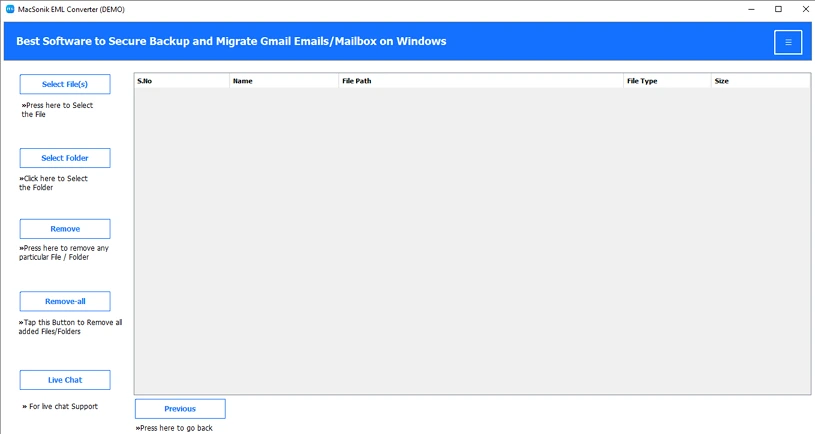
MacSonik EML Converter is a tool that helps change EML files into MSG and some other formats. It’s mainly used when you want to open EML emails in Outlook without doing everything manually. The layout is simple, so you can load your EML files and see their details before converting them. It also lets you convert EML to CSV and many other file formats.
Steps to Save EML Files as MSG
- Firstly, download the EML Converter Tool.
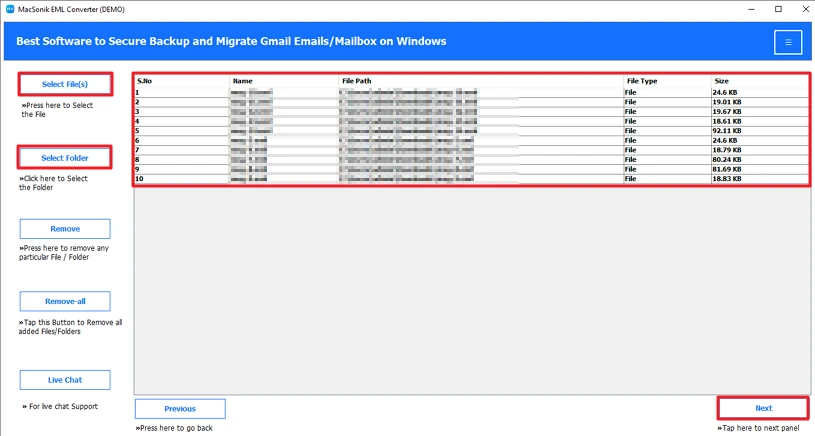
- Add the EML files and click Next.
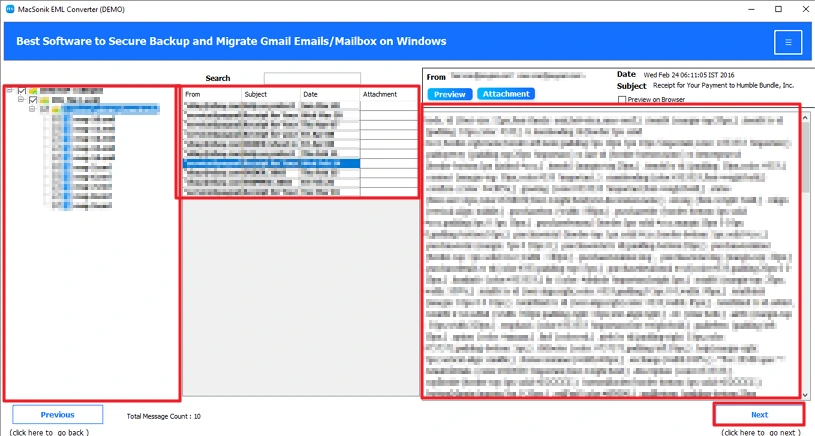
- Preview and select files and hit Next.
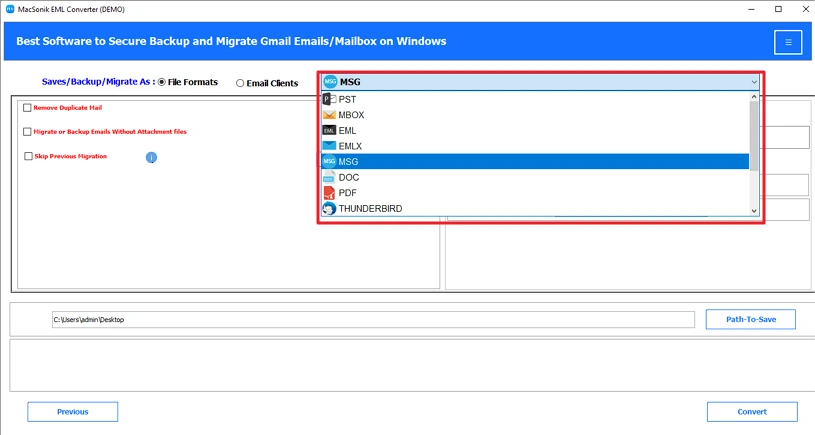
- Thereafter, choose the MSG file format.
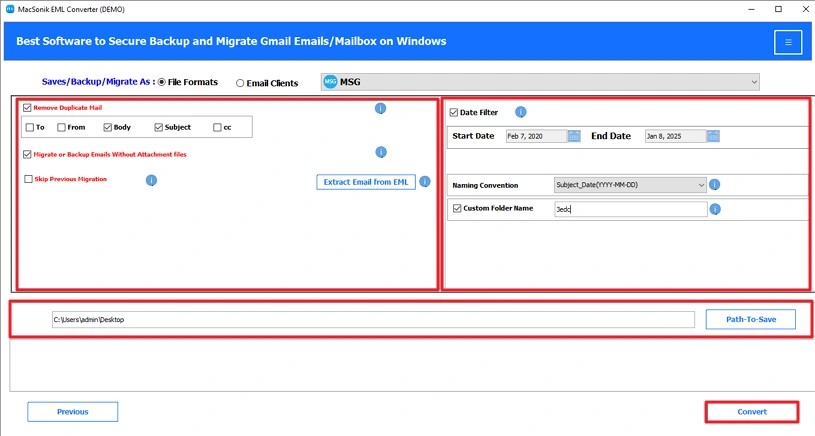
- Finally, use filters, set the path, and click Convert.
Conclusion
In this blog, we went through the different ways to convert EML to MSG. If you’re using Windows and only have a few files, the manual method can work. Using an EML Converter makes things easier. It can handle bulk files at once and keep the email data the same. You also get options to skip duplicate emails or leave out attachments you don’t need.
Frequently Asked Questions
Ans: If you are moving to Outlook, converting EML to MSG becomes necessary because Outlook mainly works with MSG files. EML files may open, but they don’t behave like normal Outlook emails.
Ans: On Mac, you can use the MacSonik EML Converter Tool. You just need to add your EML files, preview them, choose MSG as the output format, and start the conversion.
Ans: Yes, the EML Converter Tool provides filter options. You can use these options to avoid duplicate emails or skip unnecessary attachments during the conversion process.
Ans: If you only have a few files, the manual drag-and-save method in Outlook can work. But for bulk conversion and less manual effort, using the MacSonik EML Converter Tool is the more practical choice.
About The Author:
Amelia is the mistress of the webmail clients like Office 365, Gmail, Yahoo, Hotmail, and Opera Mail. Her research on downloading emails from webmail is outstanding. She has given the solution to download emails from webmail clients to a Mac device with all the mailbox items. She’s been into webmail solutions since 2010. In her free time, she reads books and writes technical blogs.
Related Post
