How to Backup Yandex Mail to Hard Drive: Quick Tutorial

Amelia James
August 11th, 2026
Mathew Kin Query:
I am on a storage cleanup mission and want to clear out my Yandex Mail space. At the same time, I want all my data securely saved on a hard drive to avoid any loss. Is there a way to save Yandex emails to Flash Drive all at once?
Introdution: Online mailboxes are generally endless until you find something wrong with them. Yandex Mail is one among them, too, as many users are complaining about slow performance, sync failures, storage overloads, data breaches, and more. Therefore, whether it is an IT admin, a professional from an enterprise, or an individual end user. Everyone wants to backup Yandex Mail to hard drive to keep an offline copy of their crucial data on their PC, HDD, or other storage. This blog explains elaboratively the free methods and an efficient Yandex Mail Backup Tool for quick and secure data transfer.
Why Backup Emails from Yandex to Computer?
A local copy of your Yandex emails helps access data even in the following situations:
- Account Lockouts: Your Yandex account is temporarily disabled, or you cannot connect.
- Accidental Deletion: The mails are deleted abruptly by human mistake or any other issue.
- Long-term Archival: Data is available in the near future, too, even if Yandex Mail stops working or is discontinued.
- Yandex Outages: The account suddenly showed an error or stopped working, or halted during data processing.
- Storage Limits: Yandex Mail mailbox is cluttered and cannot hold any new incoming data.
- Lost Credentials: You lost the password of your Yandex Mail, or the email address is incorrect.
In short, “Even though cloud is a convenient storage space, hard drives still remain the safest vault for all.”
Hands-On Method to Backup Yandex Mail to Hard Drive
There is a simple and easy free method that you can follow to save emails manually. The steps are:
- Log in to your Yandex Mail account and click on the Settings icon.
- Then, click All Settings and go to the Email Clients tab.
- Next, ensure that “From the imap.yandex.com server via IMAP” is chosen.
- Once confirmed that IMAP authorization is enabled, proceed.
- Now, open any other email client supported by IMAP of your choice. (Say, Thunderbird).
- Further, use its Add Account option to connect Yandex Mail to it via IMAP.
- Use the following IMAP credentials to connect:
- Server: imap.yandex.com with Port 993 and SSL
- After that, select the emails from the Yandex folders that you want to save and right-click them.
- Now, there are two ways for backing up Yandex Mail to Hard Drive:
- Choose Save As from the right-clicked options and select the hard drive destination. Emails will be saved in the EML format.
- Or, install the ImportExportTools NG and use it to save emails on the hard drive in EML/MBOX/PDF/ or CSV formats.
- Finally, all your emails are stored on the hard drive as desired.
Key Notes to Backup Yandex Mail to Hard Drive:
- You can choose any of the following IMAP-based email clients: Outlook, Mozilla Thunderbird, Apple Mail, eM Client, Gmail, or others.
- If you want to save data in PST format, prefer the Outlook email client.
- For Mac, prefer Apple Mail and use the Export Mailbox feature.
- Migrate Yandex Mail to Gmail to use Takeout and save as MBOX on PD.
Loopholes of the Manual Method
- It is only suitable for a non-cost approach with a few mailboxes.
- Cannot handle oversized mailboxes and needs an internet connection.
- Users must have technical skills and proper credentials. (APP PASSWORD FOR MORE SECURE AUTHENTICATION.)
- No scope for handling duplicates or availability of custom filters.
- High risk of data loss, structure alterations, and need for application installations.
In all, this method to backup Yandex Mail to Flash Drive is tiring at times, time-consuming, and lengthy. Therefore, let’s go for a simpler alternative for this email client data download.
Optimized Method to Backup Yandex Mail to Hard Drive
MacSonik Yandex Mail Backup Tool provides a streamlined solution to transfer data within minimal time with 100% accuracy. It is ideal when you need complete and automated backups of your large and bulky mailboxes, along with or without attachments. Additionally, this easy-to-use software needs no skills and ensures that duplicates aren’t created. Moreover, it keeps the folder structure preserved and data integrity maintained without any loss or alterations.
Working Steps to Save Yandex Emails to External Hard Drive
-
- Install and start the MacSonik Yandex Backup Tool as an administrator.
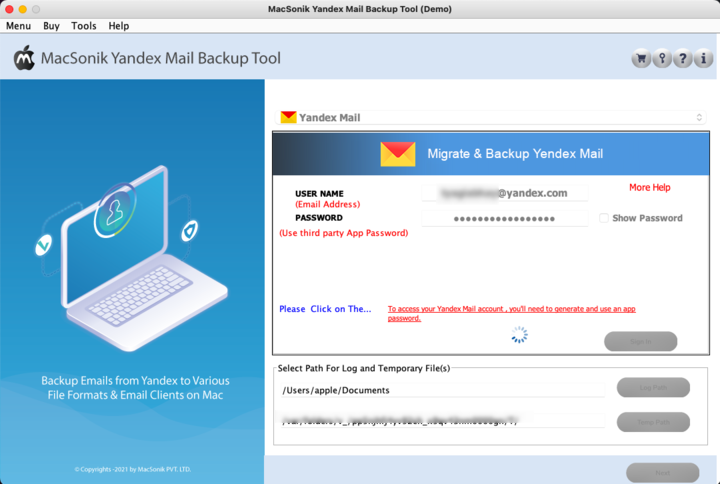
- Then, enter the credentials (email address and app password) and click Sign In.
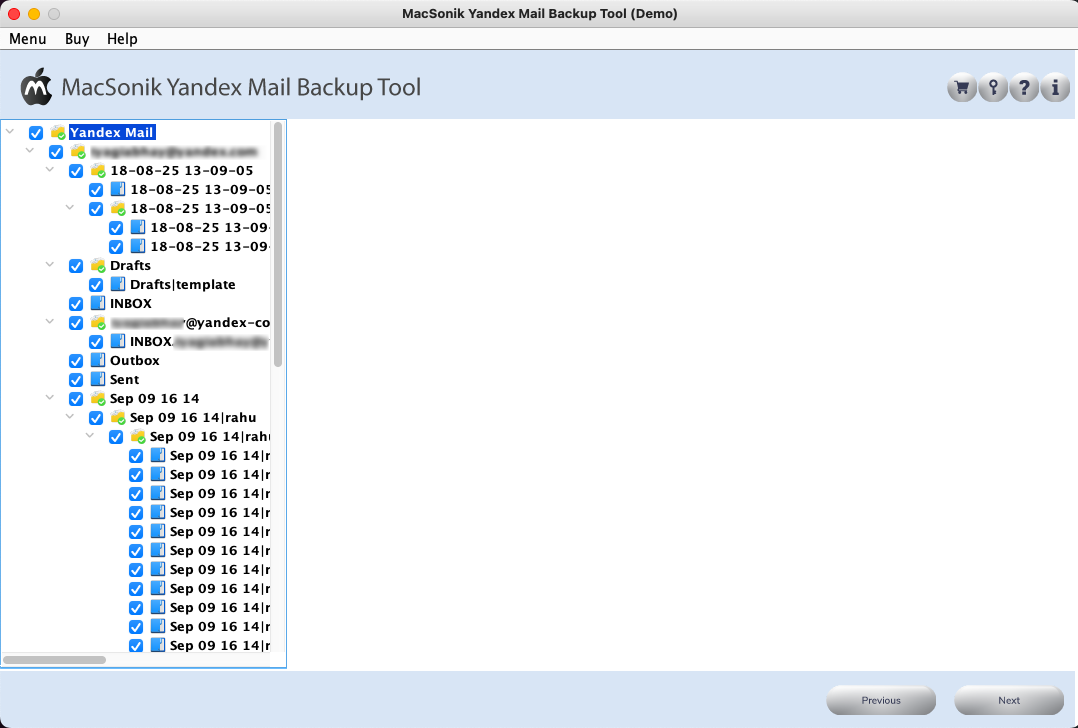
- Once signed in, all the folders appear in a tree-like structure. Preview and select them. Tap Next.
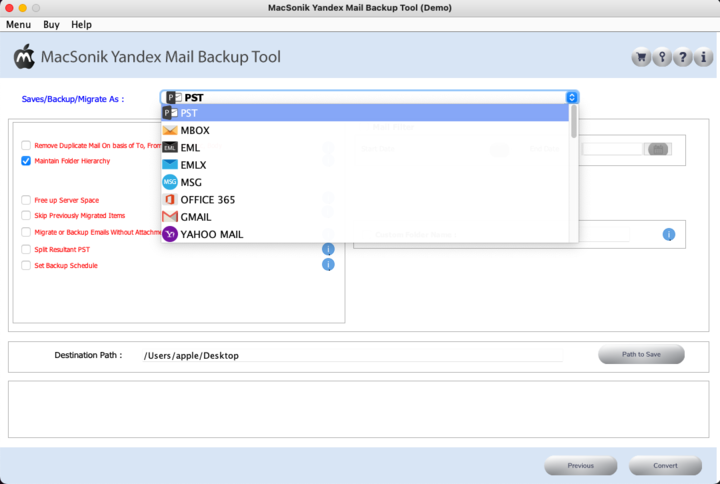
- After that, choose any file format from the listed options to store emails in your flash drive.
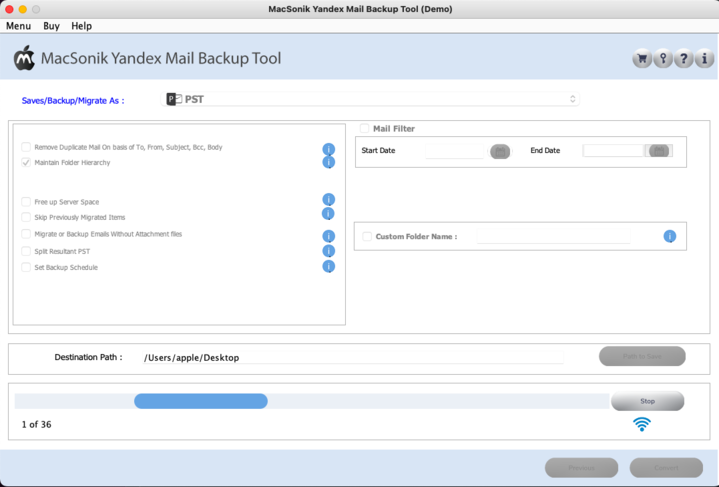
- Finally, apply the filters accordingly, pick the hard drive folder location, and press Convert to bulk save emails.
Note: This tool is a reliable solution to even directly migrate Yandex to Office 365 or any other cloud or web-based email client.
Conclusion
The decision to backup Yandex Mail to hard drive or flash drive is a good preventative action. Whether you’re resolving a storage issue, creating offline archives, or preparing to move to another service, you’ll have options for backup. That too, both manual and automatic, which will give you total control of your mailbox data. Note that, for performing regular backups over a large number of emails, a professional MacSonik Yandex Backup Software offers the best user experience. For smaller workloads, the IMAP manual method works well, too.
Frequently Asked Questions
Ans: Yes. You can either export email via IMAP mail clients or use MacSonik Yandex Backup Software to save emails directly to your computer or an external drive.
Ans:
– MBOX and EML are the most commonly used forward and backward compatible formats.
– PDF/HTML is the best option for readable archives.
– PST is the best if you consider opening backups in Outlook in the future.
– CSV is useful if you need data for archival or reports.
Ans: No. The limit depends on your local drive and not Yandex. The only challenge is that syncing a very large mailbox can take some time if you decide to do it manually. So, the best way out is to use the Yandex Backup Tool by MacSonik.
Ans: Yes, using the professional MacSonik Yandex Mail Backup Tool keeps the folder structure intact and in order.
About The Author:
Amelia is the mistress of the webmail clients like Office 365, Gmail, Yahoo, Hotmail, and Opera Mail. Her research on downloading emails from webmail is outstanding. She has given the solution to download emails from webmail clients to a Mac device with all the mailbox items. She’s been into webmail solutions since 2010. In her free time, she reads books and writes technical blogs.
Related Post
