Convert PST to EML for Mac & Win with 100% Accuracy and Fast

Neeru Kuchhal

August 17th, 2026
User-Query:
“I have a 35GB Outlook PST file containing nearly 60,000 emails, attachments, contacts, and archived folders. I need to convert it into EML format. So I can access my emails in EML-supported email clients on both my Mac and Windows PC. What’s the fastest and safest way to convert PST to EML without losing attachments or email formatting?”
— Posted by “David Wilson”
Introduction: PST (Personal Storage Table) is the default mailbox format used by Microsoft Outlook to store emails, contacts, calendars, and attachments. As mailbox sizes grow, many users need to convert PST files when migrating to other email platforms. EML is a universally supported email file format that works with a wide range of email clients. Since each email is stored as a separate file, EML is ideal for backup, sharing, legal documentation, and email migration. This guide explains the best methods to transfer PST files to EML on Mac and Windows. Moreover, it covers the MacSonik PST Converter Tool for effortless migration.
Why EML is Often the Better Choice Than PST for Archiving?
There are various reasons why Mac and Windows users choose to convert PST to EML:
- Open Outlook emails in multiple email clients.
- Create individual email files for backup.
- For sharing the emails without Outlook.
- Preserve email formatting and attachments.
- Simplify legal discovery and documentation.
- Migrate Outlook data to another platform.
- Also, to archive important business communication.
Step-by-Step Tutorial: Import PST to EML Manually
Microsoft Outlook allows users to save emails individually in EML-compatible formats through drag-and-drop.
- First, open Microsoft Outlook.
- Now, import the PST file.
- Open the desired mailbox folder.
- Select one or multiple emails.
- Drag them to a desktop folder.
- Lastly, save the exported files.
Drawbacks of the Manual Method to Export PST to EML
- Not suitable for large mailboxes.
- There is no bulk PST conversion.
- Requires Outlook installation.
- Manual organization of emails.
- It is very time-consuming.
- No advanced filters.
- Additionally, risk of missing emails.
Exporting 20,000 emails manually may require several days of effort.
Secure and Automated PST to EML Conversion Solution
For bulk migration, use the MacSonik PST Converter Software. The software is designed for both Mac and Windows users and enables direct conversion without altering the original mailbox. It supports batch conversion, maintains complete mailbox structure, and preserves every email property, including attachments and metadata intact. Besides, this software has the capacity to import PST to Yahoo Mail with 100% precision and zero data leakage.
Whether you’re migrating a 5GB personal archive or a 100GB enterprise mailbox, MacSonik ensures a smooth conversion experience.
One-Time Conversion Service
Don’t want to perform the migration yourself?
MacSonik also offers a One-Time Email Migration Service, where certified migration experts securely convert PST to EML. This service is ideal for businesses migrating 100+ mailboxes or users who prefer a hassle-free migration experience.
Simple Procedure to Convert Outlook PST to EML
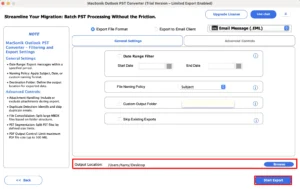
- Start by launching the MacSonik PST Converter Utility.
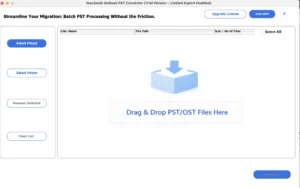
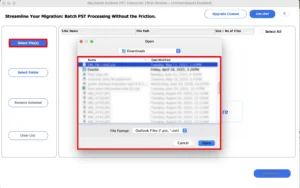
- Now, select files or folders, add the PST file that you want to convert.
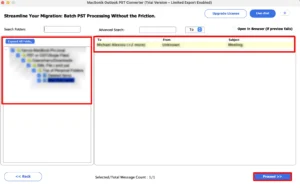
- Then, drag the hierarchy and preview the entire mailbox folder.
- Afterwards, choose EML as the saving file format and apply the filters as needed.
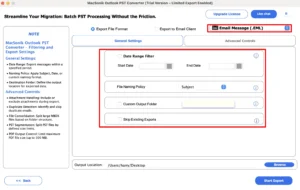
- Finally, choose the location to save the file, and click Convert to start the migration process.
MacSonik vs SysTools PST Converter: Which One is Better?
| Major Factors | MacSonik PST Converter | SysTools PST Converter |
| Mac Compatibility | Fully optimized for Mac (Intel & Apple Silicon M1/M2/M3/M4) | Limited Mac optimization with fewer Mac-specific features |
| Bulk Conversion | Unlimited batch conversion | Limited |
| Large PST File Support | Supports PST files over 100GB | Suitable for standard-sized PST files |
| Conversion Accuracy | 99.9% data integrity | High accuracy for supported conversions |
| Data Fidelity Preservation | High | Low |
| Advanced Email Filters | Filter by Date, Sender, Receiver, Subject, and Folder | Primarily date-based filtering |
| Preview Before Conversion | Detailed mailbox preview with attachments | Standard email preview |
| Technical Support | 24×7 dedicated technical assistance | Business-hours support |
Why Is MacSonik Worth Buying?
MacSonik PST Converter is designed with Mac users, IT professionals, and enterprise environments. It offers better scalability for large Outlook mailboxes, advanced filtering options for the latest macOS versions and Apple Silicon devices. For organizations migrating 30GB–100GB+ PST files, MacSonik provides faster performance, greater flexibility, and a richer feature set. This makes it a more valuable long-term investment for professional Outlook email migration.
Real-Life Case Study
A software development company needed to migrate 48GB of Outlook PST archives containing nearly 82,000 emails to an EML-supported document management system. Using the manual approach would have taken over 35 hours and required continuous monitoring.
With MacSonik PST Converter, the complete mailbox was converted in under five hours, while preserving attachments, folder hierarchy, and email metadata without any data loss.
Important Note: You can also convert PST to PDF seamlessly without any alteration.
Conclusion
In this write up, converting PST to EML enables users to access Outlook emails across multiple email clients. Although manual methods are suitable for exporting a handful of emails, they become impractical for large mailboxes and enterprise environments. If you need to convert large PST files, PST Converter is a reliable solution to convert PST to EML. Apart from that, it offers:
- 99.9% conversion accuracy.
- Bulk PST to EML conversion.
- Support for 100GB+ PST files.
- Complete attachment and metadata preservation.
- Advanced filtering options.
- Faster conversion performance.
- Full compatibility with both Mac and Windows.
- Better overall value than many competing solutions.
Whether you’re an individual user, an IT administrator, or an enterprise, MacSonik PST Converter offers a scalable way with complete data integrity.
Frequently Asked Questions
Ans. Yes. Professional MacSonik PST to EML converter software supports batch conversion, allowing you to add multiple PST files and convert them to EML in a single process. This feature is especially useful for businesses and IT administrators handling large Outlook archives.
Ans. Yes, a reliable PST to EML converter preserves all essential email properties, including To, From, CC, BCC, Subject, Date, Read/Unread status, and the original folder hierarchy. This ensures your mailbox remains organized after conversion.
Ans. Yes. Advanced PST converter tool preserves email attachments, inline images, and email properties during conversion. It also supports exporting contacts and other Outlook data into suitable file formats, ensuring no important information is lost.
Ans. The easiest method is to use a MacSonik PST to EML converter. Simply add the Outlook archive PST file, preview the mailbox, choose EML as the output format, apply filters if required, and start the conversion. This approach is much faster and more reliable than manual methods, especially for large archive files.
Ans. The MacSonik PST Converter provides advanced filtering options that allow you to convert emails based on date range, sender, recipient, subject, or specific folders. This helps migrate only the required emails and reduces conversion time.
Ans. To safely convert large PST files (50GB or more), use an enterprise-grade PST converter that supports bulk processing and maintains complete data integrity. This preserves folder hierarchy, email formatting, metadata, and attachments while ensuring a secure, error-free conversion on both Mac and Windows systems.
About The Author:
I am Neeru Kuchhal, a Technical Content Writer who focuses on turning complex ideas into clear, engaging, and impactful content. I combine creativity with strategy to write blogs, web content, and technical articles that connect with the right audience and support brand goals. I believe great content is not just written. It is thoughtfully created to inform, build trust, and drive action.
Related Post
