Migrate ProtonMail to Outlook PST Easily – Expert Solution

Mohd Kaif

September 7th, 2026
Quick Solution:
To migrate ProtonMail to Outlook PST, first export ProtonMail mailbox data using the available export options or Proton Mail Bridge, then use a professional conversion tool to convert the exported mailbox data into PST format. A reliable IMAP Backup tool preserves email content, attachments, folder structure, sender details, recipients, timestamps, and other mailbox metadata during conversion.user Query: “I’m planning to migrate emails from ProtonMail to Outlook PST file without losing any data. What is the best way to complete this task? I want to keep my folders, attachments, and old messages intact. Has anyone done this successfully, or is there a reliable migration method?”
Introduction to ProtonMail and Outlook PST Data
ProtonMail: ProtonMail is an email service that puts a big emphasis on keeping your emails private. It stores your mailbox data safely on their servers, which is why a lot of individuals and businesses that need some extra email privacy use it. One thing to keep in mind is that ProtonMail doesn’t store emails in the format Outlook expects, which makes moving to Outlook a bit more complicated than it would be otherwise – direct migration from ProtonMail to Outlook’s PST files just isn’t possible.
PST File: The PST is Microsoft’s way of storing email data that Outlook uses. A PST file can store:
- Emails
- Attachments
- Folders
- Calendar items
- Contacts
- Tasks
Having a PST file makes it a whole lot easier to take your Outlook mailbox data and move it to a different computer or archive it somewhere.
Why Switch from ProtonMail to Microsoft Outlook?
Users may need to migrate ProtonMail to Outlook PST for various reasons:
- Outlook Compatibility: A lot of the time when organisations are moving over to Microsoft Outlook, they need their ProtonMail emails in a format that Outlook can understand so they can access them easily.
- Email Backup: Having your ProtonMail emails in a PST file means you’ve got an offline copy of your emails that you can keep on a local machine.
- Business Migration: If you’re switching from ProtonMail to another email system, you’re probably going to need to transfer your old emails to the new one.
- Legal and Compliances: PST files are also commonly used for keeping track of emails for legal or regulatory requirements.
- Centralised Email Management: Some organisations like to manage all their different email accounts from the one Outlook interface.
Method 1: Manually Convert ProtonMail to PST File
A manual approach generally requires exporting ProtonMail emails into an intermediate format and then importing them into Outlook.
- Firstly, export ProtonMail emails using available export methods.
- Configure Outlook or another supported email client.
- Now, import the exported mailbox data.
- Move emails into Outlook folders.
- Lastly, export Outlook mailbox data as PST.
Limitations of the Manual Migration
|
Limitation |
Impact |
|
Longer migration process |
|
Requires intermediate applications |
|
Mailbox organization may change |
|
Time-consuming |
|
Requires additional effort |
|
Risk of missing data |
For small mailboxes, manual migration may work. However, large ProtonMail archives require a more reliable approach.
Method 2: Migrate ProtonMail to Outlook PST Using MacSonik
For bulk migrations, MacSonik IMAP Backup Tool provides a simplified workflow to convert mailbox data into PST format. The tool helps users export emails while preserving important mailbox properties, including: email content, attachments, folder hierarchy, email headers, sender and recipient details, date and time information. Users can also migrate IMAP-based mailboxes to other platforms such as Office 365. For more details, refer to this guide on migrate IMAP to Office 365 Additionally, it is useful for:
- Individual ProtonMail users
- Business email migration
- Email archiving
- Compliance projects
- Outlook mailbox preparation
Step-by-Step Guide for ProtonMail Emails to Outlook Migration
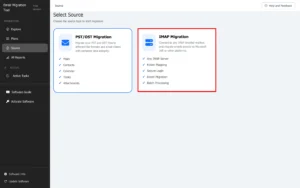
- Firstly, download and launch the MacSonik IMAP Backup Tool, then select the IMAP Migration option to proceed further.
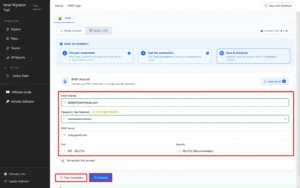
- Enter IMAP Account Credentials to securely connect your mailbox. Then, click Test Connection to verify the account and select Continue to proceed with the migration.
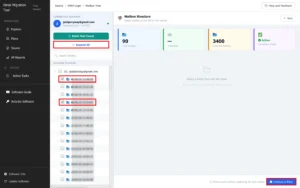
- Choose the required mailbox folders to migrate and click Continue to Filter to proceed with applying migration filters.
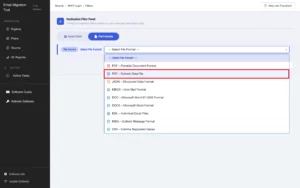
- Choose PST Outlook Data File from the available file formats to export and save IMAP mailbox data.
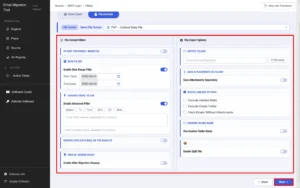
- Configure advanced migration settings according to your requirements and click Next to continue.
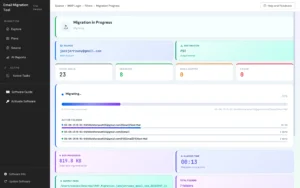
- Finally, track the ongoing migration status.
For a detailed migration workflow, follow the MacSonik IMAP Backup Tool Guide to understand the complete process of connecting IMAP accounts, applying filters, and exporting mailbox data to PST and other formats.
Features Required for Successful ProtonMail to Outlook PST Conversion
|
Feature Aspects |
Benefits |
|
Handles multiple mailbox files together |
|
Allows verification before migration |
|
Maintains mailbox organization |
|
Keeps attached files with emails |
|
Migrates only required data |
|
Creates Outlook-compatible mailbox files |
|
Helps avoid repeated emails |
Migrate ProtonMail to Outlook PST: Best Practices
- Keep Your Source Data Safe: Always, always make a backup of the data you’re exporting from ProtonMail.
- Test Before Doing It For Real: If you’re not sure what you’re in for, do a small test batch first to make sure everything comes out okay.
- Verify Attachments: Check that attachments are coming over okay and that any important ones aren’t getting lost in the shuffle.
- Check Folders: Compare the source folders with the ones that get created in Outlook.
- Don’t Use Online Conversion Services : For super sensitive emails, it’s probably better to convert them on your local machine rather than sending them off to some unknown server.
Real-Life Scenario: Conversion from ProtonMail to MS Outlook A financial consulting company used ProtonMail for several years to manage confidential client communication. After company X adopted Outlook as their go to email platform, the IT team had to figure out how to bring all their historical ProtonMail emails over into Outlook’s PST files. The ProtonMail email box had thousands of emails, some with really important attachments as well as a bunch of different folders to sort through.
The team thought about just doing it the old fashioned way and exporting and importing each email one by one, but that was just not going to work, especially with the amount of data they had to deal with.
They ended up using the MacSonik IMAP Backup Tool to get the job done. They exported the mailbox, previewed all the emails, chose PST as the output format, picked out the folders they needed to convert and then finally converted the emails.
Once the conversion was complete, they opened up the PST files in Outlook and checked that the emails were transferring over okay and that all the attachments were present and correct. They were able to get access to their historical emails but without having to manually sort through every single email.
Key Insights
So in conclusion, migrating ProtonMail emails to Outlook PSTs is a bit of a two step process because ProtonMail doesn’t have a direct export option to PST. If you only have a small mailbox that isn’t too complicated, you might be able to get away with doing it manually, but for bigger archives with lots of attachments and folder structure it’s probably best to use a tool.
A professional IMAP backup solution simplifies the process to migrate ProtonMail to Outlook PST by allowing users to load exported mailbox data, preview emails, select PST as the output format, and create an Outlook-compatible archive. Before migration, always maintain a backup, verify converted data, and test the output before completing the full mailbox transfer.
Frequently Asked Questions
Ans. Yes. The tool can be used to process large mailboxes and export their data to PST. For large migrations, sufficient disk space and a stable system environment are recommended.
Ans. Yes. The folder hierarchy can be maintained in the resulting PST file, making it easier to access the migrated emails in Outlook.
Ans. Yes you can select a specific date range and export only the required emails instead of processing the complete mailbox
Ans. Yes. Converting ProtonMail mailboxes to PST can be useful for email archiving, backup, compliance, mailbox consolidation, and Outlook-based access. For multiple users, administrators can process mailboxes separately and maintain individual PST files.
Ans. Yes. Multiple ProtonMail accounts can be processed individually or in batches, depending on the tool and license capabilities. Separate PST files can be created for easier mailbox management.
About The Author:
Mohd Kaif is an experienced technical content writer who specializes in researching and presenting dependable solutions to user problems. He offers practical guidance on email migration, data backup, and file conversion for users of all skill levels.
Related Post
