How to Migrate Redtail Email to Office 365 Account on Mac?

Amelia James
August 11th, 2026
User-Query: I need to migrate all my Redtail emails to Microsoft 365 using a reliable professional tool without any data loss. Can you recommend a solution that supports bulk migration with attachments and maintains folder hierarchy?
Summary:An enterprise-scale firm faces a high level of regulatory scrutiny. Redtail provides a baseline compliance and, hence, needs to migrate to a more modern platform. Microsoft Office 365 is the best option to migrate Redtail email to Office 365 for expanded storage space and scalability. In this blog, we will learn about the different techniques, both manual and automated, using the IMAP Backup Tool. Now, before implementing the solutions, let us understand why this migration is useful for enterprises
Reasons to Migrate Emails from Redtail to Microsoft 365
Various organizations migrate their Redtail emails to Office 365 for data control features and long-term storage management. The following are the reasons why users consider this migration:
- IT professionals benefit from Redtail to Office 365 migration by handling all their work in a single dashboard.
- Many organizations migrate to Office 365 to leverage robust security settings to protect important information.
- The growing businesses can easily scale their email infrastructure for storage expansion.
- Users benefit from better workflow through connecting with various applications and business tools.
- Microsoft Office 365 platform offers options to create a reliable data backup and long-term email storage options.
Manual Technique to Migrate Redtail Email to Office 365
In this technique, we will use Microsoft Outlook as an intermediate step to transfer Redtail emails to Office 365. First, add both email accounts to Outlook, and then drag and drop emails to Office 365.
The following are the instructions to initiate the process:
- In Outlook for Mac, go to Tools > Accounts.
- Then, click on Add Account (+) and input your Redtail email account credentials.
- Complete the IMAP configuration and wait for some time to sync emails.
- Similarly, add the Microsoft 365 email account and allow it to sync.
- Now, open the Redtail mailbox in Outlook and drag and drop the emails to the Microsoft 365 mailbox.
Limitations:
This solution is impractical to bulk transfer emails from Redtail to Office 365. During the sync process, emails may get lost, increasing the risk of data loss. Also, the syncing process may get disrupted if the internet connection is unstable.
An Expert Tool to Migrate Redtail Email to Office 365
The MacSonik IMAP Backup Tool offers users an efficient means of migrating Redtail emails to their Office 365 account. Besides this, it migrates to various other types of email and file format backups. With the same tool, users can transfer iiNet emails to Gmail. Additionally, the tool allows users to transfer Redtail emails in bulk, so users can transfer all emails at once with preserved attachments. In addition to this, users can use the built-in filters to eliminate duplicates or backup only selected email messages. Along with the above-mentioned features, the tool offers users the ability to keep the original folder hierarchy intact.
Simple and quick steps to export Redtail email to Office 365:
- Initially, install and launch the tool on the system and click Continue.
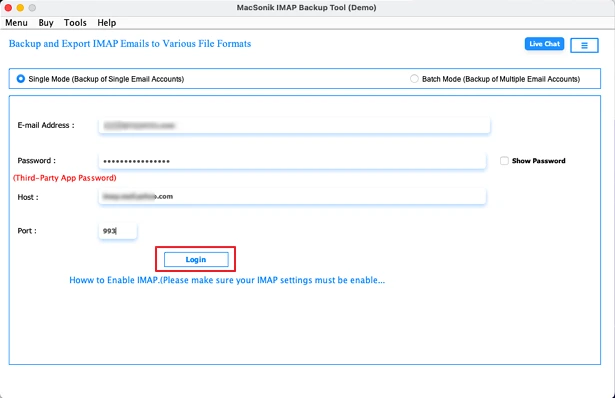
- After that, select the Mode you want and log in to your Redtail IMAP account credentials. Click Login.
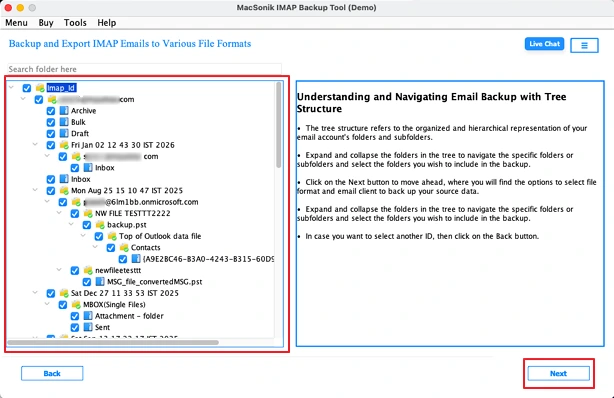
- Afterwards, select the folders you want to migrate, then press Next.
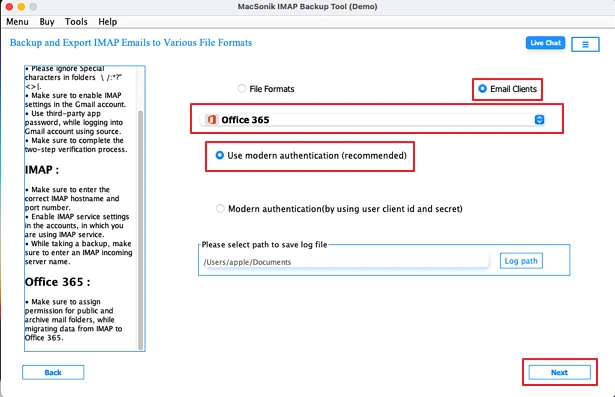
- Next, select Office 365 as an Email Client from the given list, and click Next.
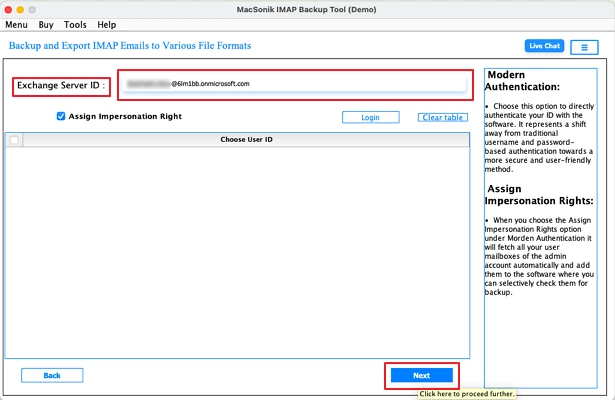
- Now, provide your Office 365 as the Exchange Server ID and press Next.
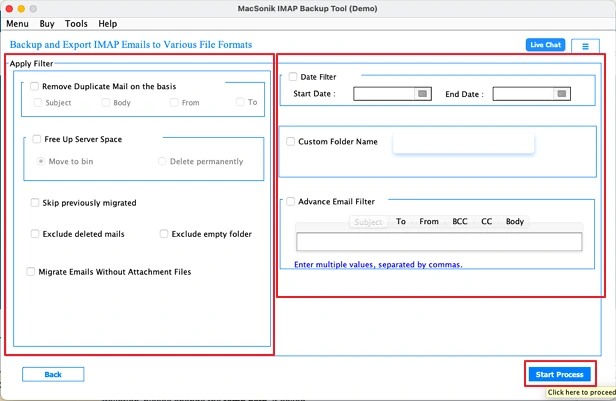
- Lastly, use filters and features according to your needs, then click Start Process.
A financial advisor relying on Redtail email needed a more scalable and collaborative platform. So, they decided to move Redtail email to Microsoft Office 365. To handle a large volume of client emails securely, they used the MacSonik IMAP Backup Tool. The tool enabled them to transfer all emails, including attachments, without data loss. As a result, they achieved better email management, accessibility, and team collaboration.
Conclusion
Businesses migrate Redtail email to Office 365 account for better email organization and improved productivity. Through this blog, we have learnt about different techniques for performing Redtail emails to Office 365 email migration. An expert tool is recommended to manage bulk email migration at scale: the IMAP Backup Tool. This tool provides an efficient, reliable, and error-free email migration experience.
Frequently Asked Questions
Ans- Yes, you can export Redtail emails to Microsoft 365 with attachments by using an email client like Microsoft Outlook configured with both accounts. However, attachments will only transfer properly if the sync process completes without interruption and all emails are fully loaded.
Ans- Yes, you can migrate selective emails from Redtail to Microsoft 365 by applying date filters in Microsoft Outlook before transferring them. However, this process is manual and may require individually selecting or filtering emails based on the desired date range. Alternatively, the user can use a professional tool for a direct email migration.
Ans- The best method to migrate Redtail email to Microsoft 365 is by using a professional MacSonik IMAP Backup Tool, as it ensures accuracy, speed, and complete data transfer. For smaller data, you can use Microsoft Outlook manually, but it is time-consuming and less reliable for large-scale migrations.
Ans- Migrating emails from Redtail to Microsoft 365 is essential for improved collaboration, advanced security, and better email management. It also helps businesses scale efficiently by providing cloud access, integrations, and reliable data control features.
About The Author:
Amelia is the mistress of the webmail clients like Office 365, Gmail, Yahoo, Hotmail, and Opera Mail. Her research on downloading emails from webmail is outstanding. She has given the solution to download emails from webmail clients to a Mac device with all the mailbox items. She’s been into webmail solutions since 2010. In her free time, she reads books and writes technical blogs.
Related Post
