Quick Way to Migrate Gmail to Webmail on Mac & Windows

Amelia James
August 14th, 2026
A large number of users and businesses heavily depend on Gmail for personal or business communications. However, as an organization switches to a custom hosting solution, it often switches from Gmail to a Webmail-based email account. This allows organizations to have better ownership over their data and greater integration with their hosted services.
This blog is mostly intended to allow users to get a quick and reliable way to migrate Gmail to Webmail. To help users with a small migration, we’ll first provide a manual method. After that, a professional MacSonik Gmail Backup Tool will be discussed for efficient conversion.
“I have been using Gmail for multiple years, personally and professionally, to manage my emails. However, my organization has recently switched to a Webmail server for better control and hosting flexibility. I now want to migrate all my Gmail emails, attachments, contacts, and folders to my Webmail account. Can anyone suggest a quick, secure way of doing that on both Mac and Windows?”
Reasons Users Transfer Emails from Gmail to Webmail
There are a number of factors why users like to move their data from Gmail to a Webmail account. These are:
- Webmail servers allow businesses to host emails under their domain, which provides total control over the data, as well as branding.
- Google accounts have limited free storage space. Whereas a Webmail account can be hosted on a dedicated server and provides scalable storage.
- Webmail supports custom email addresses, which is a legitimate way to build authenticity for your business.
- A Webmail account can be accessed from any browser or device without depending on Google Workspace.
- Many organizations prefer to have their own mail server hosted to meet internal security standards.
Real-World Use Cases across Industries
Education:
Educational institutions use Webmail to manage communication and identities under their institutional domains (e.g., @college.edu).
Healthcare:
Health care agencies are increasingly using Webmail to access confidential records (i.e., medical records) and exchange information regarding patients.
Corporate Sector:
Large corporations move from Gmail to Webmail to have more control, data governance, and branding over employee email accounts.
Law Firms:
Law firms transition from Gmail to Webmail to securely transfer email evidence within controlled data to their server, to comply with data retention laws.
Startups and Small-Mid Size Enterprises:
Startups and small to mid-sized enterprises transition from Gmail to Webmail to eliminate regular subscription fees and have control of their hosted email service.
Methods to Migrate Gmail to Webmail
In this blog, there are the most trusted and tested ways for users to migrate Gmail data to Webmail. First, we have demonstrated the manual conversion method. However, this approach may often be lengthy, complicated, or have potential synchronization issues. Therefore, a professional solution is discussed to provide a very helpful, secure, and simple procedure for transferring email data.
Requirements to Transfer Gmail to Webmail
- An IMAP-enabled Gmail account to establish a connection.
- Enough storage space to store data in the Webmail account.
- A working Webmail account and valid login credentials.
- Stable internet connectivity for seamless migrations.
- Create a 16-character App-Password in Gmail.
Manual Method to Migrate from Gmail to Webmail
The manual method uses the Outlook application to complete the migration from Gmail to the Webmail account. The data will be transferred with the help of IMAP, which will work as a bridge between Gmail and the Webmail account. Follow the conversion steps carefully:
Step 1: Add Your Gmail Account to Outlook
- To begin, launch Microsoft Outlook on your computer and access File > Add Account.
- Now, simply enter your Gmail email address and select Connect, followed by entering the App Password to continue.
- Here, Outlook will auto-configure Gmail IMAP settings and start syncing all your emails and folders.
Step 2: Add Your Webmail Account to Outlook
- Again, press File > Add Account, and enter your Webmail email address.
- Then, select Advanced Options → choose Let me set up my account manually → select Connect.
- Further, select IMAP as your account type and enter your Webmail IMAP settings.
- Moving on, enter your Webmail account credentials, select Next → Finish.
Step 3: Export Emails from Gmail to Webmail
Once different email account set-ups are finished, you can now find the folder(s) you want to transfer.
- Next, select the emails or folders (or everything in the folders) you want to move.
- Finally, simply drag and drop them into your Webmail inbox or your chosen target folder.
Limitations of the manual method
- Large Gmail mailboxes may take hours or even days to completely sync.
- Requires multiple setups and passwords.
- Cannot choose particular date ranges or folders to migrate.
- Syncing over again can create duplicate emails.
- If the internet or IMAP connection fails, migration can stop midway.
Automated Way to Migrate Gmail to Webmail
The MacSonik Gmail Backup Tool is a reliable and professional utility made to simplify Gmail migrations. With the software, users can easily backup a full Gmail mailbox to any file format with attachments without losing data. Additionally, the tool doesn’t need users to configure anything manually.
It runs efficiently on Mac and Windows systems and has advanced functionality, such as date filtering, duplicate removal, and selective data migration. This tool is available for both IT administrators and non-IT administrators. Users can migrate Gmail to Zoho Mail or another email client very easily, keeping their data safe.
Quick Steps to Save Gmail Email into cPanel
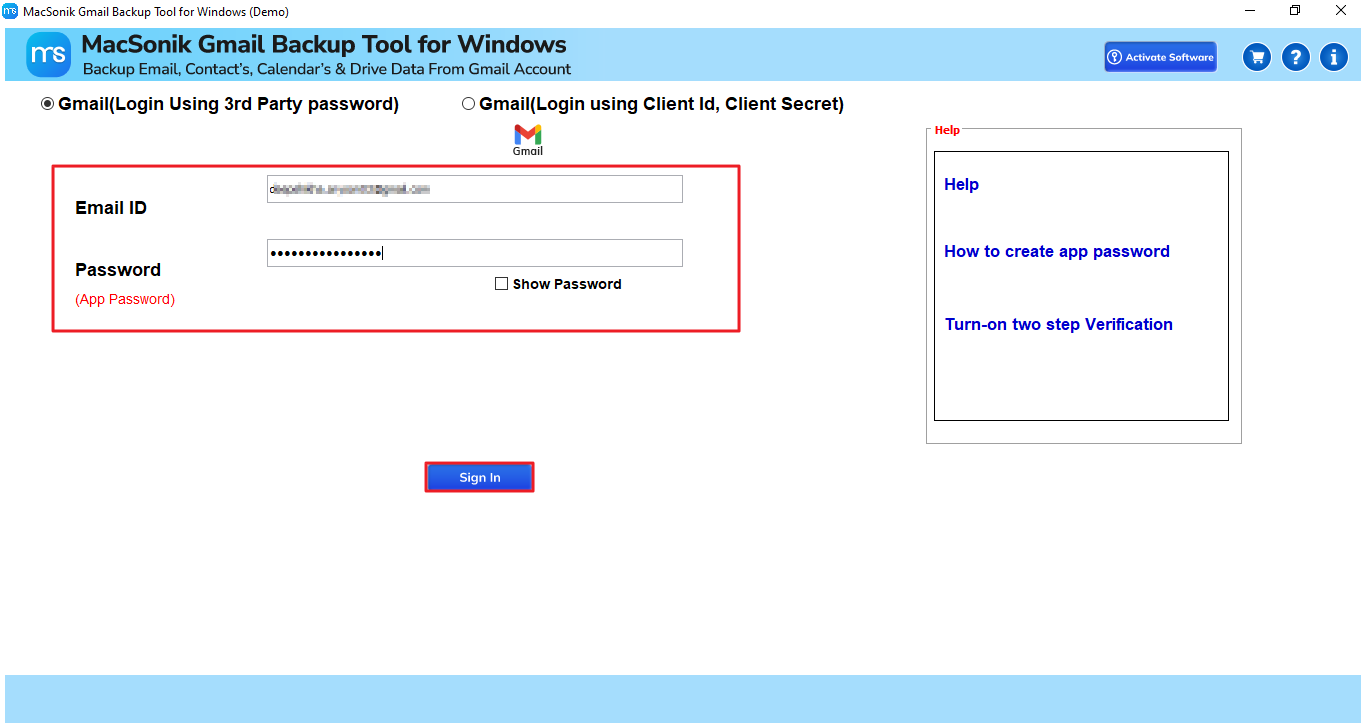
- First, you need to download and run the MacSonik Gmail Backup Tool and Sign in using your Gmail account and App password.
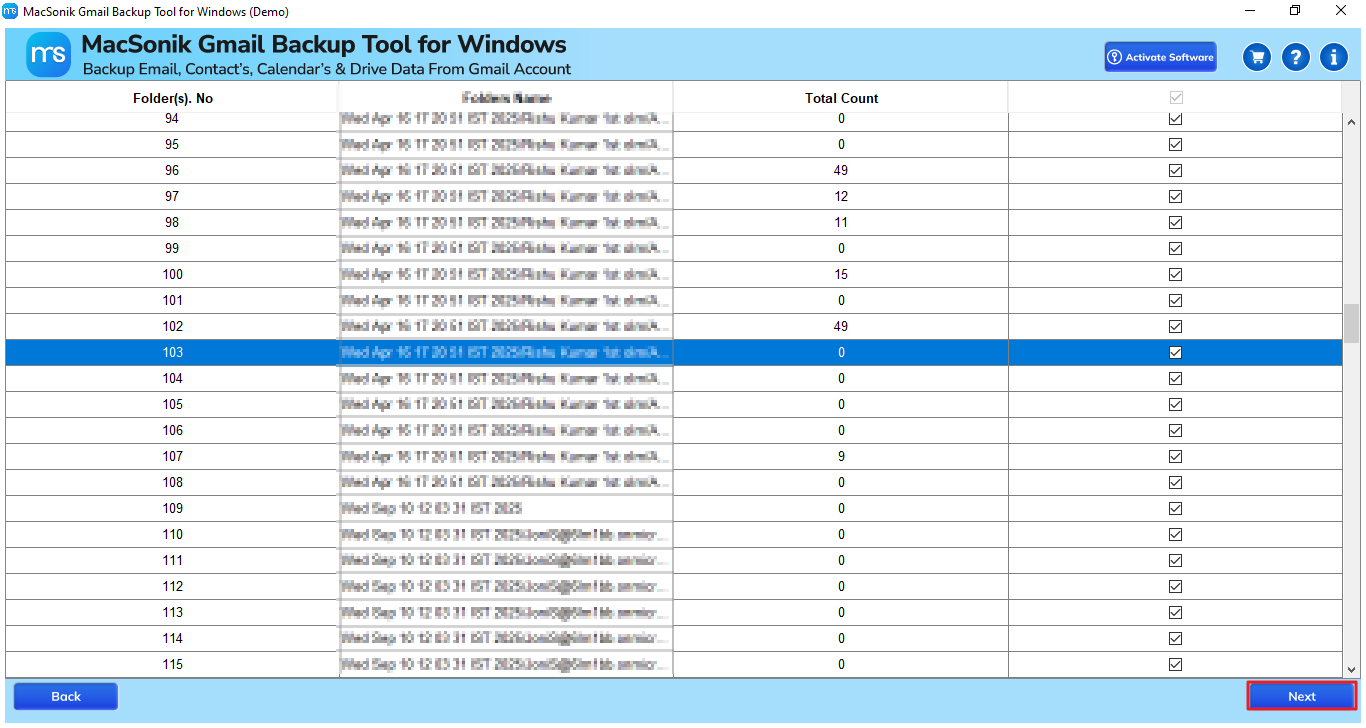
- Next, choose the email folders you want to backup and select Next.
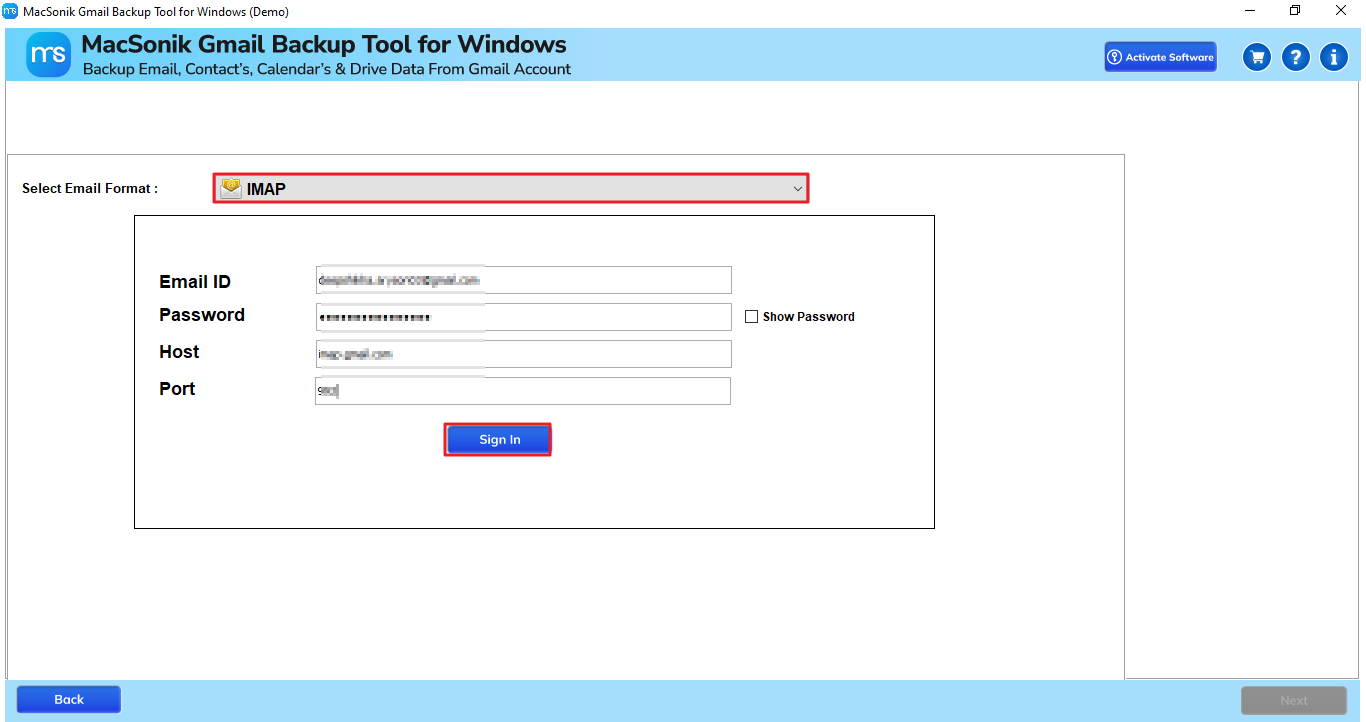
- Now, choose Save in Email Client and select IMAP, and finish signing in with your IMAP credentials.
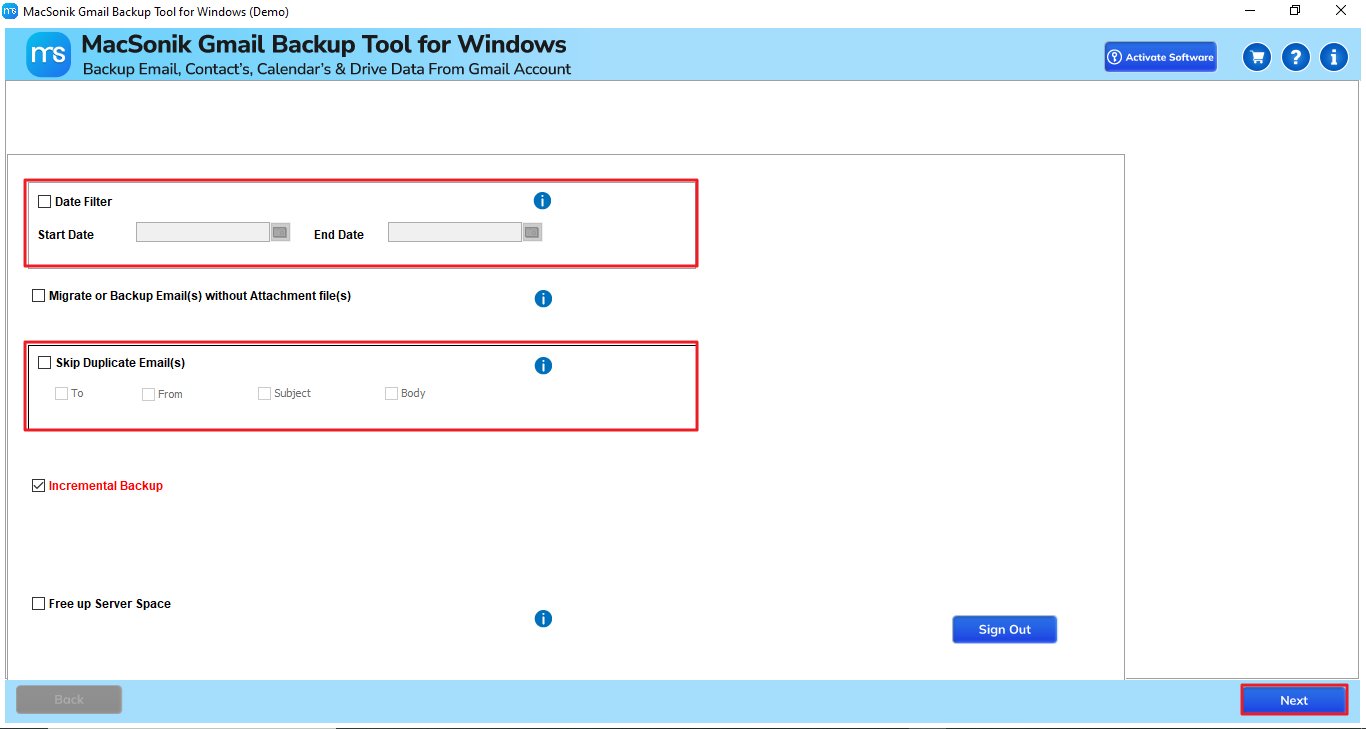
- Further, apply the required advanced filters before migration and click Next.
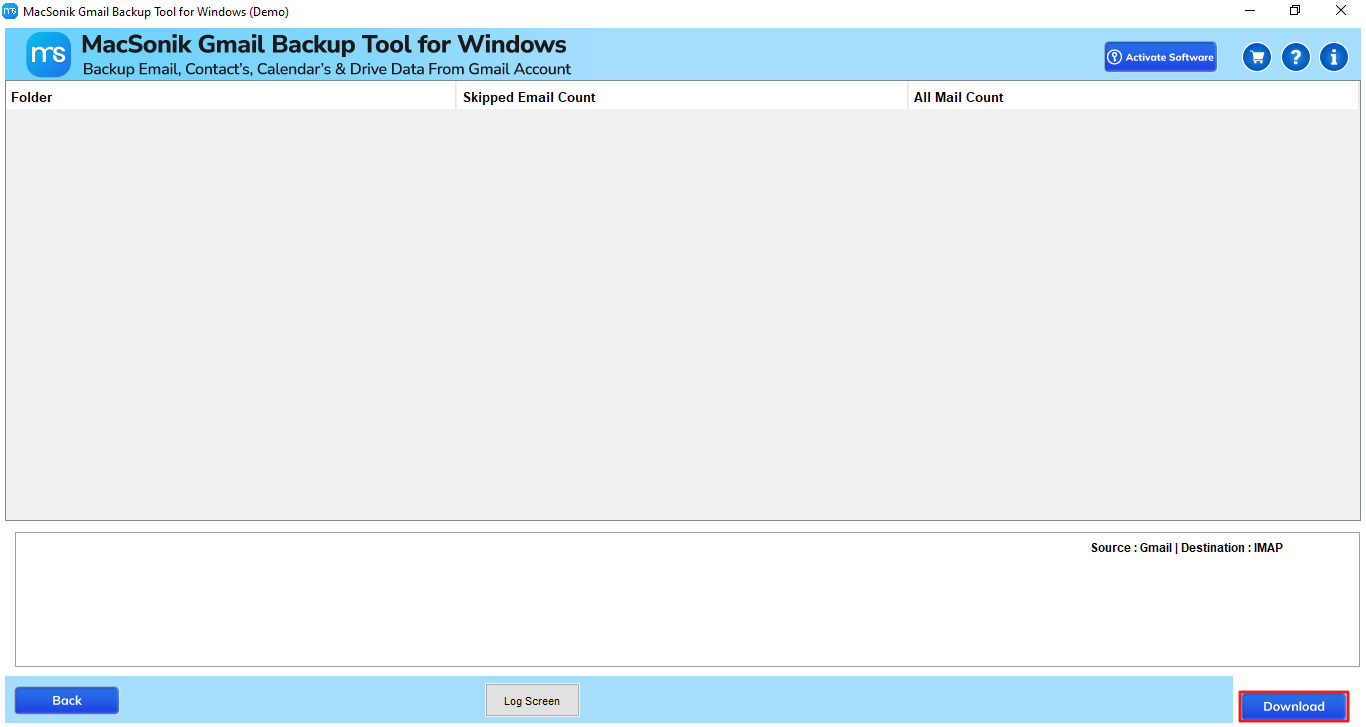
- Finally, click Download to start migration.
Advantages of the Backup Software
- Migration of Gmail to Webmail, either fully or selectively, in just minutes.
- 100% data integrity, folder hierarchy, and meta-properties are retained.
- Advanced filters to migrate emails selectively within date ranges and extract duplicates.
- Provides the capability to migrate Gmail to Office 365.
- The demo version is free to test the migration process.
“Our organization decided to migrate away from Gmail to Webmail for hosting our emails in our domain. And, I was not sure how to efficiently migrate years of emails. I experimented with some unsupported manual processes, but found that they were too complicated and slow.
Next, I used the MacSonik Gmail Backup Tool, and it was a complete turnaround! The migration was precise, and every single email (attachments and labels included) was visible exactly as it appeared in my Webmail account. The old folder structure was maintained. I did not lose any messages, and everything occurred as fluidly as I could hope.”
– Sarah Thompson, HR Manager, United Kingdom
Conclusion
To conclude, this blog guides users to quickly and securely migrate Gmail to Webmail on their Mac or Windows. Users are available with a manual and an automated method to complete their migration. However, it’s best to use the specialized backup tool for bulk and secure migration. Additionally, the tool is highly recommended by many it professionals and technical experts. The tool comes with various advanced filters that help users to effectively migrate their required data.
Frequently Asked Questions
Ans: Yes, the MacSonik Gmail Backup Tool supports both Mac and Windows operating systems. It ensures smooth Gmail to Webmail migration across platforms without losing any data or formatting.
Ans: Yes. Whether you use the manual method or the MacSonik Gmail Backup Tool, both methods preserve attachments, metadata, and the original folder hierarchy. However, the automated method is more reliable in maintaining accuracy for large mailboxes.
Ans: Yes, absolutely. The MacSonik Gmail Backup Tool uses a secure authentication process and ensures 100% data confidentiality throughout the migration. It doesn’t store or share your login credentials and maintains complete privacy.
About The Author:
Amelia is the mistress of the webmail clients like Office 365, Gmail, Yahoo, Hotmail, and Opera Mail. Her research on downloading emails from webmail is outstanding. She has given the solution to download emails from webmail clients to a Mac device with all the mailbox items. She’s been into webmail solutions since 2010. In her free time, she reads books and writes technical blogs.
Related Post
