Import OLM to Zoho Mail in Bulk? Easy and Trusted Methods

Amelia James
March 20th, 2026
User-Query:
In my old MacBook, I have many client details that are stored in OLM files. But now these days I am using Zoho Mail. So, is it possible to save my file in Zoho from OLM?
Summary: If you’ve used Outlook on a Mac, you know it saves emails in OLM files. The problem is, Windows and other platforms can’t read them easily. That’s why many people choose Zoho Mail instead. It works in any browser, keeps your emails online, and doesn’t lock you to one device. In this blog, I’ll show a manual way to import OLM to Zoho Mail and also an easier option using the MacSonik OLM Converter Tool.
Why Import Mac Outlook Zoho Mail?
- OLM files only open in Outlook for Mac. You can’t use them directly on Windows.
- Zoho Mail works in your browser. You can check your emails anywhere.
- Keeping emails online is easier than managing files on one system.
- You’re no longer tied to a Mac to access your old emails.
- Everything stays in one account, ready to access anytime.
Manual Method to Import OLM to Zoho Mail
You can move OLM files manually, but it involves connecting Zoho Mail to Outlook on Mac using IMAP. Then your emails sync to Zoho Mail.
Step 1: Add Zoho Mail to Outlook for Mac
- Firstly, log in to Zoho Mail and enable IMAP in settings.
- Then, open Outlook for Mac -> Tools -> Accounts -> Add new account -> Other Email.
- After that, enter your Zoho email and password.
- Thereafter, choose IMAP as the account type.
- Incoming server:
- imap.zoho.in (personal)
- imappro.zoho.in (business)
- Enable SSL. Outgoing server: smtp.zoho.in, port 465.
- Lastly, click Add Account.
Step 2: Import Mac OLM to Zoho Mail
- Firstly, open Outlook for Mac -> File -> Import -> Outlook Data File (.olm).
- Then, select your OLM file and click Next.
- Finally, emails will start syncing to Zoho Mail.
Limitations
- A small mistake can stop the account from connecting.
- Large OLM files take a long time to import.
- You need a stable internet connection during sync.
- Interrupted syncs can cause some emails not upload.
- Not practical if you have multiple OLM files to move.
Common Errors During OLM to Zoho Migration
| Issue | What Usually Happens |
|---|---|
| OLM file not importing in Outlook for Mac | Sometimes Outlook refuses to load the OLM file. This usually happens with very large files or if the file didn’t export properly earlier. |
| IMAP connection error in Zoho Mail | If IMAP is turned off in Zoho Mail or the server details are typed incorrectly, Outlook won’t connect to the account. |
| Sync stops during the process | The manual method depends on internet syncing. If the connection drops or Outlook freezes, the transfer may stop halfway. |
Easier Way to Import OLM to Zoho Mail in Bulk
If you want to skip the manual steps, the MacSonik OLM Converter Tool is easier. It moves your emails directly to Zoho Mail and keeps everything intact. It works well for large files and multiple OLMs. You also don’t have to deal with IMAP settings. More that migrate OLM to Zoho Mail, you can use this tool to migrate OLM to HTML, and in addition, it is useful to import OLM file to Office 365.
Steps to Import OLM File to Zoho Mail
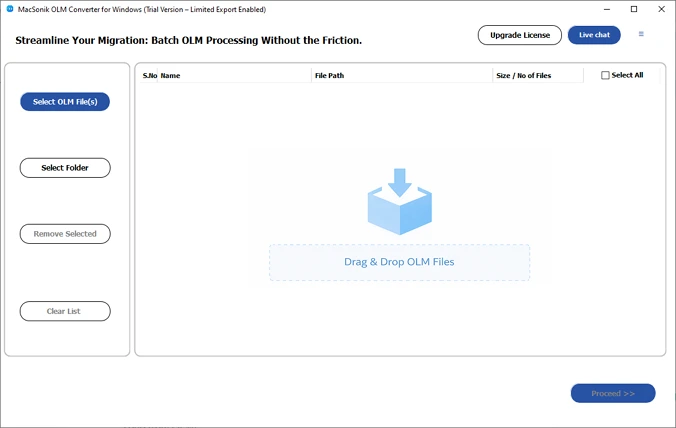
- Firstly, download and open the OLM Converter Tool.
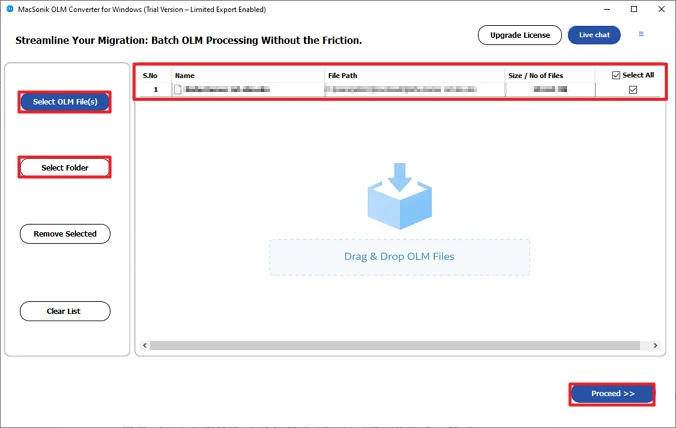
- Further, add your OLM files and click Proceed.
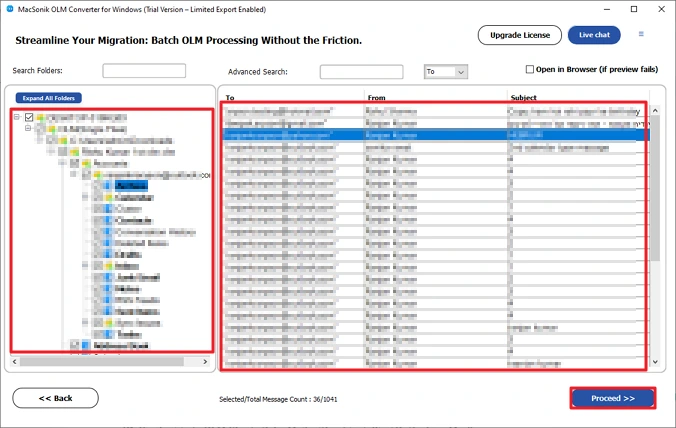
- Preview and select the emails you want to move. Click Proceed.
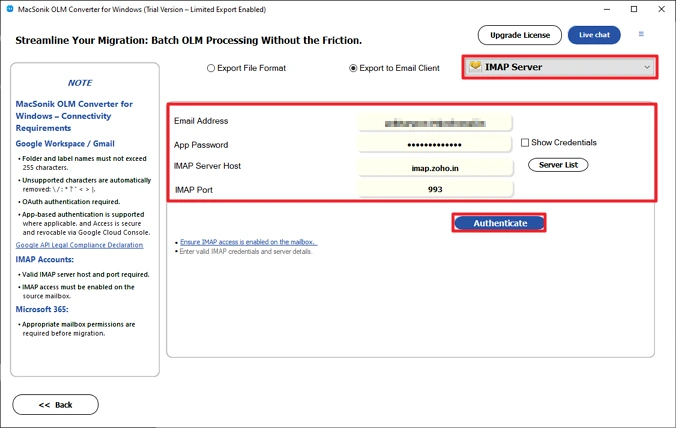
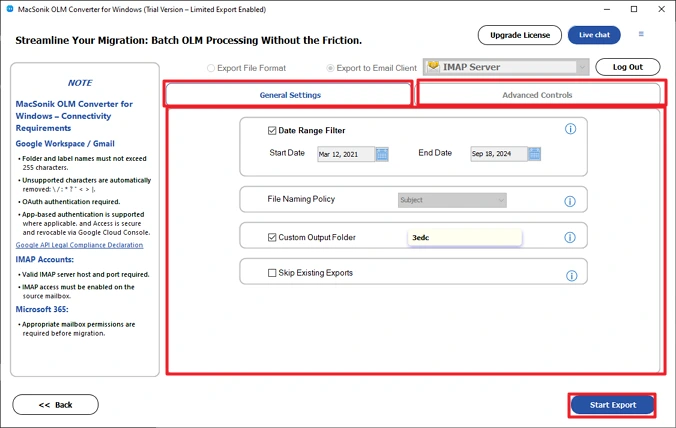
- Choose IMAP and log in with Zoho credentials.
- Apply any filters if needed and click Start Export.
Conclusion
So, basically, there are a couple of ways to import OLM to Zoho Mail. The manual method works if you don’t have many emails, but it can be slow and confusing when the file is big. If you’ve got a lot to move, using something like the MacSonik OLM Converter is way easier. It just moves all your emails, folders, and attachments without messing anything up.
Frequently Asked Questions
Ans: Yes, you can. The manual method requires Outlook for Mac to import the OLM file and sync it with Zoho Mail. However, if you use the MacSonik OLM Converter Tool, you can move the OLM file to Zoho Mail directly without setting up Outlook.
Ans: Yes. Both methods can move emails with attachments. The MacSonik OLM Converter Tool keeps the attachments along with the email and folder structure during the migration.
Ans: OLM files only work in Outlook for Mac. If someone stops using a Mac or switches to Zoho Mail, those emails are hard to access.
Ans: The manual method works for small mailboxes, but it requires Outlook setup and IMAP configuration. The MacSonik OLM Converter Tool can move OLM data directly to Zoho Mail and works better for large files or multiple OLMs.
About The Author:
Amelia is the mistress of the webmail clients like Office 365, Gmail, Yahoo, Hotmail, and Opera Mail. Her research on downloading emails from webmail is outstanding. She has given the solution to download emails from webmail clients to a Mac device with all the mailbox items. She’s been into webmail solutions since 2010. In her free time, she reads books and writes technical blogs.
Related Post
