Migrate IMAP to Office 365 Account? Secure Migration

Neeru Kuchhal

February 28th, 2026
User-Query: I’m searching for a reliable way to migrate IMAP emails to his Microsoft 365 account in bulk and want guidance on the best migration method that ensures all mailboxes are transferred without data loss, including information about tools or approaches that simplify the process.
Summary: Nowadays, teams require more storage space for their heavier data needs. The traditional IMAP servers provide capped and restrictive mailbox limits. In the modern business environment, it is best to migrate IMAP to Office 365 that offers 50GB primary mailbox storage. Now, what is the best way to migrate the IMAP emails to an Office 365 email account? A professional solution includes the IMAP Backup Tool, which migrates the IMAP emails into various email clients. Let us now start with the technical blog to better understand each of the solutions in more detail.
Advantages of Migrating IMAP to Office 365
Businesses and individuals gain numerous advantages by migrating IMAP to an Office 365 email account. Below are a few of them:
- Stronger Data Protection: Office 365 improves email safety against spam and cyber threats.
- Seamless Cloud Access: Users can seamlessly access emails from the cloud across locations.
- Hassle-Free Data Syncing: Unlike traditional IMAP, Office 365 syncs the emails and data smoothly across devices.
- Scalable Storage Options: The O365 provides increased mailbox storage for emails and large attachments.
- Effortless Sync with Microsoft Services: Users can experience seamless connectivity with productivity tools.
Efficiently Migrate IMAP to Office 365 Account
There are different approaches to migrating the IMAP emails to an Office 365 account. This includes a manual process and an automated approach that directly migrates IMAP emails to an Office 365 account.
Approach 01: Using Exchange Admin Center
In this, admins can use the built-in migration feature of Exchange Centre to migrate from IMAP to Office 365. It is suitable for those who want to migrate a small number of IMAP emails.
Use the following instructions to begin the process:
- First, create user mailboxes in your Microsoft 365 and assign them with valid licenses.
- Now, verify the domain in Microsoft 365 and update the DNS records.
- Then log in to the Microsoft 365 Admin Centre and go to the Exchange Admin Centre.
- Next, navigate to Recipients > Migration > add migration batch.
- Set the migration type as IMAP Migration.
- Upload a list of users as a CSV file.
- Provide IMAP information and start your migration.
Limitations:
This approach does not migrate contacts, calendars, or tasks. The user should have admin-level access and a basic understanding of technology. Also, it takes a significant amount of time to sync large mailboxes.
Approach 02: Use a Specialized Tool to Migrate IMAP to Office 365
The MacSonik IMAP Backup Tool is a practical solution that easily migrates IMAP emails to an Office 365 account. With this tool, users can backup IMAP email to PST and to different file formats and can migrate to popular email services without any complications. Users can also batch process IMAP emails simultaneously while preserving the attachments. The built-in filters include duplicate message removal, and backup only the selected emails. It also ensures that the original folder hierarchy remains intact during the migration.
Simple steps to import IMAP email to Office 365:
- Initially, install and launch the tool on the system and click Continue.
- After that, select the Mode you want and log in to your IMAP account credentials.
- Afterwards, select the folders you want to migrate, then press Next.
- Next, select Office365 as an Email Client from the given list, and click Next.
- Now, provide your Office365 as the Exchange Server ID and press Next.
- Lastly, use filters and features according to your needs, then click Start Process.
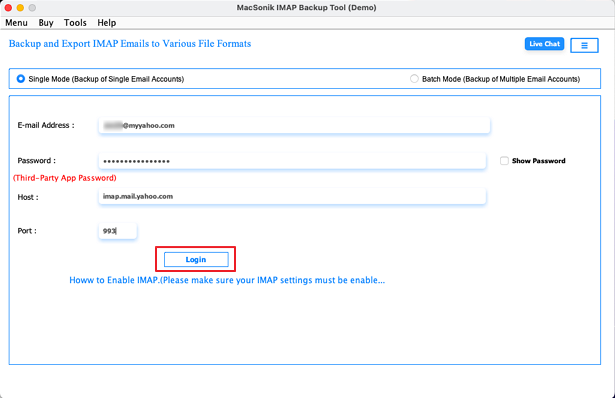
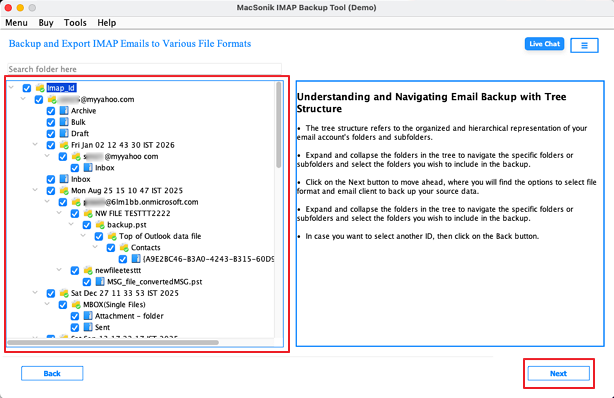
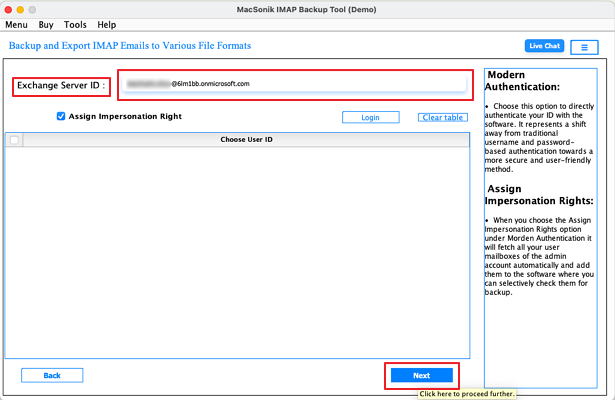
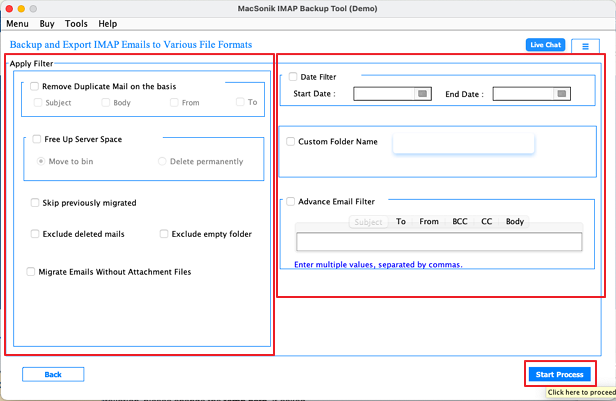
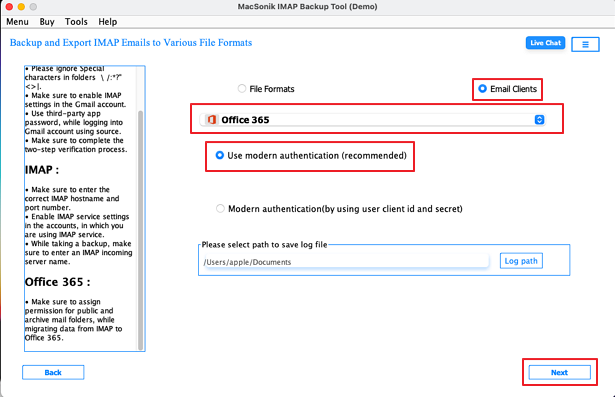
A user needed to export emails from IMAP to Office 365 due to reliability issues. They used MacSonik IMAP Backup Tool to download emails in bulk, keeping attachments and folder hierarchy intact. After exporting the data, they imported it into their new Office 365 account, achieving a smooth transition without losing information. The process enabled better email synchronization and accessibility across multiple devices.
Conclusion
Moving email from IMAP to Office 365 is important if you want scalable storage and better security for your domain. We’ve already gone through the different ways to do it in this blog. The manual method works, but it doesn’t always go smoothly. That’s why many users prefer to go for a professional tool, the MacSonik IMAP Mail Backup Tool, to migrate IMAP to Office 365. It makes the conversion process more direct and easier to manage. Users can also try the demo version first to see how it works. With the same tool, users can transfer emails from cPanel to Google Workspace. If it feels right, then you can go for the full version.
Frequently Asked Questions
Ans- To import IMAP emails to Office 365 in bulk, create an IMAP migration batch in the Exchange Admin Center and upload a CSV file containing users’ mailbox credentials. The system will sync all emails automatically to the respective Microsoft 365 mailboxes.
Ans- Yes, you can migrate emails, contacts, calendars, and notes from IMAP to Microsoft 365, but IMAP migration typically transfers emails only and may require a professional tool for contacts and calendars. To move all data, using a MacSonik IMAP Backup Tool that exports contacts and calendars separately ensures a complete transition without data loss.
Ans- Yes, duplicate emails can be removed during migration by using a specialized migration tool, while the built-in IMAP migration to Microsoft 365 does not automatically eliminate duplicates. For clean data, tools with duplicate filtering options ensure only unique emails are migrated.
Ans- The top method to migrate IMAP to Microsoft 365 is by using the professional tool that offers faster bulk processing, duplicate removal, and migration of additional data like contacts and calendars.
About The Author:
I am Neeru Kuchhal, a Technical Content Writer who focuses on turning complex ideas into clear, engaging, and impactful content. I combine creativity with strategy to write blogs, web content, and technical articles that connect with the right audience and support brand goals. I believe great content is not just written. It is thoughtfully created to inform, build trust, and drive action.
Related Post
