How to Convert Postbox Emails to Outlook PST? Complete Guide

Amelia James
August 10th, 2026
User-Query: My Postbox email client contains a large number of important emails, and I want to import them into Microsoft Outlook. Can someone suggest a secure and efficient way to convert Postbox mailbox files into PST format while preserving attachments and metadata?
Introduction: Postbox no longer keeps up with a growing workload, which makes users switch to Outlook. Employees convert Postbox to Outlook PST as a strategic upgrade to enterprise-level efficiency. Today’s technical article covers everything you need to know about the Postbox emails to Outlook PST conversion. Continue to read the article and find out why users convert to Outlook PST and then execute solutions to do it. We’ll also introduce a professional utility, the MBOX Converter Tool, which bulk converts MBOX files into PST and various file formats
Why Convert Postbox Emails to Outlook?
Users choose to convert their Postbox emails to a more professional platform like MS Outlook. The following are the reasons why this conversion is beneficial:
- Organizations prefer Microsoft Outlook as it integrates well with the enterprise-level platforms, ensuring smooth communication.
- MS Outlook offers a unified platform where users can manage emails, contacts, calendars, and tasks in an all-in-one environment.
- The Outlook application works seamlessly with MS Teams, MS Word, and MS Excel for improved productivity.
- Outlook PST files are generally used for backing up the email data. Hence, by storing Postbox emails into PST, users can open their emails in the Outlook environment.
- Microsoft Outlook includes advanced security features and administrative capabilities that safeguard organizations’ email data.
Learn How to Convert Postbox to Outlook PST
Let’s take a look at the ways of converting MBOX files to the Outlook PST file format on Mac.
By Using Apple Mail
The user can export emails from Postbox to Outlook by using the Apple Mail email client. Apple Mail supports MBOX files, and Postbox emails are in MBOX file format.
Look at the step-by-step process to begin converting emails:
Step 01: Export Emails from Postbox
- On your Mac system, open Postbox.
- Then, go to the mailbox or the folder that you wish to export.
- After that, navigate to the File menu and select the Export option.
- Next, save the selected mailbox in the MBOX format.
Step 02: Import MBOX into Apple Mail
- In Apple Mail, head to the File menu.
- Then, choose Import Mailboxes > Files in MBOX Format and tap Continue.
- Next, find and select the desired MBOX files. Emails will appear under the Export folder.
- Now, add an email account in Apple Mail using IMAP.
- Drag and drop the imported emails into an IMAP mailbox folder.
- Add the same IMAP-enabled account in MS Outlook and sync the emails.
Issues with the Manual Process
- This manual process will require users to have a basic understanding of the IMAP configuration. Hence, it is not suitable for non-technical users.
- It takes a considerable amount of time to sync large mailboxes.
- The original folder hierarchy and other email metadata can be changed during the conversion.
- Also, the steps are lengthy, complicated, and technical which is not suitable for beginners.
All-in-One Solution to Convert Postbox to Outlook PST
Enterprises can streamline their email migration with the high-performance utility, the MacSonik MBOX Converter. It is designed for secured and authentic Postbox emails to PST conversion. The tool specializes in managing bulk email migrations while maintaining the data integrity. With this tool, users can convert their Postbox email data into various file formats and email clients. Users can convert Apple Mail to Outlook PST with the same utility. Also, it keeps the folder exactly as they are while preserving the original folder hierarchy.
Simplified steps to import Postbox to Outlook:
- Download and open the converter on your system and click Continue.
- Then, click the Select File(s) option, browse the MBOX file, select it, and Open it.
- After that, expand the tree-hierarchical structure, select the files, and preview them.
- Click Next and choose PST as the File Format from the available options.
- Next, apply the filters if needed and specify the destination Path to Save.
- Finally, tap Convert to complete the process.
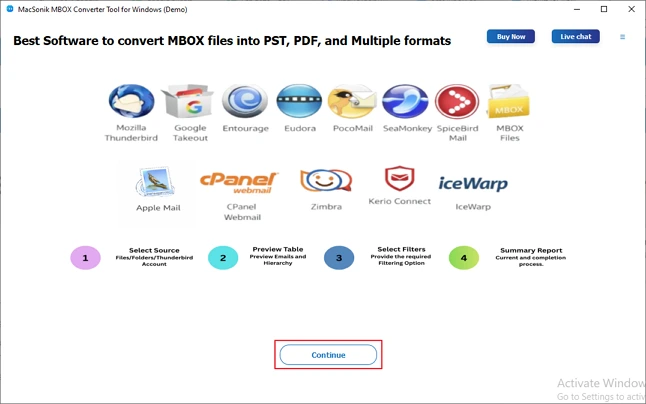
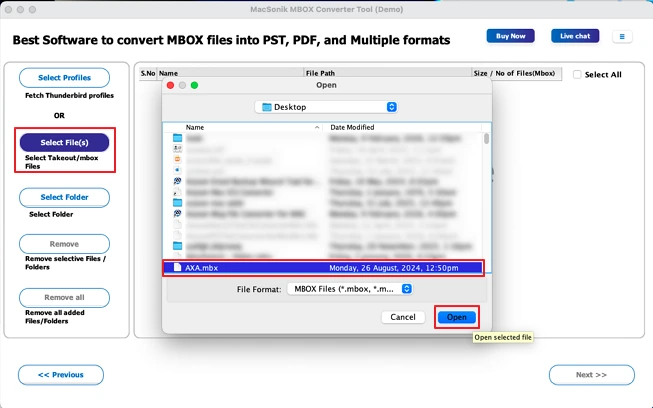
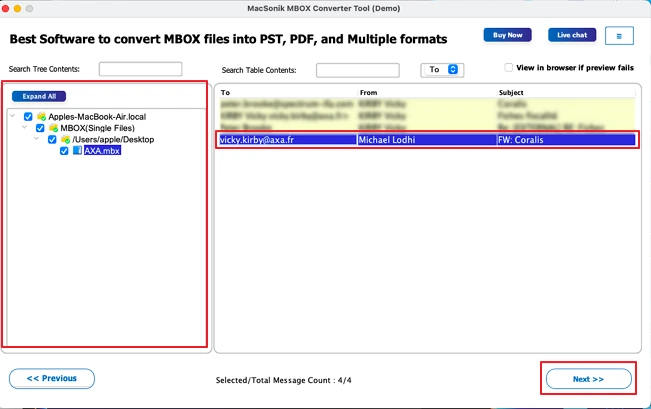
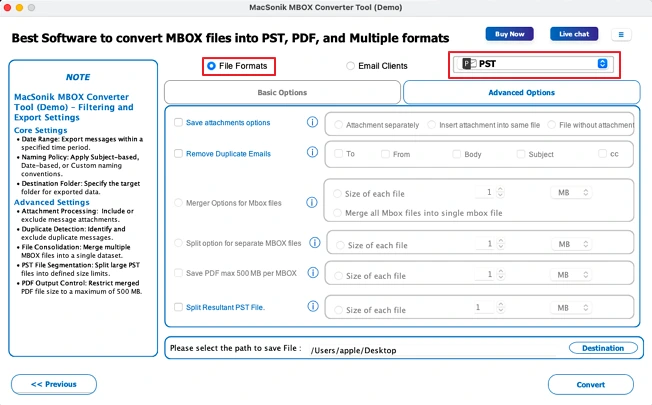
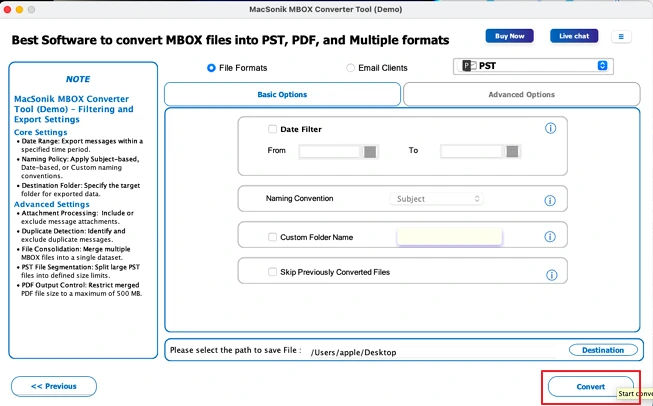
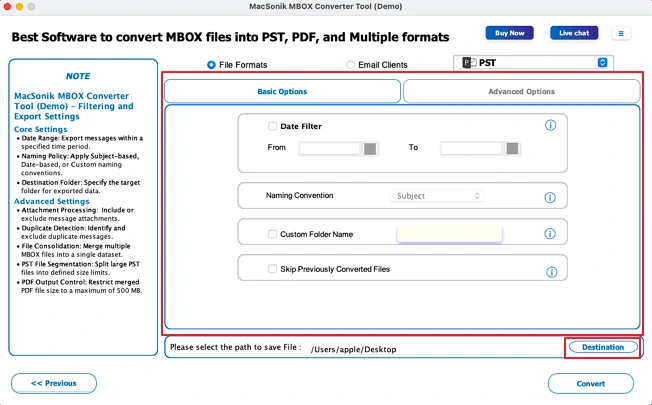
An IT consultant had been managing his emails in Postbox but needed to move them to Microsoft Outlook after his company adopted Outlook for communication. To perform the migration safely, he used the MacSonik MBOX Converter to convert MBOX file of Postbox to Outlook. The tool helped him quickly transfer all emails, attachments, and folder structure into Outlook without any data loss.
Conclusion
Organizations convert Postbox to Outlook PST to store, back up, and access their email data more conveniently. The IT professionals recommend using the MacSonik MBOX Converter for a professional-grade conversion without any hassle. It is built with a ton of features that give users a great deal of control and reduce the chance of error. Plus, the bulk conversion feature allows users to convert all MBOX files in one go. Download the demo version today to see what the application can do for you!
Frequently Asked Questions
Ans- To export emails from Postbox to Microsoft Outlook in bulk, you can first export the mailbox in MBOX format and then import it using an intermediate email client like Mozilla Thunderbird or Apple Mail. Alternatively, users can use the professional MacSonik MBOX Converter to directly convert the emails in bulk.
Ans- Yes, it is possible to convert selective emails from Postbox to Microsoft Outlook by exporting only the required emails or folders from Postbox. You can then import or transfer those selected emails to Outlook using an intermediate email client or manual methods.
Ans- Yes, it is generally safe to convert emails from Postbox to a PST file used by Microsoft Outlook if the process is performed using reliable methods or a trusted MBOX converter. Ensuring proper conversion helps maintain email data, attachments, and folder structure without data loss.
Ans- The best method to export emails from Postbox to Microsoft Outlook is by using the MacSonik MBOX Converter. It directly converts Postbox MBOX files into Outlook PST format in bulk while preserving emails, attachments, and folder structure.
About The Author:
Amelia is the mistress of the webmail clients like Office 365, Gmail, Yahoo, Hotmail, and Opera Mail. Her research on downloading emails from webmail is outstanding. She has given the solution to download emails from webmail clients to a Mac device with all the mailbox items. She’s been into webmail solutions since 2010. In her free time, she reads books and writes technical blogs.
Related Post
