How to Migrate Opera Mail to Thunderbird – Complete Guide

Amelia James
November 24th, 2025
Introduction: Email migration is inevitable when you are making the switch between email platforms. After the discontinuation of support for Opera Mail by Opera, many professionals, IT admins, and other end users decided to shift to Mozilla Thunderbird. It is because the latter provides more flexibility, regular updates, constant support, and much more. But the question is, how to migrate Opera Mail to Thunderbird without losing the mailbox structure, attachments, or years of archived data integrity. Explore the free solution and the MacSonik MBOX Converter Tool discussed in this guide for a simplified migration.
But before that, check out this user query from one of the power users: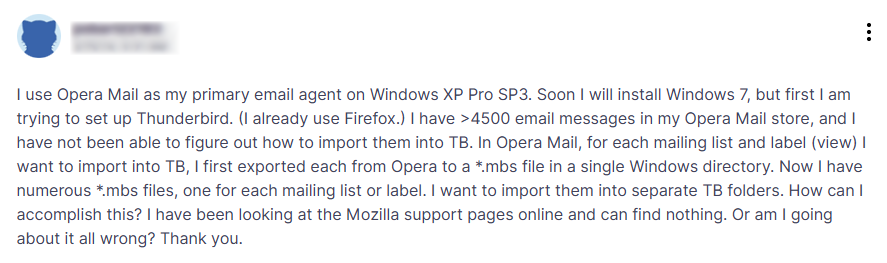
Benefits of Migrating from Opera Mail to Thunderbird
Data continuity is an essential requirement for businesses, and platform transfers should not affect the workflow. Therefore, some of the common practical reasons for users to shift from Opera to Thunderbird are:
- Opera Mail is no longer actively deployed, updated, or supported.
- Users face frequent performance issues with large mailboxes in Opera Mail.
- Unlike Thunderbird, Opera Mail doesn’t have advanced add-on features, search filters, and cloud sync.
- Thunderbird has robust spam filtering and security, and it works cross-platform.
- Mozilla Thunderbird is free and open-source, with enticing features and a large storage space.
- As compared to Opera, Thunderbird has better data synchronization and allows opening multiple tabs simultaneously.
In all, shifting to the modern Thunderbird instead of struggling with Opera Mail is a smart choice.
Convenient Ways to Migrate Opera Mail to Thunderbird
Before jumping to the methods, it’s necessary to first understand the file format differences of the two clients. Where Opera Mail stores emails and data in .mbs (MBOX-styled) files, Thunderbird’s native format is .mbox. The two may seem similar, but aren’t directly interoperable, unless intentionally reconfigured or converted. Here, go through the classic and modern methods to migrate mailbox data correctly and precisely.
Convert Opera Mail to Thunderbird Cost-Free
If you can access your Opera Mailbox from 2016, then this method can be used for the conversion. The steps to follow are:
- Start Opera Mail and move to the mailbox navigation directory.
- Then, locate the folder with your Opera emails to move.
Generally, found at C:\Users\\AppData\Local\Opera Mail\Opera Mail\mail\store\AccountID
- Next, copy all the emails and export them to your system locally.
- Select a location to save .mbs emails and give the file a name. Click Save.
- After that, start Mozilla Thunderbird and go to the More Menu >> Add-ons and Themes.
- There, search and select the ImportExportTools NG and click +Add to Thunderbird.
- Furthermore, restart Thunderbird and right-click Local Folders.
- Choose the ImportExport extension and opt for Import mbox files >> Individual files.
- Finally, browse to the saved .mbs file from earlier and click Open to import it.
You have managed to migrate Opera Mail to Thunderbird successfully. But this method has a few limitations.
Loopholes of the Manual Method
- Cannot handle very large Opera mailboxes with heavy attachments.
- Folder hierarchy is not always retained, and loss may occur.
- Time-intensive and lengthy process that requires skills and focus.
- Original format is not necessarily retained, and complexities may arise.
So, what is a more feasible alternative to this email client for email client migration?
Migrate Opera Mailbox to Thunderbird Risk-Free
A simplified and streamlined solution for your Opera to Thunderbird conversion is the MacSonik MBOX Converter Tool. With great support for Mac and Windows OS, this self-explanatory software ensures that the entire mailbox data is migrated in a single go. Additionally, it keeps the folder structure retained and attachments and data intact as in the original mailbox. Moreover, the data is saved directly into the Thunderbird profile with complete security and no loss.
This hassle-free software has a few simple steps that you need to follow. Furthermore, you can use its Demo Version to freely convert upto 50 emails per folder and evaluate the functions and performance.
Steps to Migrate Opera Mail to Thunderbird
- Launch the MacSonik Opera Mail MBOX Converter and click Next from the bottom right.
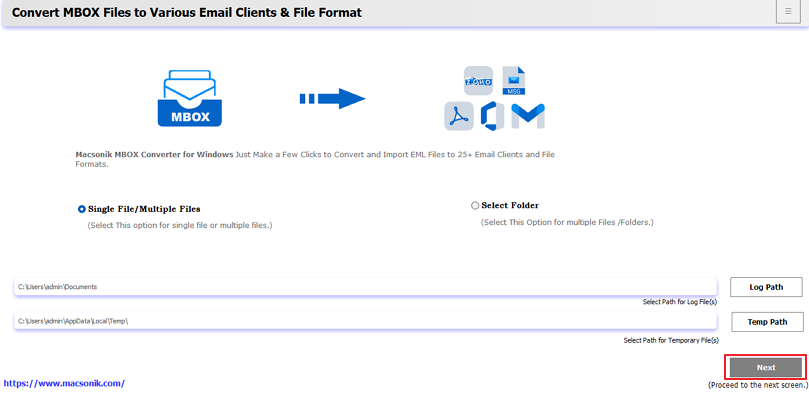
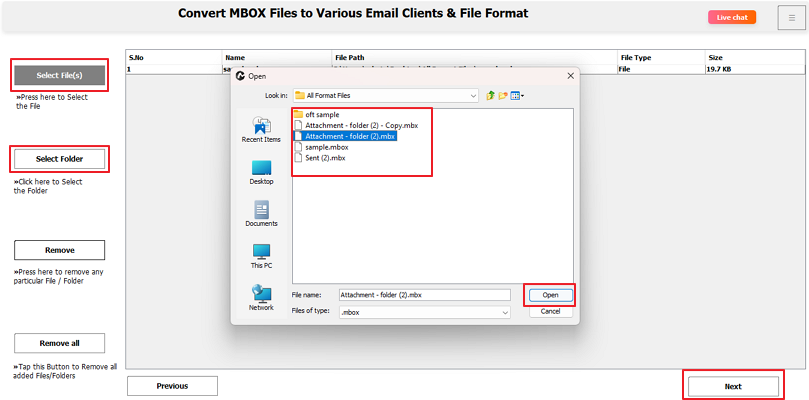
- Then, with Select File or Select Folder, insert Opera Mail emails into the software. Tap Next.
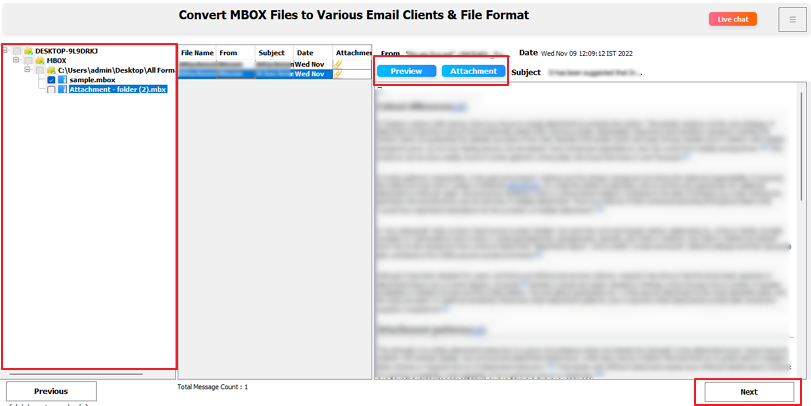
- Further, expand the tree view to check the folders and attachments and select them. Tap Next.
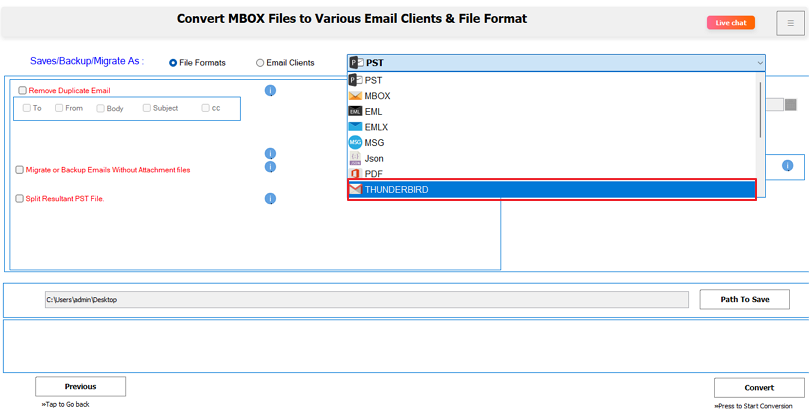
- Afterward, pick Thunderbird from the file format options and apply relevant filters.
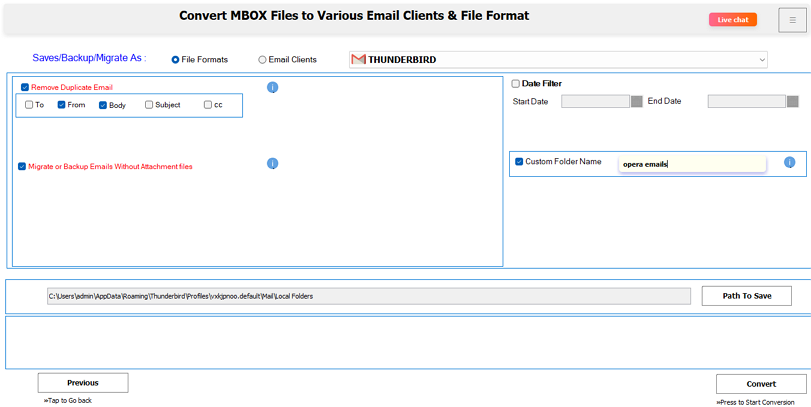
- At last, the path is already set for your file. If needed, change it and click Convert to save the Opera Mail emails.
This is how you can import Opera Mail to Thunderbird in no time with ease and full accuracy.
Suggested Read: Import Google Takeout to External Drive
Conclusion
The migration from Opera to Thunderbird is an effortless process when you do it strategically. For structure-preserving precision and high-level reliability, the MBOX File Converter is the ultimate option. Whether you are an individual user, an IT team, or someone from an enterprise, it is suitable for all to upgrade email platforms without disruption. With this smart method, you can directly migrate Opera Mail to Thunderbird and securely future-proof your email communications for the long term.
Frequently Asked Questions
Ans: Yes, you can do it manually yourself, moving emails one by one. Or choose to use the MacSonik One-Time Service for conversion without software installation. In the service, our experts will handle everything while you manage to complete other tasks.
Ans: Of course, yes. If you have your Opera Mail .mbs files, then use the MBOX File Conversion Tool for the migration. It will easily save emails in your Thunderbird profile without wasting time and effort, and that too precisely.
About The Author:
Amelia is the mistress of the webmail clients like Office 365, Gmail, Yahoo, Hotmail, and Opera Mail. Her research on downloading emails from webmail is outstanding. She has given the solution to download emails from webmail clients to a Mac device with all the mailbox items. She’s been into webmail solutions since 2010. In her free time, she reads books and writes technical blogs.
Related Post
