How to Backup Office 365 Emails on Mac Easily

Neeru Kuchhal

May 14th, 2026
User-Query:
“I use Microsoft 365 for business communication and want to back up all my Office 365 emails on Mac safely. I need an easy method that preserves folders, attachments, and mailbox data for offline access and future recovery. What is the best way to backup Office 365 emails?”
— Posted by “Christopher Hall”
Introduction: Microsoft 365 is one of the most widely used cloud-based platforms for businesses and professionals. It stores important emails, attachments, calendars, and communication records inside the Outlook environment. Although Office 365 provides cloud storage, many users still prefer creating local backups for various purposes. However, backing up emails on Mac helps users protect important communication against accidental deletion, account issues, ransomware attacks, etc. That’s why, this guide includes the various ways to backup office 365 mailbox. Along with this, explains how to use the MacSonik Office 365 Backup Tool for instant solution.
What Problems Can Occur Without Email Backup?
Many users assume that the cloud email services automatically protect all mailbox data permanently. However, accidental deletion, policy limitations, or account problems can still affect important emails.
There are some common issues due to which users need to backup Office 365 emails:
- There is a risk of accidental email deletion.
- Need for offline email access.
- Large mailboxes becoming difficult to manage.
- Retention policies affecting old emails.
- Also, business compliance requiring secure archives.
Who Should Use This Solution?
This guide is useful for the following users to backup emails from office 365:
|
Business professionals using Office 365 |
IT administrators managing employee data |
Legal departments archiving records |
|
Freelancers preserving client communication |
Mac users needing offline email backups |
Organizations following compliance policies |
The Importance of Local Office 365 Archiving on macOS
The following are the reasons users try to backup office 365 mac;
- To create secure offline email archives.
- Protect against accidental deletion.
- Preserve business communication records.
- Improve disaster recovery preparedness.
- For storing long-term compliance data.
- Moreover, access emails without internet connection.
How to Manually Export Microsoft 365 Emails to Local Storage?
Tired of using the external or third-party tools? Use the manual approach to backup Office 365 emails. Therefore, it should be noted that this approach is ideal only for a one-time backup.
Approach 1: Export Mailbox Using Outlook
- Firstly, open Microsoft Outlook on Mac.
- Sign in with your Office 365 account.
- Now, go to File and then Export.
- Choose the mailbox data you want to back up.
- After that, select the destination location.
- Lastly, start the export process.
Cons of this Approach to Backup Office 365 Mailbox
- This process is slow for large mailboxes.
- There are limited filtering options.
- It is difficult for multiple accounts.
- Sometimes there is a risk of incomplete exports.
- Time-consuming for enterprise backups.
- Moreover, it requires manual mailbox management.
Streamlined Microsoft 365 Backups: A Professional Mac Guide
Want to get out of manual cons? Use the MacSonik Office 365 Backup Tool to backup Office 365 emails. It is useful for backup Microsoft 365 mailboxes in bulk with zero information loss. Along with the clean and accessible interface it ensures protection against ransomware, human error, and data retention gaps. Additionally, it is specially designed for Mac users working with the large Office 365 mailbox archives.
Boost Productivity with MacSonik’s Backup Features
- Backup Office 365 emails securely.
- Bulk mailbox processing support.
- Preserves attachments and metadata.
- Maintains folder hierarchy with no loss.
- Multiple backup format options.
- Suitable for all types of users.
Simplified Instructions to Use the MacSonik’s Utility
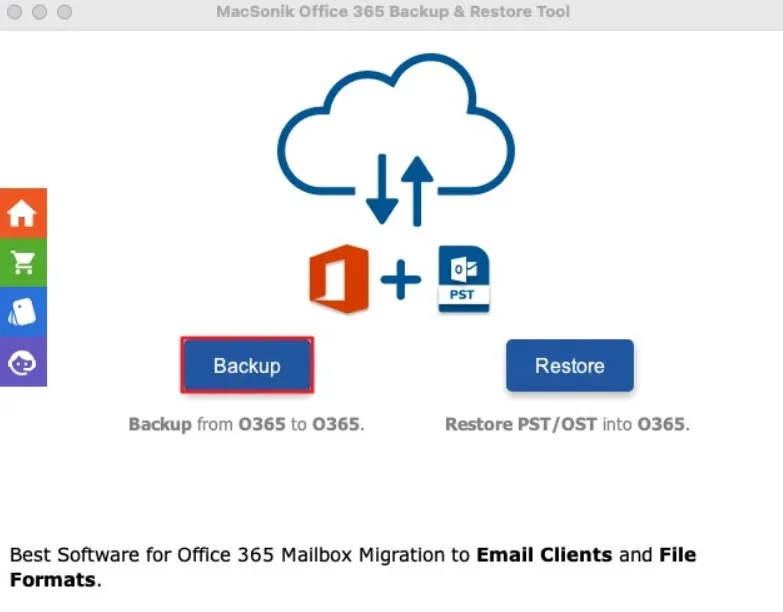
- Firstly, begin by launching the ‘MacSonik Office 365 Backup Tool’, and click on ‘Backup’.
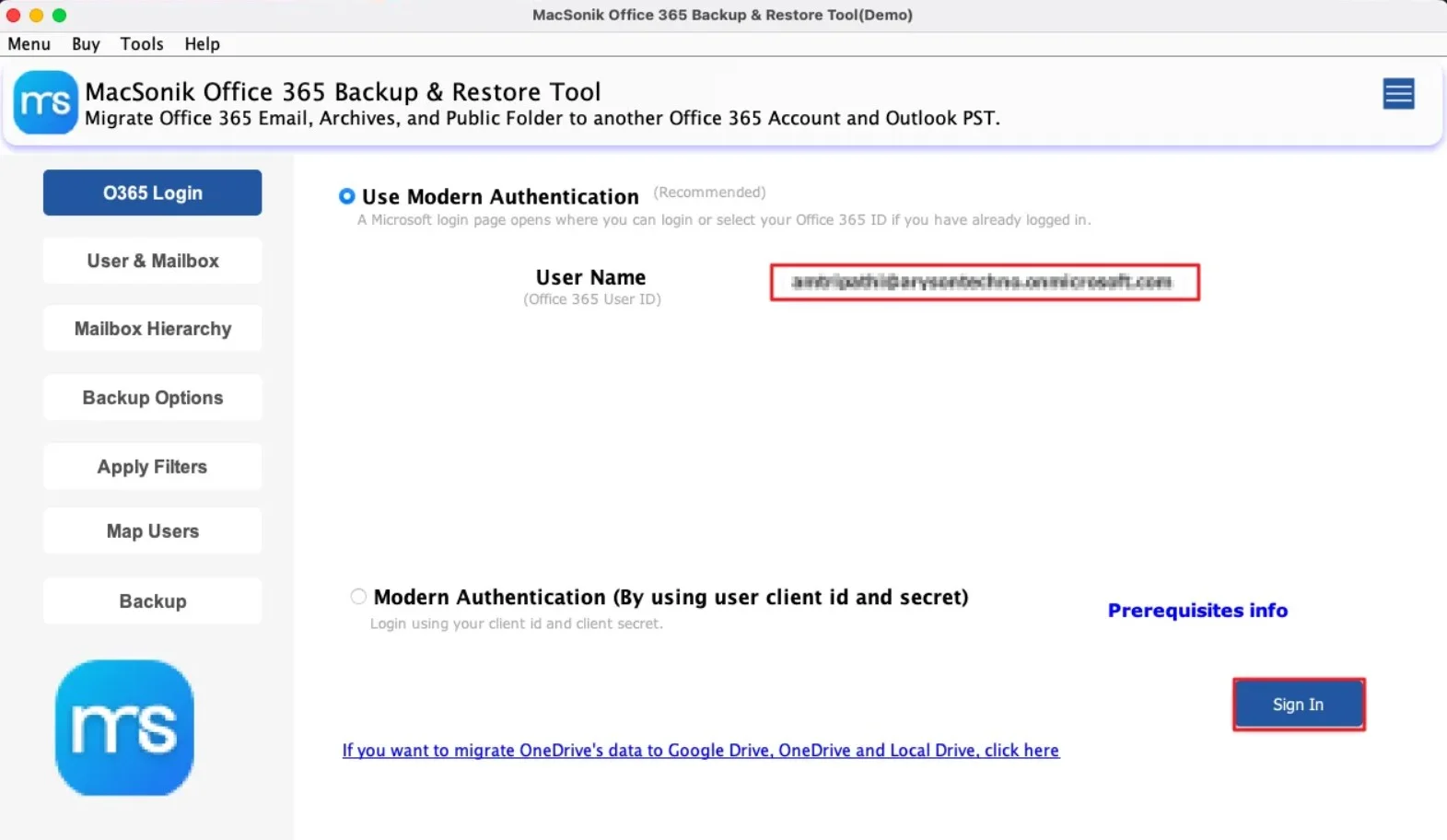
- Now, ‘Sign in’ using the ‘Microsoft 365 account’ verified username and password.
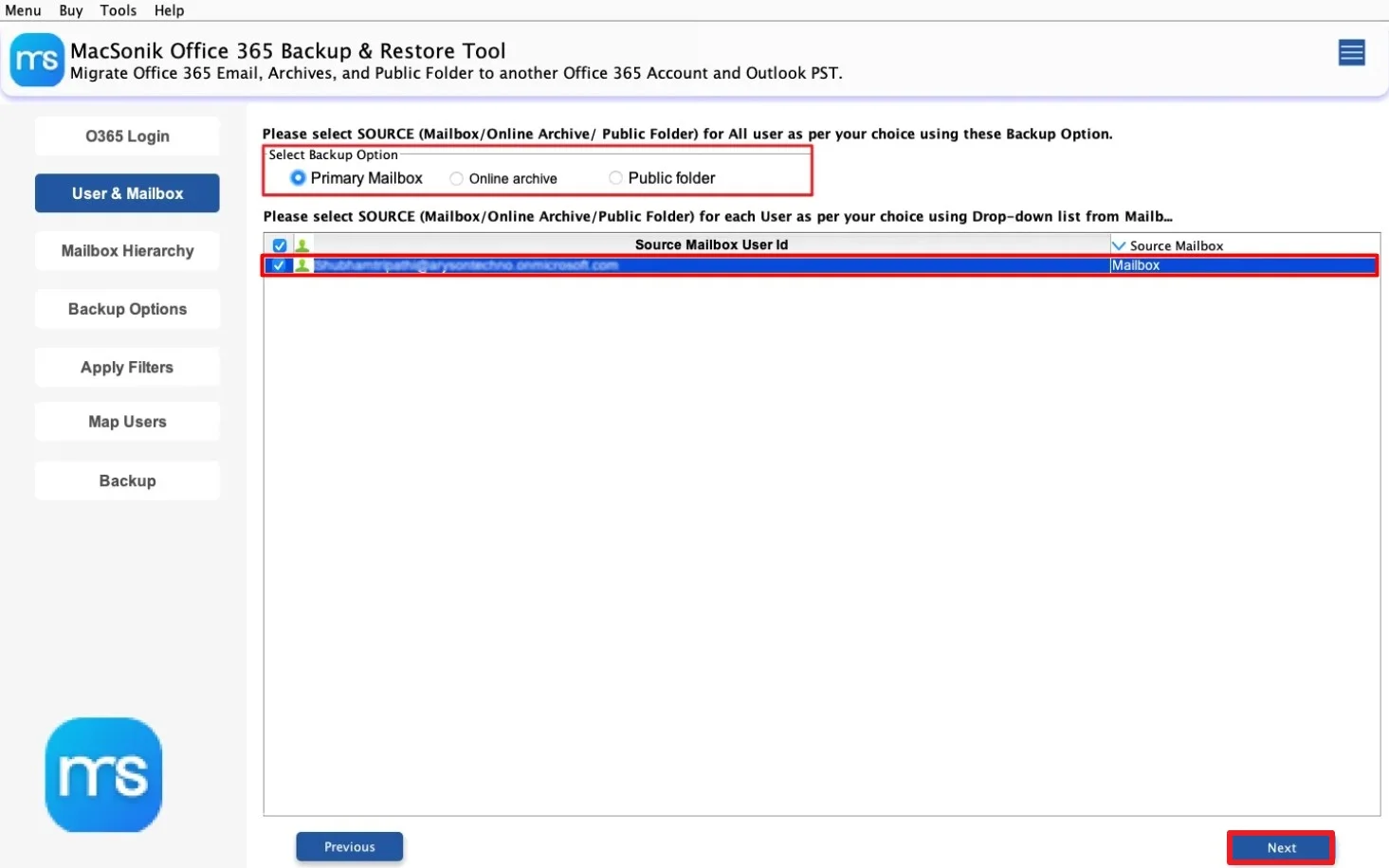
- Select the ‘backup option’ and choose the ‘source mailbox user id’ and click ‘Next’.
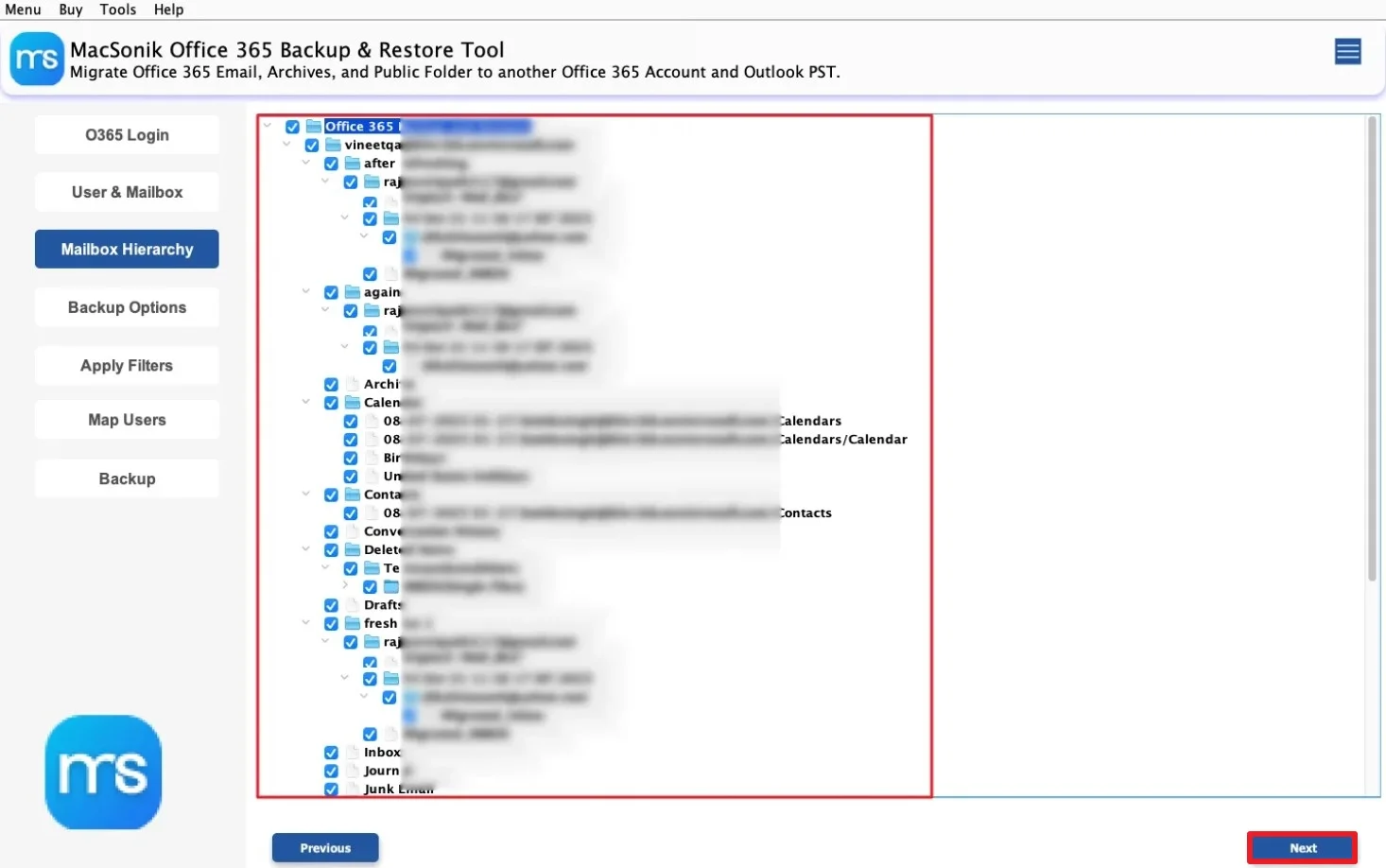
- ‘Drag’ the mailbox hierarchy and ‘preview’ the complete mailbox folder, and tap ‘Next’.
- Further, choose ‘PST’ as the saving file format, and ‘apply the filters’ as per your requirement.
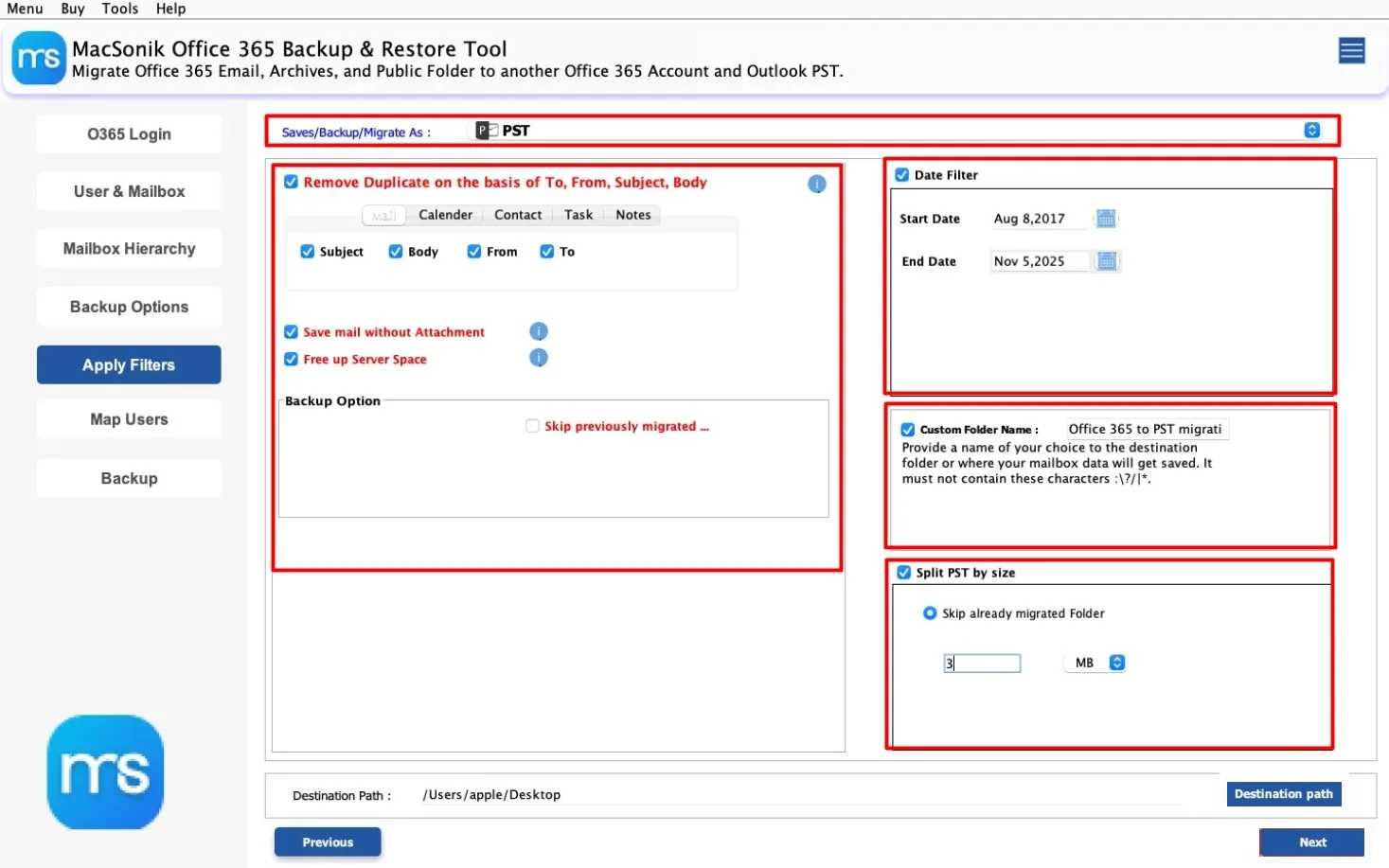
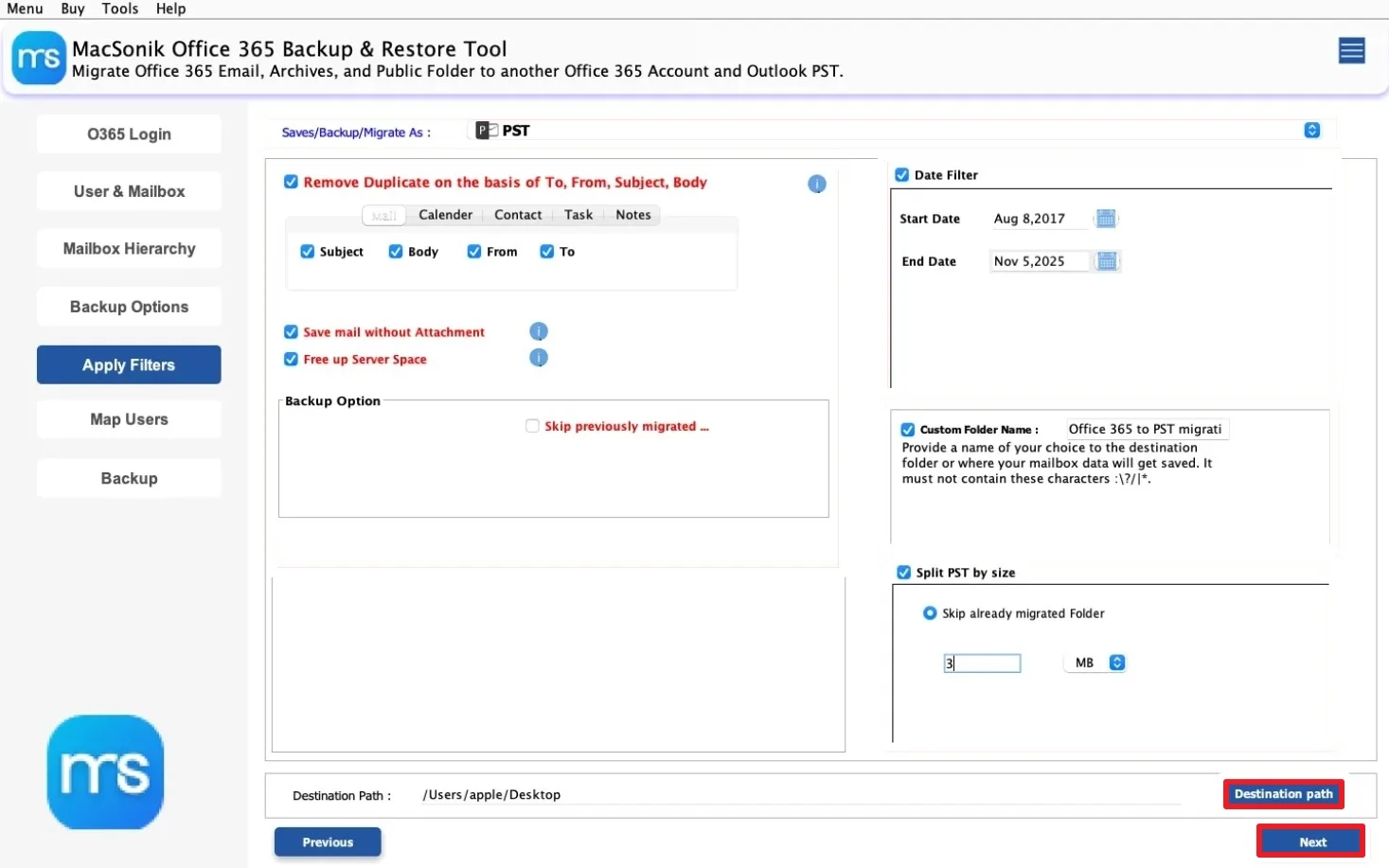
- In the end, set the ‘path’ to save the file, and hit ‘Next’ to start the process.
Real-Life Scenario: Compliance Email Archiving
An accounting firm needed to preserve years of Microsoft 365 email communication for audit and compliance purposes. However, the manual exports through Outlook became difficult because multiple employee accounts had large mailbox sizes. To simplify the process, the company used the MacSonik Office 365 Backup solution. As a result, all mailbox data was backed up securely, attachments remained intact, and the organization created a reliable offline email archive for future access.
Important Note: You can import PST in Exchange Online with complete accuracy.
Closing Remarks
In this blog post, backing up Office 365 emails on Mac is important for protecting communication, compliance records, and long-term archives. However, the manual methods work for small mailbox data. But they become difficult for larger or enterprise-level accounts. The Office 365 backup software is the best solution to backup Office 365 emails. As it guarantees a secure and a reliable email backup on Mac. Besides, if you want any help, you can reach out to our support team anytime.
Frequently Asked Questions
Ans. Yes, the advanced Gmail backup tool allows users to export emails selectively based on date range, folders, labels, sender, or subject. This helps save only the required mailbox data instead of exporting the complete account. Selective export also reduces backup time and storage usage.
Ans. Yes, exporting emails is generally safe when using trusted MacSonik solutions. This uses secure authentication methods and protects mailbox privacy during the export process. It also follow read-only processing, meaning original mailbox data remains untouched.
Ans. Yes, enterprise-grade Gmail backup solution supports bulk export for multiple employee accounts simultaneously. This feature is highly beneficial for HR departments, IT administrators, and organizations handling large-scale email archiving.
Ans. Yes, reliable Gmail export tool preserves essential metadata such as sender details, recipient information, timestamps, subject lines, and attachment references. Maintaining metadata helps preserve the authenticity and structure of original email communication.
Ans. Yes, professional Gmail backup solution is designed to handle enterprise-level mailbox environments efficiently. They support large mailbox sizes, bulk account processing, selective export, and secure data handling. These features make them ideal for organizations requiring long-term email archiving, compliance management, and disaster recovery planning.
About The Author:
I am Neeru Kuchhal, a Technical Content Writer who focuses on turning complex ideas into clear, engaging, and impactful content. I combine creativity with strategy to write blogs, web content, and technical articles that connect with the right audience and support brand goals. I believe great content is not just written. It is thoughtfully created to inform, build trust, and drive action.
Related Post
