Helpful Guide to bulk Convert EPUB Books to PDF Format Free on Mac

Neeru Kuchhal

July 28th, 2026
User-Query:
“I have nearly 4,800 EPUB books stored on my Mac. Our training department wants every manual converted into PDF so employees can read them without installing an EPUB reader. I tried online converters, but they either failed on large files or completely ruined the formatting. Is there a reliable way to bulk convert EPUB Books to PDF while keeping everything intact?”
— Training Manager, posted on a Mac discussion forum
Quick answer: To complete this conversion on Mac, simply open the EPUB file in the MacSonik EPUB Converter Tool. Then, preview the book, choose PDF as the output format, select the destination folder, and click Convert. The software performs bulk conversion while preserving the original formatting, chapters, images, hyperlinks, metadata, and document layout. Unlike manual methods, it does not require an internet connection or compromise the quality of your eBooks. This makes it an ideal solution for students, publishers, educators, legal teams, and businesses managing large digital libraries.
Therefore, users need to convert a few novels, while others manage 1000+ technical manuals, compliance documents, product guides, or digital archives. Online converters often impose file size restrictions, compromise formatting, or raise privacy concerns when uploading confidential documents. In this guide, you’ll learn the various techniques to convert EPUB Books to PDF using the MacSonik EPUB Converter Tool on Mac.
What are EPUB and PDF Files?
Before converting your files, it’s helpful to understand the difference between these two popular document formats.
|
EPUB File |
PDF File |
|
EPUB (Electronic Publication) is an open-standard eBook format widely supported by Apple Books, Google Play Books, and numerous other digital readers. Unlike PDFs, EPUB files automatically adjust text size and page layout according to the screen size of the reading device.
EPUB files commonly include:
|
PDF (Portable Document Format) is a fixed-layout document format developed to preserve the exact appearance of a document regardless of the device or operating system.
Unlike EPUB, PDF files maintain:
This consistency makes PDFs the preferred choice for printing, legal documentation, compliance records, and document sharing. |
Transform Your E-Books: Key Reasons to Convert EPUB to PDF
There are many situations where PDF becomes the more practical choice.
- Universal Compatibility
Not every device includes an EPUB reader by default. PDFs open on virtually every computer, smartphone, and web browser without requiring additional software.
- Easy Printing
EPUB files are designed for digital reading rather than printing. PDF preserves page dimensions, making it much easier to print books, reports, or manuals exactly as intended.
- Legal and Compliance Documentation
Many legal departments require documents in PDF format because page numbering, formatting, and layout remain unchanged during review and archiving.
- Business Documentation
Organizations frequently convert employee handbooks, training materials, and technical documentation into PDF for standardized distribution across departments.
- Long-Term Archiving
PDF is widely accepted for document preservation because its formatting remains consistent over time and across platforms.
Frequent Issues Users Face During EPUB to PDF Conversion
|
My EPUB Formatting Breaks After Conversion This is one of the most frequent complaints. Many free online converters distort:
As a result, the converted PDF often looks significantly different from the original EPUB. The professional MacSonik converter preserves the complete document structure while maintaining formatting accuracy. |
|
I Have Thousands of EPUB Files. Can I Convert Them All Together? Manual conversion works reasonably well for one or two books. However, converting 1000+ EPUB files individually can consume several days. An automated EPUB converter supports bulk conversion. This allows multiple EPUB books to be processed simultaneously while maintaining their individual formatting. |
|
Online EPUB Converters Reject Large Files Most free online tools impose restrictions such as:
For organizations handling confidential documentation, uploading files to unknown servers may also create privacy concerns. Offline conversion software eliminates these limitations. |
|
My Converted PDF Looks Different Users frequently notice that:
These problems usually occur because low-quality converters cannot accurately interpret EPUB formatting. |
|
I Need to Convert Only Selected EPUB Files Sometimes an entire folder contains hundreds of books, but only a few require conversion. Instead of processing everything. The MacSonik software allows selective EPUB conversion, saving both time and storage. |
Manual Technique to Convert EPUB Books to PDF on Mac
You can use a manual approach, if you only need to convert a limited number of EPUB books.
- Firstly, open the EPUB.
- Now, select the File and then, Print.
- After that, choose Save as PDF.
- Lastly, save the document.
Limitations of the Manual Technique
- This process only works for one book at a time.
- It doesn’t support bulk conversion.
- Sometimes formatting may vary.
- Interactive content may not be preserved.
- Moreover, it is time-consuming for large collections.
EPUB to PDF Conversion Using MacSonik Software
The MacSonik EPUB Converter Tool is designed to simplify the entire process. It allows users to convert EPUB to Word in just a few clicks. The software works while ensuring your files remain private throughout the conversion process. This preserves the original structure of every EPUB file while delivering high-quality PDF output. Besides PDF, the software also supports multiple output formats. This makes it a complete EPUB management solution for individuals, educational institutions, publishers, and enterprises.
Steps:
- Download and install the MacSonik EPUB Converter Tool on your Mac.
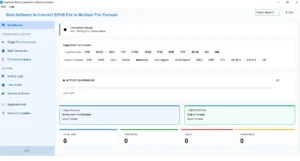
- Now, Add Files or Add Folder to import one or multiple EPUB books.
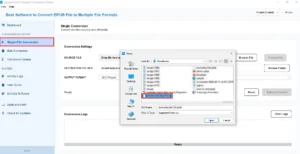
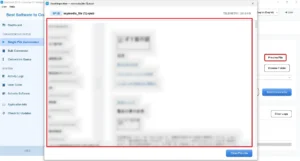
- Expand the hierarchy and preview the imported books to verify their contents.
- Furthermore, choose PDF from the list of available export formats.
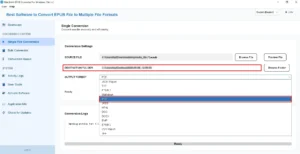
- Finally, apply the advanced filters as per your need, and press Convert.
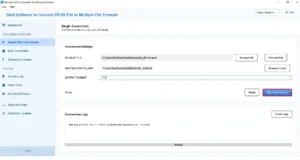
Output:
After conversion, you’ll receive professionally formatted PDF files that maintain the appearance and readability of the original EPUB books.
Free Trial Available
The free demo version allows users to evaluate the software before purchasing by converting a limited number of EPUB files and verifying the output quality.
Beyond PDF: Convert EPUB into Multiple Formats
Depending on your workflow, you may need EPUB files in different formats for compatibility with other applications and devices. The MacSonik EPUB Converter supports conversion to multiple popular formats, including; Input and Output formats.
Supported Input File Formats |
|||||
|---|---|---|---|---|---|
|
|
DOCX |
DOC |
TXT |
HTML |
JPEG |
|
PNG |
BMP |
TIFF |
EPUB |
MD |
XML |
Supported Output File Formats |
|||||
|---|---|---|---|---|---|
|
|
HTML |
DOC |
DOCX |
Markdown |
CSV Report |
|
JSON Report |
JPEG |
BMP |
TIFF |
EPUB 2/EPUB 3 |
TXT |
Features that Matter at Enterprise Scale
|
Key Capabilities |
Detail |
|
Bulk EPUB Conversion |
Convert multiple EPUB books simultaneously without repetitive manual work. |
|
Large File Support |
Efficiently processes large EPUB files while maintaining stable performance. |
|
Metadata Preservation |
Maintains title, author, publisher, publication date, language, and other metadata. |
|
Formatting Integrity |
Preserves fonts, images, tables, hyperlinks, and page structure. |
|
Preview Feature |
Preview EPUB content before conversion. |
|
Offline Processing |
No file uploads or internet connection required. |
|
User-friendly interface |
Simple interface suitable for both beginners and IT professionals. |
|
Apple Silicon Support |
Fully compatible with Intel-based Macs and Apple Silicon (M1, M2, M3, and newer). |
One-Time EPUB Conversion Service
Don’t want to install software or manage the conversion yourself?
MacSonik also offers a one-time file conversion service for users who need professional assistance with EPUB conversion. This service is particularly useful for publishers, educational institutions, legal teams, and businesses that have a large collection of EPUB books but don’t require permanent software.
The MacSonik technical team securely converts your EPUB files while maintaining document formatting, metadata, images, and layout. Confidentiality is prioritized throughout the process. This makes it a practical option for organizations handling proprietary publications or sensitive documentation.
MacSonik vs Calibre vs Convertio EPUB Converter
|
Major Factors |
MacSonik |
Calibre |
Convertio |
|
Bulk EPUB Conversion |
Yes |
Yes |
Limited by upload size |
|
Offline Conversion |
Yes |
Yes |
No |
|
Preserves Formatting |
High accuracy |
Moderate |
Varies by file |
|
Metadata Preservation |
Yes |
Partial |
Limited |
|
Large EPUB File Support |
Yes |
Moderate |
Upload restrictions |
|
Selective File Conversion |
Yes |
Limited |
No |
|
User-Friendly Interface |
Simple |
Moderate |
Easy |
|
Data Privacy |
Files remain on your Mac |
Local |
Files uploaded online |
|
Customer Support |
Technical support |
Community support |
Limited |
Case Study: University Converted 6,200 EPUB Books in One Project
A private university maintained a digital repository of more than 6,200 EPUB-based study materials, research papers, and faculty publications. As part of a new learning management system rollout, the university needed every document in PDF format so students could access the files consistently across laptops, tablets, and mobile devices.
Initially, the IT team experimented with online converters and manual methods, but file size restrictions, inconsistent formatting, and the inability to process large batches quickly became major obstacles.
Using the MacSonik EPUB Converter Tool, the team imported the complete EPUB library, selected PDF as the output format, and completed the conversion in batches while preserving document formatting, embedded images, hyperlinks, and metadata. The converted PDFs were then uploaded to the university’s LMS without requiring any manual editing, significantly reducing project time and ensuring a consistent reading experience for students and faculty.
Read Also: Convert EPUB to TXT
Closing Insight
In this blog post, converting EPUB books to PDF is often necessary on devices that do not support EPUB files. While manual methods and online converters may work for occasional conversions. They become inefficient when handling large collections, confidential documents, or files that require accurate formatting. The EPUB Converter tool convert EPUB Books to PDF by providing fast, secure, and bulk conversion. It preserves formatting, images, hyperlinks, chapters, and metadata while supporting multiple output formats for greater flexibility. Its offline processing, selective conversion options, and compatibility with modern macOS systems make it a dependable solution.
If you’d like to evaluate the software before purchasing. The free demo version lets you convert a limited number of EPUB files so you can verify the output quality using your own documents.
Frequently Asked Questions
Ans. Yes. Professional EPUB migration software, such as MacSonik EPUB Converter, supports batch conversion, allowing you to convert multiple EPUB files simultaneously. This feature saves time and is ideal for users managing large eBook libraries, publishers, educational institutions, and businesses.
Ans. Yes. A reliable EPUB Converter preserves important metadata such as the book title, author name, publisher, language, publication date, and document structure wherever the selected output format supports it. It also maintains the original content formatting, images, tables, and hyperlinks for accurate conversion.
Ans. Absolutely. MacSonik EPUB Converter is designed to process both small and large EPUB files efficiently. Its optimized conversion engine ensures fast performance while maintaining the quality, formatting, and integrity of even large eBooks containing hundreds of pages, images, and complex layouts.
Ans. Yes. MacSonik EPUB Converter provides a preview feature that allows users to review EPUB files before conversion. You can select the specific EPUB files you want to convert instead of processing your entire collection, making the conversion more flexible and efficient.
Ans. The secured EPUB Converter supports multiple output formats to meet different user requirements. You can convert EPUB files into PDF, DOC, DOCX, and other popular document and image formats, making the converted files compatible with a wide range of devices and applications.
About The Author:
I am Neeru Kuchhal, a Technical Content Writer who focuses on turning complex ideas into clear, engaging, and impactful content. I combine creativity with strategy to write blogs, web content, and technical articles that connect with the right audience and support brand goals. I believe great content is not just written. It is thoughtfully created to inform, build trust, and drive action.
Related Post
